One home.
Every file.
Already read.
ViDoShare is a single platform for videos, documents, spreadsheets, boards, and Drive files with a built-in AI that reads every file the moment it is uploaded. One library. One link. No scattered tools. Built as a proof-of-concept by Gigaflop Techlab.
What is
ViDoShare?
ViDoShare is one platform that holds every kind of file your team shares videos, documents, spreadsheets, and visual boards all in the same place. Instead of keeping work scattered across many different apps, everything lives in a single, tidy library.
Every file can be shared with a single link. Private files can be locked behind a password, while things like product demos can be made public. A built-in AI Assistant reads every file the moment it is uploaded — so it can summarise it or answer questions about it straight away.
Today most teams spread their work across many tools: a video sits in one app, a spreadsheet in another, a whiteboard photo in a chat message, and a brief in someone's email. ViDoShare folds all of that into one calm dashboard where everything is easy to find, easy to share, and quietly understood by a built-in AI helper.
"The win isn't another sharing tool. It's the absence of five other ones — and an assistant that already finished the reading."
| Capability | What It Means |
|---|---|
| 5 content types | Videos, documents, spreadsheets, visual boards, and Google Drive — all in one dashboard. |
| 2 AI modes | Summary for instant key points, and Ask AI for grounded questions — on every file. |
| 1-click sharing | Share by public link or lock behind a password — decided when you upload. |
| Source-based AI | Every AI answer is tied to your actual file, so it never makes things up. |
Three headaches
every team has.
Too Many Scattered Tools
Recording happens in one app, storage in another, and presenting in a third. It takes five browser tabs just to share one update. Every tool has its own sharing rules, which are hard to remember and impossible to enforce consistently.
Confusing Privacy
Some links are public by default, while others demand a special login. Sensitive files sometimes leak, while harmless ones get locked away unnecessarily. Nobody knows the rules because every tool invented its own.
Content Goes Dark After Sharing
Once a file is shared, it disappears into a void. Did anyone actually watch the video? Did they reach slide 12? Did they open the document at all? Nobody knows — so nobody can follow up on the right thing.
ViDoShare fixes all three. Everything lives in one place, privacy is set once per file, and analytics show exactly who engaged with what.
Five content types.
One dashboard.
Videos
Recorded screen walkthroughs and video files — all in the same library as your documents.
Documents
PDFs, briefs, and written files. Shared by link, read by AI, found by search.
Spreadsheets
Pricing sheets, reports, and data files — treated exactly like every other content type.
Boards
Visual canvases for flowcharts, mind maps, and diagrams. AI can build the structure from a prompt.
Google Drive
A bridge to your existing Drive files no need to move them. AI reads them in place.
Analytics that actually
mean something.
Know exactly who watched and what they opened.
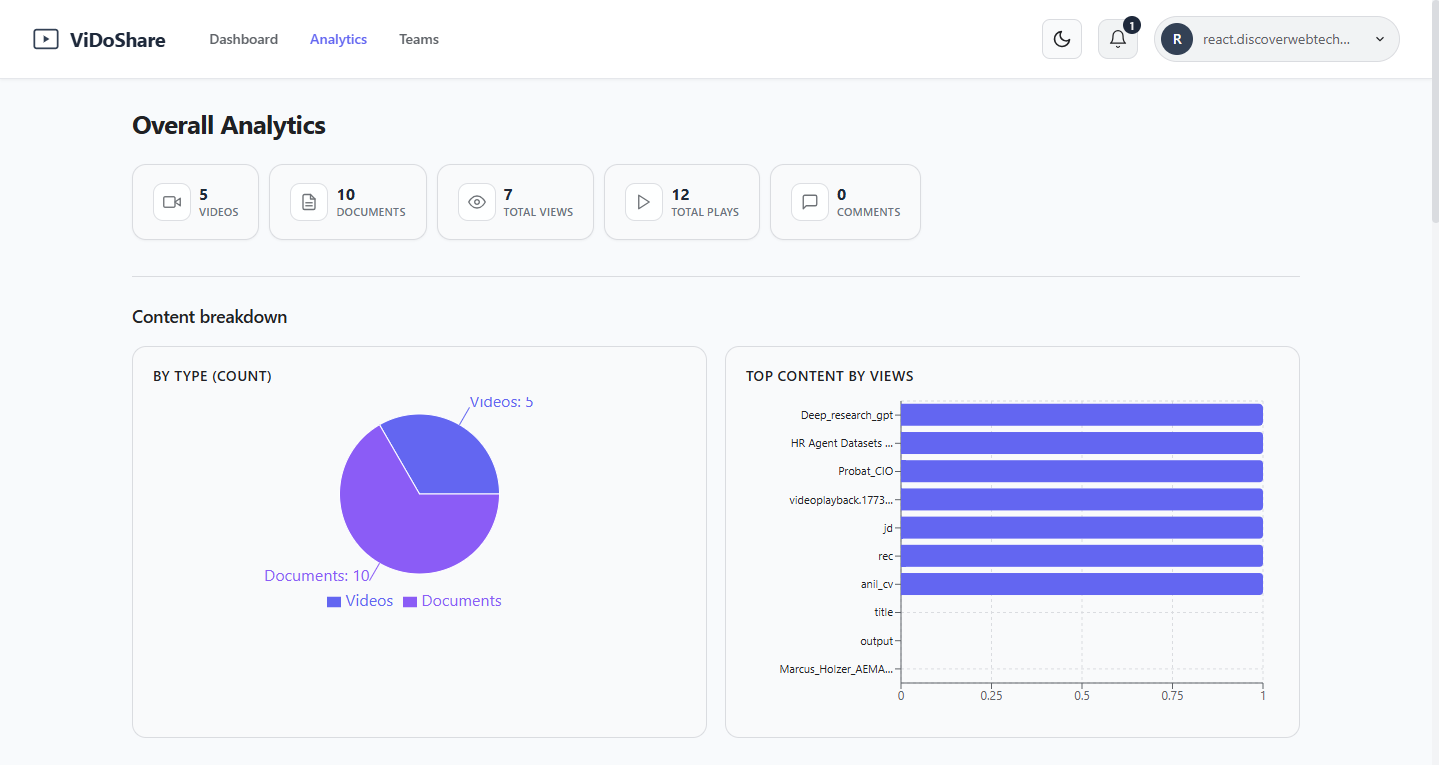
Once content is shared, ViDoShare tracks who watched, what they opened, and where they stopped so you no longer have to send a follow-up asking if someone saw your email.
- Simple counters: videos, documents, total plays, total views, and comments
- Content breakdown chart see your library by type at a glance
- Top content ranking find what's getting real engagement vs. what isn't
- All analytics visible from the same dashboard, no export required
Shared workspaces
for every team.
One shared library for the whole team not just the person who uploaded.
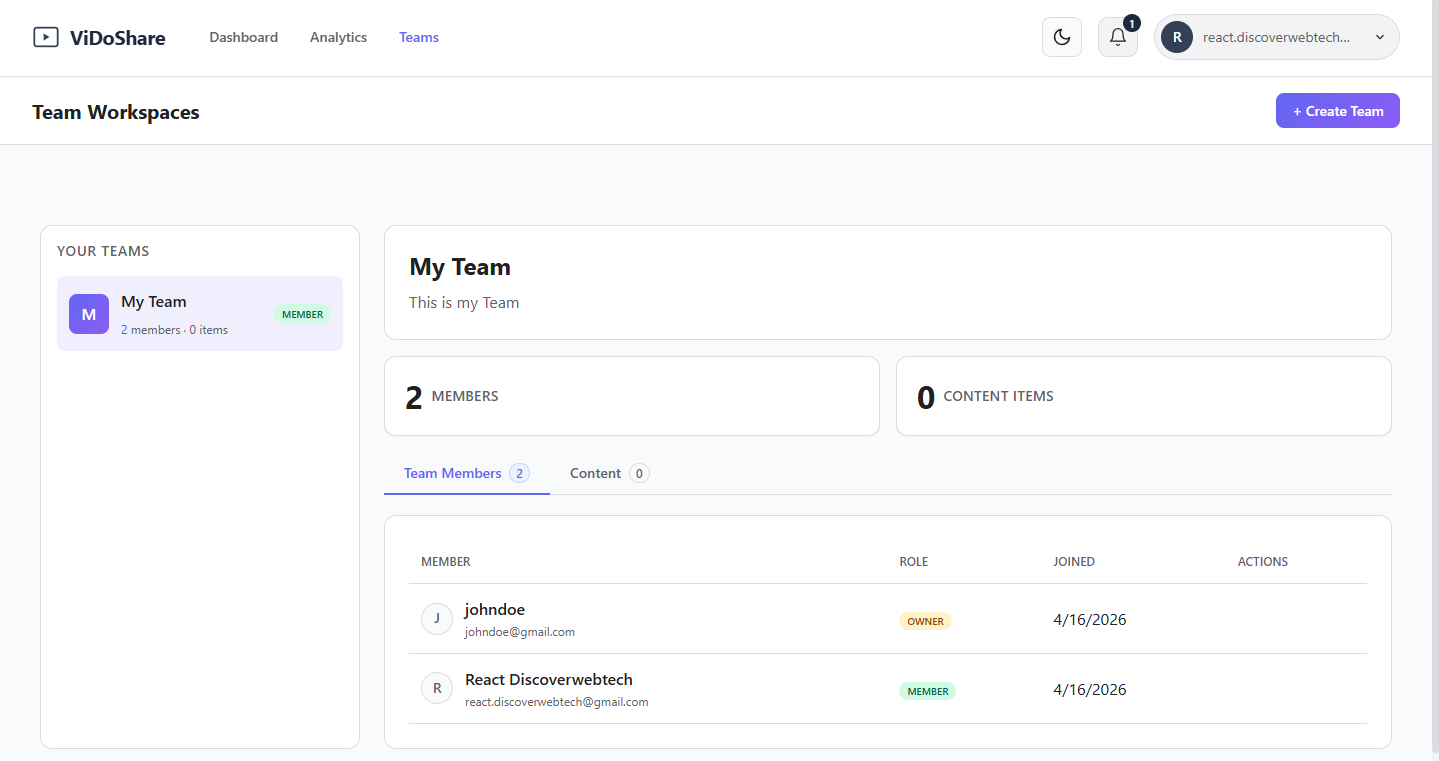
Teams in ViDoShare get a shared workspace where all content lives together. Members see the same files, follow the same sharing rules, and work from a single source of truth — no more "I'll send it to you separately."
- Create a team and invite members in under a minute
- Owner and member roles with clear permission boundaries
- All team content counted and tracked in one place
- Shared visibility no more guessing who has access to what
An AI that already
finished the reading.
This isn't a chatbot bolted on at the end. It's a reading partner that has already finished the homework by the time you click. The moment a file finishes uploading, the AI reads it and is ready to help.
Importantly, every answer is tied to your actual file. The AI does not pull random facts from the open internet, so it won't make things up. The source is always your content.
Key Points in 30 Seconds
The default view. It automatically pulls out a numbered list of the key points facts, dates, totals, and action items — so you can read in 30 seconds what would normally take 30 minutes. Works on invoices, briefs, reports, meeting notes, and anything else you upload.
Open Questions, Grounded Answers
An open chat where you can ask about a specific page, number, or deadline. Answers come back neatly organised with headings and bullet points always based on what's actually in the file. Ask about a clause in a contract, a figure in a spreadsheet, or a step in a process doc.
Example: Upload a sample invoice from "Acme Design Co." the Summary tab automatically pulls out who issued it, who it was billed to, the date, the total, the services listed, and the invoice number. No prompting needed.
Five steps.
First file in a minute.
-
01
Capture
Record a screen, upload an existing file, or start a new board. The dashboard treats all of them equally same upload button, same library, same AI coverage.
-
02
Organise
Drop the file into a folder and tag it. The search index makes the whole library feel like a second brain find anything by name, type, or content keyword.
-
03
Decide Privacy
Choose public, password-protected, or private right at the moment you upload. One decision, clearly stated, no revisiting settings later.
-
04
Share & Collaborate
Send the link or invite the team to a board. Everyone lands in the same place no install, no plugin, no account required for viewers.
-
05
Ask, Measure, Decide
Open the AI panel for a summary or a question. Open analytics to see who engaged. Use both to make better decisions about what to share next, and what to change.
Want a platform
like this for your team?
We scope, design, and build. Fixed-price. Starting with a 2-week discovery sprint to define the feature set, data model, and AI integration layer.
Book a 30-min discovery call → hello@gigafloptechlab.com