Audit. Monitor.
Create. Grow.
One platform.
HotSpot SEO brings six different SEO jobs — site audits, uptime monitoring, page speed, AI content, keyword research, and Google analytics — into a single dashboard. Everything shares the same data. Nothing gets siloed. Built as a proof-of-concept by Gigaflop Techlab.
What is
HotSpot SEO?
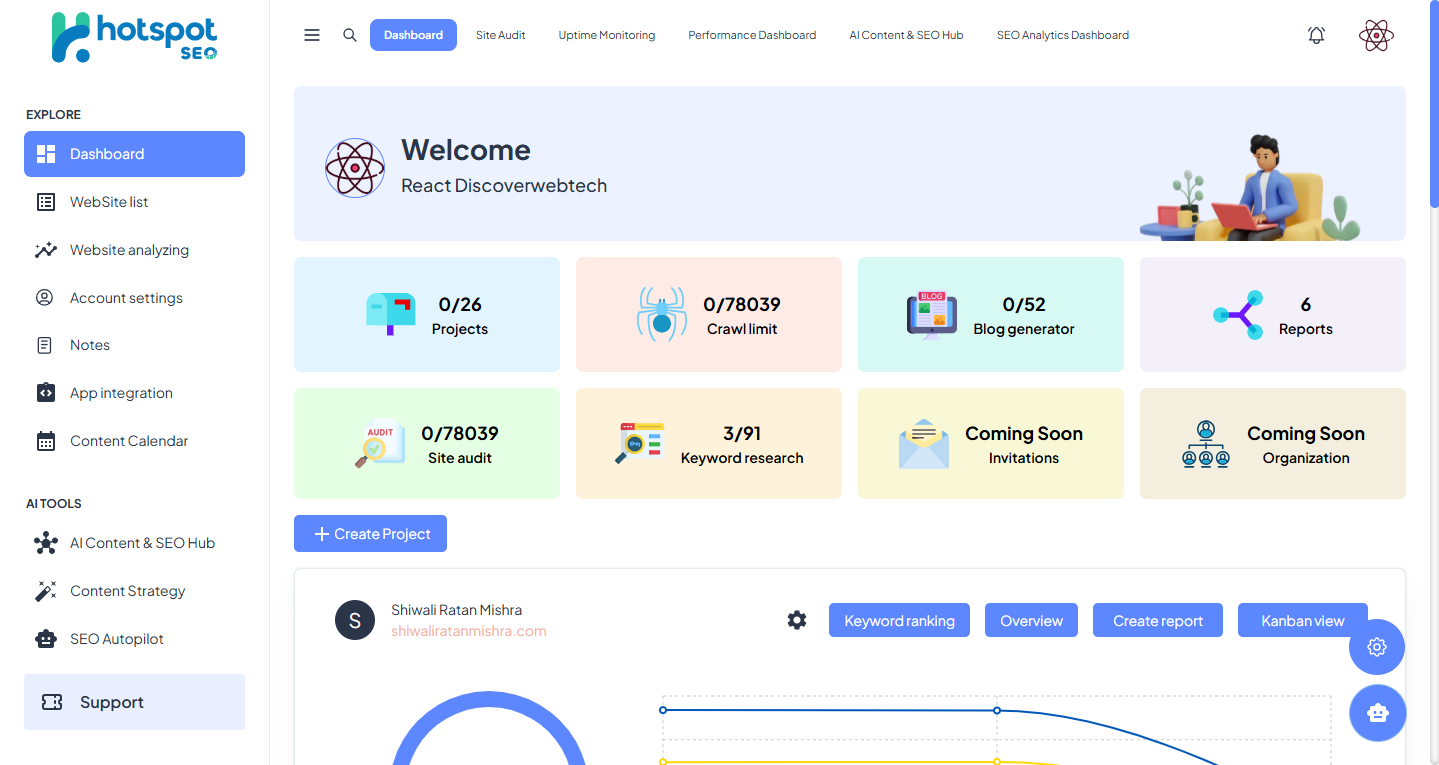
HotSpot SEO is an all-in-one tool for people who look after websites. Instead of jumping between five or six different apps to do their job, users get everything they need in one place — and everything works together, so the information from one tool helps the others.
Each website lives in its own "project" space, so its reports, history, and content stay neatly separated. A single health score (0–100) tells users immediately whether a site needs attention — and everything else is detail, available when needed.
Most SEO teams today use one app to check a website, another to see if it is online, a third to measure how fast it loads, a fourth to write articles, and yet another for visitor data. That means many logins, many bills, and a lot of wasted time switching back and forth. HotSpot SEO eliminates all of that.
"The best SEO tool isn't the one with the most features. It's the one that makes your data talk to itself."
| Number | What It Means |
|---|---|
| 6 | Areas of SEO work brought into one platform |
| 4 | AI writing tools: Blog Generator, Content Writer, Planner, Keyword Research |
| 2 | Google connections: Search Console and Analytics 4 — on one screen |
| 1 | Simple health score (0–100) for every website |
Three headaches
every SEO team has.
Too Many Separate Tools
Checking the site, watching uptime, measuring speed, writing content, and reading analytics each happen in a different app.
- Five logins, five monthly bills, five ways to share a report
- None of the tools talk to each other
- Switching between them wastes the first hour of every workday
Information Stays in Silos
A health score showing a problem in one app never connects to a drop in visitors shown in another. Real-world impact stays hidden until it is too late to act easily. You fix the problem after you've already lost the traffic.
Content Without Context
Most AI writing tools have no idea what a website actually needs. Without keyword data and site-check results, the writing comes out generic — it does not target the right topics, fix the right gaps, or match the site's actual authority.
Site Audit.
Find every problem at once.
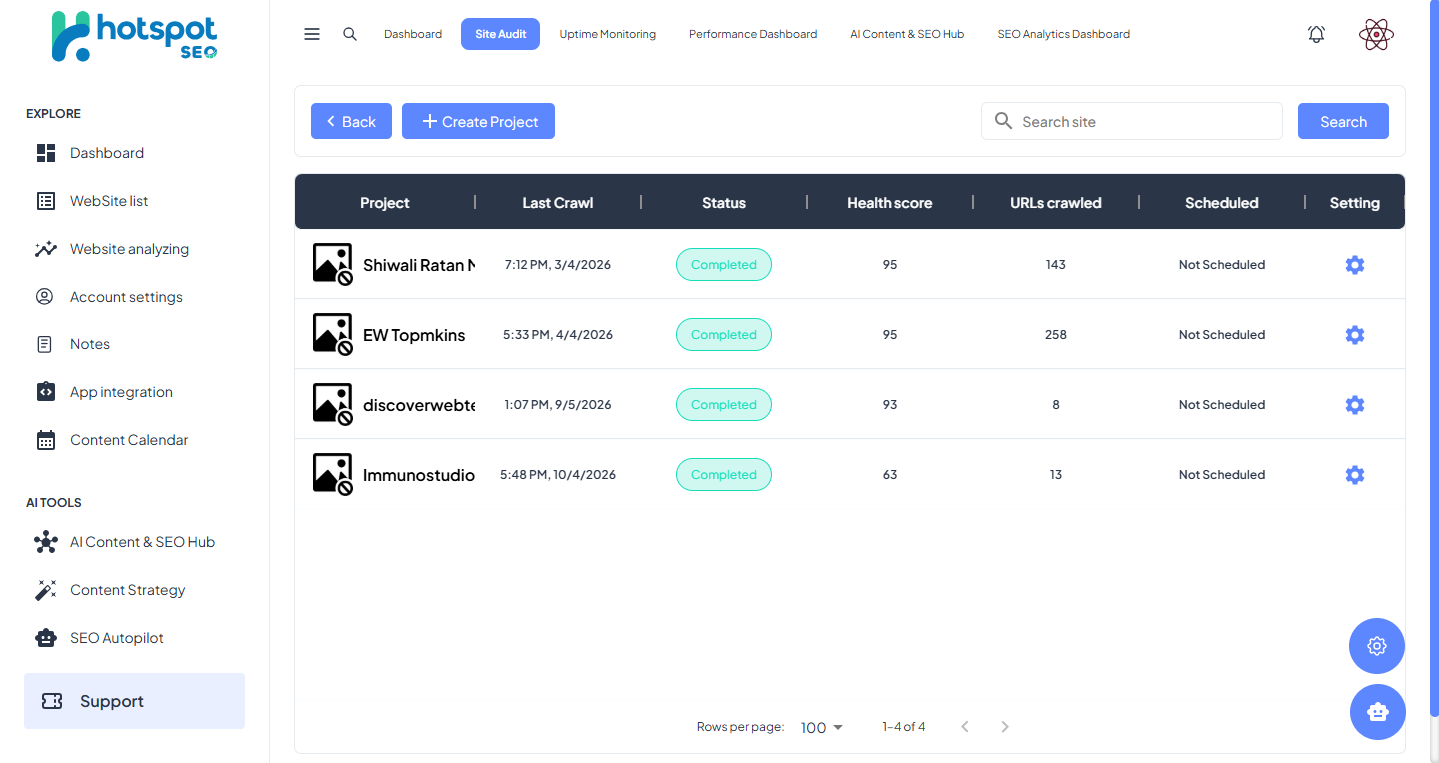
The Site Audit tool is the heart of HotSpot SEO. It looks through every page of a website, finds technical problems, and gives the site a single health score out of 100. Audits can run automatically on a schedule or on demand — so clients always have a fresh report ready.
The audit checks technical health (broken links, missing tags), on-page details (titles, headings, image alt text), whether Google can reach every page, and early warnings about page speed.
Site is in great shape. Minor improvements only — nothing that will hurt rankings.
Some issues need attention. Warnings present but nothing critically affecting performance yet.
Serious issues present. These directly hurt search rankings and should be fixed immediately.
AI Content Hub.
Write with real data behind it.
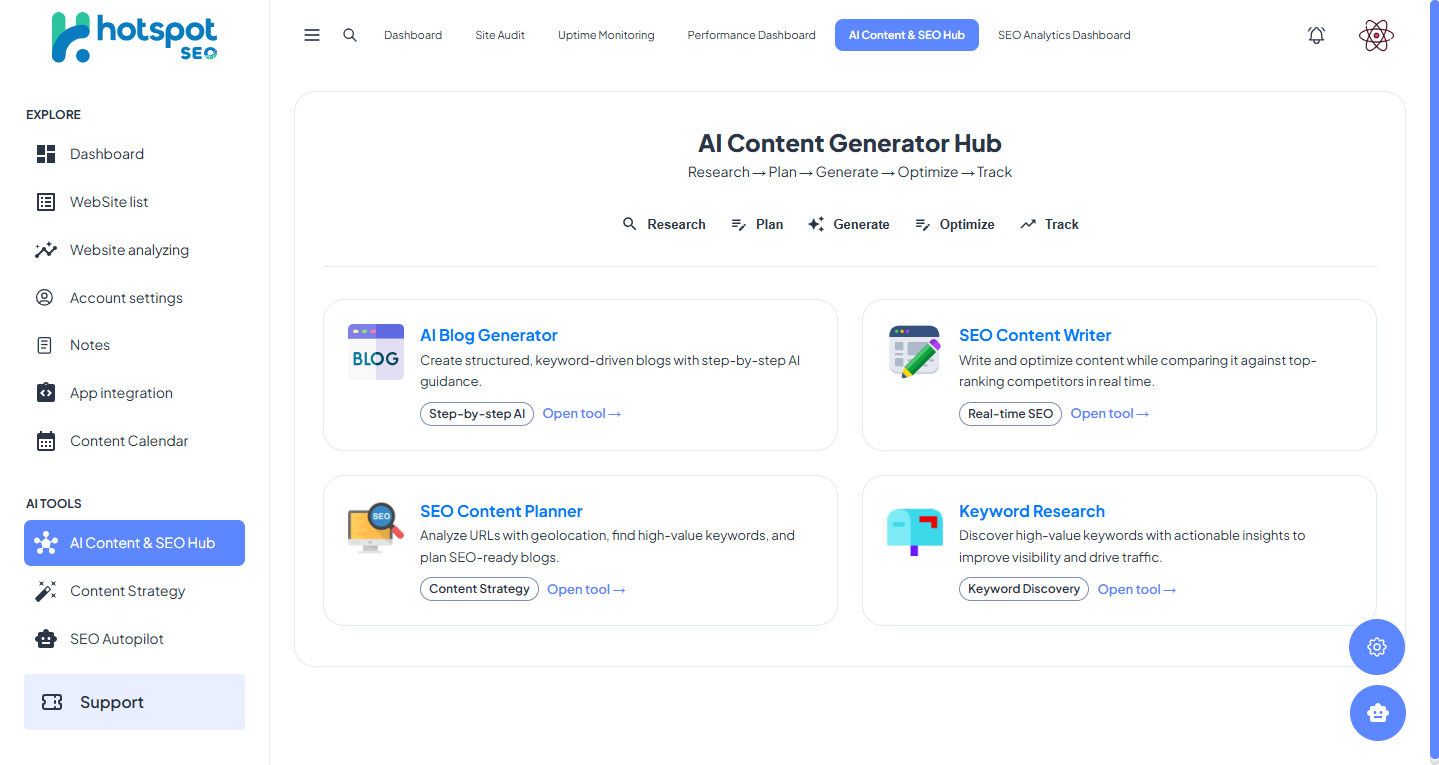
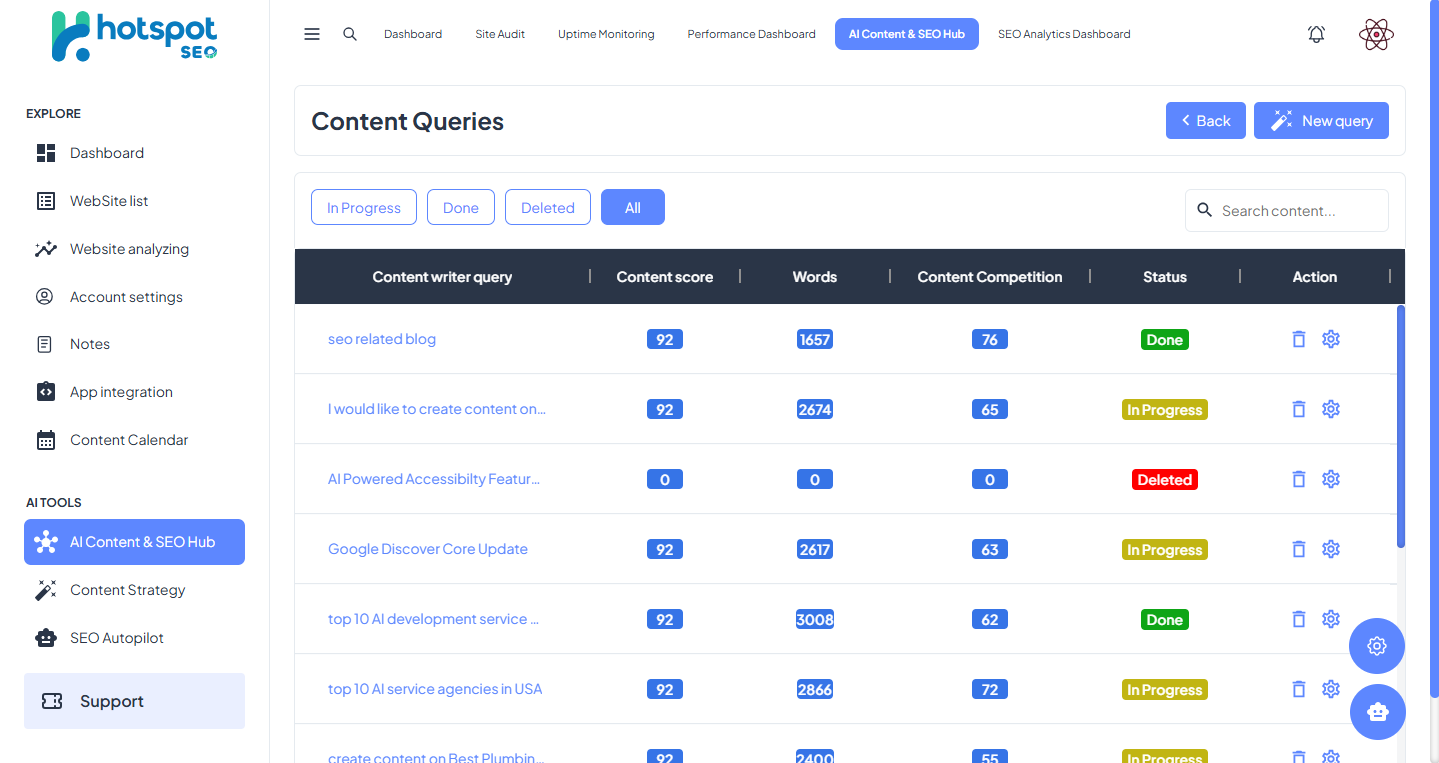
This is a set of four writing tools that use your real keyword and audit data — so the content they produce actually fits what your website needs. Unlike standalone AI writers, HotSpot knows the site's health, its current rankings, and its keyword gaps before it writes a word.
Keyword-driven outlines in four steps
Enter up to 3 keywords, pick a language and length, and get ready-made blog outlines with titles, intros, and headings. Works as a simple step-by-step guide — keyword, title, intro, then headings — so the result is always organised and on-topic. Supports any language.
Write against competitors in real time
Write and improve content while comparing it live against the top websites already ranking for your topic. You can see exactly what the competition covers — and make sure your content covers it better. The same tool that wrote the draft can also refine it with AI.
Plan a full content calendar
Find valuable keyword groups to build an entire calendar of posts around — with location-based filtering so local businesses and agencies can target the right geography, not just the right topic.
Find keywords worth targeting
Discover high-value keywords along with their search volume, difficulty score, and opportunity score — all in one screen, without a separate tool subscription. Feeds directly into the Blog Generator and Planner.
Uptime + Speed.
Know before your client does.
If a site goes down, you know in minutes — not days.
If a website goes offline, it can hurt search rankings. If Google visits while the site is down, it can lose its place in search results — and recovering takes months, not days. HotSpot watches every website around the clock and sends an alert within minutes of any outage. A simple on/off switch controls monitoring per project.
Speed scores for desktop and mobile — separately.
How fast a website loads affects its Google ranking directly. The Performance Dashboard runs speed tests across all your websites and shows four scores per site — for both desktop and mobile views. Mobile and desktop are measured separately because Google checks the mobile version first.
Performance
How quickly and smoothly the page loads.
Accessibility
How easy the site is to use for people with disabilities.
Best Practices
Technical health and safety — secure connections, etc.
SEO
On-page basics that help a site rank well in search.
Google data.
Both sources. One screen.
HotSpot connects directly to two Google services and shows their information together on one screen. Seeing both together matters: a drop in visitors means little on its own, but next to site-health data you can quickly see whether a technical problem caused it.
This connection between audit scores and traffic data is what makes the platform more than a dashboard — it becomes a diagnostic tool. A ranking drop, a crawl error, and a site health decline on the same date tell a complete story.
Google Search ConsoleShows how your site appears in search: keyword rankings, clicks, impressions, and position over time.
Google Analytics 4Shows visitor numbers, where they come from, how long they stay, and what they do on the site.
Seven steps from
login to live reports.
-
01
Create a Project
Add any website. HotSpot creates a workspace for it with its own history, reports, and analytics — kept completely separate from every other project.
-
02
Run the First Audit
Start a site check on demand or schedule it weekly. A health score and a full list of problems are ready within minutes.
-
03
Turn On Uptime
Flip the switch to start watching whether the site stays online — the first safety net against downtime and ranking drops caused by outages.
-
04
Check Page Speed
Open the Performance Dashboard to see speed scores for desktop and mobile, and spot any pages that are dragging the site down.
-
05
Create Content with AI
Use the Blog Generator to make keyword-focused outlines based on real audit and keyword data, then refine them in the Content Writer.
-
06
Connect Analytics
Link Google Search Console and Analytics 4. The dashboard then builds itself from live Google data — rankings, traffic, and behaviour all in one view.
-
07
Create Reports
Pull everything — audits, speed, uptime, and analytics — into one shareable client report. No copy-pasting between tools required.
Need an SEO platform
built for your agency?
We scope, design, and build. Fixed-price. Multi-tenant SaaS, white-label tools, or internal platforms. Starting with a 2-week discovery sprint to map the feature set and data architecture.
Book a 30-min discovery call → hello@gigafloptechlab.com