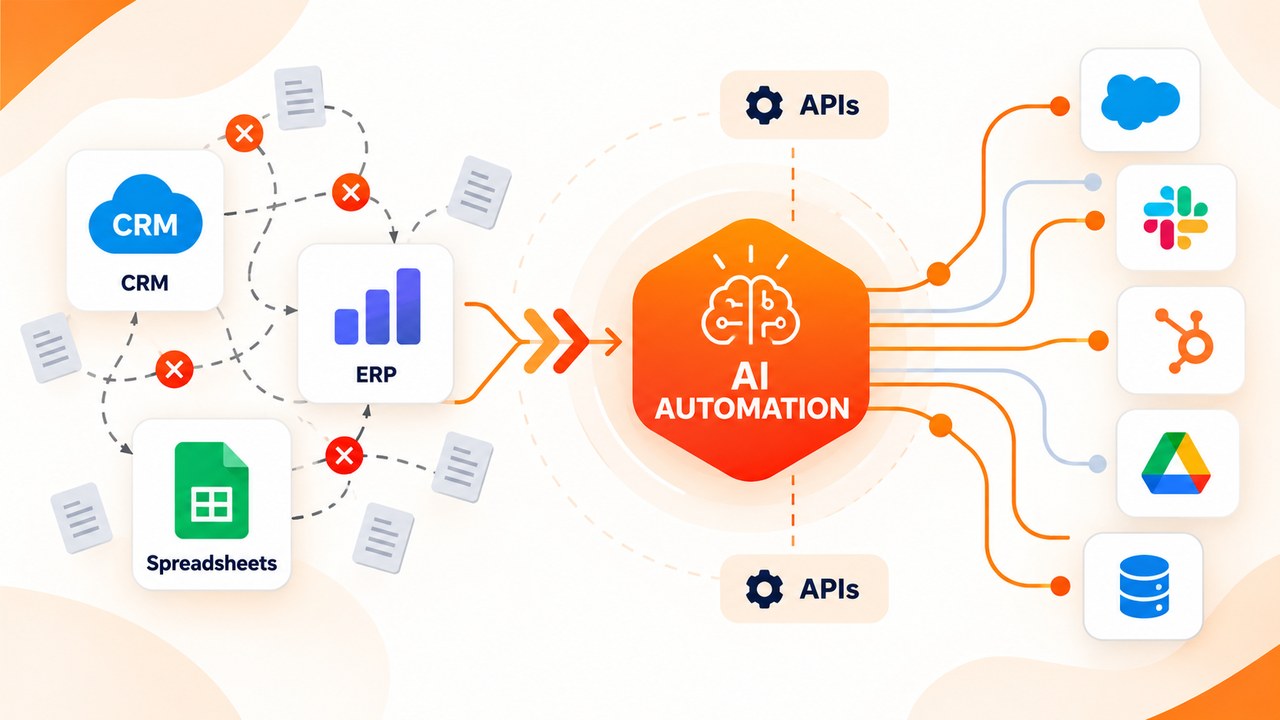
The majority of successful establishments employ various technology platforms to function properly. It’s common to see one application for managing customers, another for managing warehouses, and a messy array of manual spreadsheets to manage the entire operation. Naturally, as order volume and scale of operation grows, manual entries create bottlenecks, slow down the operation, and contribute to human errors.
When managers seek to eliminate the bottlenecks from their operations, traditional IT wisdom calls for throwing a current solution out the door and investing in a multi-million dollar monolithic solution.
Such a path is slow, costly, disruptive, and usually unnecessary.
The thing is that it’s possible to build a custom ai automation platform on top of existing software solutions instead of assembling everything from scratch. By keeping existing applications in harmony with intelligent orchestration workflows, it’s possible to eliminate manual work, speed up customer response time, and scale business operations without forcing the company to learn new software.
As Microsoft CEO Satya Nadella highlighted when describing the shift toward enterprise AI infrastructure:
“The next layer of business software won’t replace your core systems—it will connect them. Up till now, software was built to help humans enter data. The future of enterprise software is using AI to automate the workflows between those systems, so employees can focus on driving strategy.”
This shift is backed by global research: according to recent research from the McKinsey Global Institute, workflow automation and generative integration could inject $2.6 to $4.4 trillion in economic value globally each year, primarily by connecting legacy software and eliminating the 30% of repetitive operational tasks that stall knowledge workers daily.
This practical guide breaks down what an enterprise automation layer is, how it transforms business efficiency, where to deploy it, and how to execute your rollout without getting bogged down in technical jargon.
Chatbots vs. AI Automation Platforms: What Is the Difference?
Before being able to understand the impact of the AI automation software on their business operations, business leaders need to understand the difference between basic conversational AI and the relevant workflow automation systems.
A simple chatbot answers users’ messages through text but doesn’t have access to the advanced logic of the business. An enterprise automation solution, on the other hand, has the necessary permissions on the system level to perform actions directly on databases.
| Capability Layer | Traditional Rule-Based Automation | Generative AI Chatbots | AI Automation Platform Layer |
| Logic Basis | Strict “if/then” static decision trees | Large language models | Context-aware execution loops |
| Data Handling | Structured data only (form IDs, fields) | Text generation & prompts | Unstructured data (PDFs, emails, chats) |
| System Access | Single API endpoints | Text and code generation | Reads and writes across core databases |
| Adaptability | Breaks when formats change | Responds to human user input | Adapts naturally to variations and typos |
| Autonomy Level | Low (scripted branches) | Medium (human must copy outputs) | High (autonomous execution with guardrails) |
Unlike conventional scripts that adhere to unyielding, unchanging protocols, a unified AI system works based on a smart four-step process that consists of the following stages.
1. Obtain information, which means that the system gets an activation signal, whether it is an incoming order from a client, change in stock data, or receipt of a new seller invoice document through an email.
2. Analyze & categorize information, which means that the system understands the text, verifies access rights of the user, retrieves important information, and searches through CRM or ERP to confirm authenticity.
3. Complete the task automatically, meaning that the system performs all necessary updates in the database, informs the customer, issues a shipping label, and communicates with payment services through a secure API.
4. Assess & record outcomes, where the system checks whether the goal was accomplished, creates a full audit record for related verification procedures, and forwards any unusual situations to human management professionals.
Why Build on Your Existing Stack Instead of Replacing It?
Migrating core enterprise software brings enormous operational threats, lengthy implementation times, and potentially steep capital expenditures. Quite often, businesses end up experiencing productivity losses spanning months due to all the necessary adjustments employees need to make after switching to another system. Having an intelligent automation layer over your current technology brings three essential business benefits
- Reduced Total Cost of Ownership: The migration does not require you to pay for millions of dollars worth of contracts, engage data mapping consultants, or continue licensing unutilized modules of enterprise software.
- Quick Adoption by Employees: Your personnel will use the same tools that they are already familiar with (such as Shopify, Salesforce, Zendesk, QuickBooks, or SAP), resulting in minimized retraining costs and preserved productivity levels.
- Quick Operating Return on Investment: Thanks to the provision of professional ai integration services, your software ecosystem will be able to interact and run complicated flows after a few weeks rather than months.
Is your tech stack ready for custom AI automation?
Don’t spend months experimenting without clear financial returns. When we implemented these automated workflows for a high-growth distributor, we helped an enterprise brand cut manual invoice processing costs by 64% without replacing their accounting platform.
Book a Free 15-Minute AI Audit with our strategy team to identify your top 3 high-impact workflows.
4 Steps to Build Your AI Automation Layer
Executing a successful enterprise initiative around AI workflow development doesn’t require writing complex code, it requires defining business rules, establishing governance, and building clear operational guardrails.
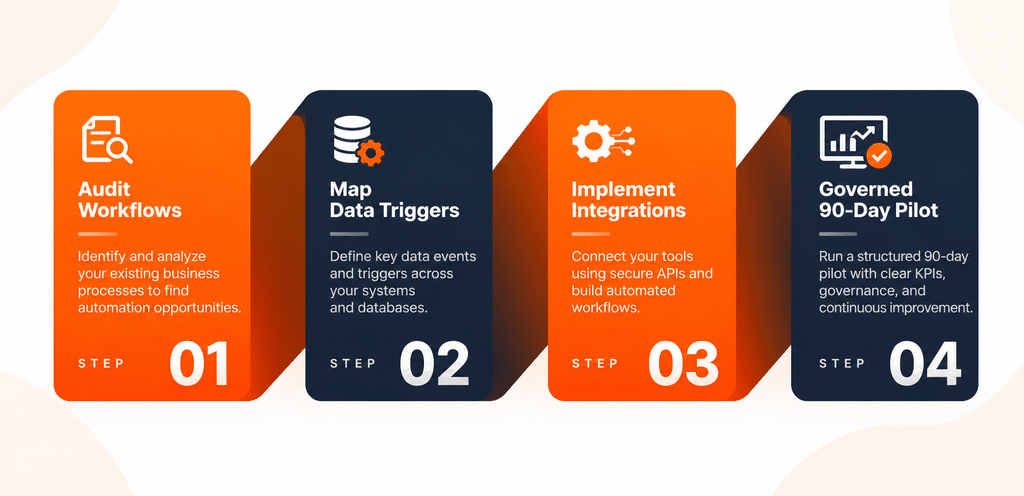
Phase 1. Analyze Workflows and Identify Major Delays
Steer clear of sweeping, ambiguous rules such as “automate customer support.” Instead, aim your focus on straightforward processes that are executed often and monitored for results. Look for administrative issues that require
- Copying and pasting data between various computer programs.
- Sorting, classifying, and organizing email messages and client requests.
- Crosschecking purchases with stocks, suppliers, and financial documents on multiple spreadsheets.
Phase 2. Identify Data Triggers and Establish Activity Limits
Specify the input to be used, the steps to be completed, and the extent of the work you intend to tackle
- Event to trigger – Call from a customer regarding return or change of order status in online store
- Logic step – System checks inventory and reads invoice while assessing returns eligibility
- Action – Database is updated and return label is created and supplied to warehouse team.
- Limit – Any transaction with money returned that exceeds 500 dollars will automatically be sent to be approved by the manager.
Phase 3. Put into operation Specialized AI Automation Solutions
The process of linking modern AI models to older databases necessitates Credible API channels, middle-page orchestration, and precise data verification levels. Collaborating with specialized companies providing AI automation services guarantees compliance of your operations with corporate security norms, standards of data encryption and non-retaining data protocols.
Step 4 – Conduct a Governed Pilot Test for Three Months
Training and deploying the automated workflow solution along with operators is crucial at the first step. Several parameters should be checked, the length of the process, error occurrence, the speed of work, and the number of human decisions.
Practical Applications Across Business Operations and E-Commerce
Companies that are experiencing fast gains from their investments rely on systematic processes that help eliminate inefficiencies by automating procedures.
1. E-Commerce Order and Inventory Reconciliation
As opposed to rounding up warehouse employees to make adjustments in inventory for numerous sales channels and stores, the automated system is sourcing orders in real time. The program allows for automatic changes in stock, alerting users of delays in deliveries and dispatching orders whenever levels fall short of the minimum stock set.
2. Customer Support and Service Orchestration
Instead of generating banal, pre-made auto replies, the software gets to know the user’s identity, checks their purchase history in either Shopify or SAP, manages simple returns of products, and issues credits directly in the accounting systems, being able to solve simple tickets immediately and to hand over complex inquiries to humans.
3. Finance and Vendor Invoicing
Because of the operation of automatic document processing solutions, the invoices from vendors are addressed and the purchase invoices are matched with bank statements. If there are any mismatches, the program shows them directly and composes messages to vendors about them, as well.
To review verified benchmark statistics on operational software integration, consult the Gartner Enterprise Automation Report on enterprise technology adoption.
🚀 Accelerate Your Automation Strategy
Ready to build or deploy automated workflows on your existing technology stack?
Explore our full range of custom AI Integration Services and Solutions to see supported platform connectors.
Security, Governance, and Risk Management
Introducing intelligent automation into enterprise databases creates serious technical problems that must be solved by the executive leadership team:
Execution Risk.
If an automated system makes an incorrect software decision, the business operations will suffer more than if a chatbot provided the wrong answer. It is crucial that proper API schema validation and sandbox testing are conducted prior to implementation of the automated system.
Data Security and Access Management.
Automated processes should be subject to rigorous role-based access management. Make sure that the AI system executes only those processes that require that particular system of records to access, and no other database tables or API endpoints.
Data Protection.
Ensure you have zero data retention APIs in place in your system design in order to prevent your sensitive data from being used for training the public AI systems.
Audit Trails.
Ensure your company keeps track of all actions and data alterations made by automated systems and logs all API usage in order to be able to audit all changes, as well as for the regulatory compliance purposes.
Frequently Asked Questions (FAQs)
No. An API-first strategy allows you to connect seamlessly to your current CRM, ERP, helpdesk, databases, and communication tools without the need for expensive complete software migration or replacements.
Proof-of-concept deployments for single-function workflows usually take between 2 to 4 weeks. On the other hand, enterprise-level solutions with multi-department integrations typically require approximately 8 to 12 weeks to be deployed.
Yes. Enterprise-grade integrations come with secure API connection (TLS 1.3 encryption) and ensure that the company data remains private, isolated and protected through access limits according to roles.
No. With the intuitive admin dashboard, business managers can manage the platform easily or can collaborate with third parties to have the full management completed through a third party.
Transform Your Tech Stack Without Replacing It
You do not need an expensive, multi-year IT overhaul to run a modern, efficient enterprise operation. By building a custom ai automation platform on top of your existing stack, you eliminate repetitive manual work, increase operational processing speed, and scale your business profitably.
Ready to Scale Your Operations?
Stop wasting valuable staff hours on manual data entry and software toggling. Schedule a 1-on-1 strategy session with our technical architects to audit your stack and map out your custom automation roadmap.