Most teams assume a high Snowflake bill means they’re using a lot of Snowflake. Usually it means they’re wasting a lot of Snowflake paying for idle compute, oversized warehouses, and queries that cost ten times what they should. The tell is simple: if your bill keeps climbing but your data volume isn’t, the problem is configuration, not consumption.
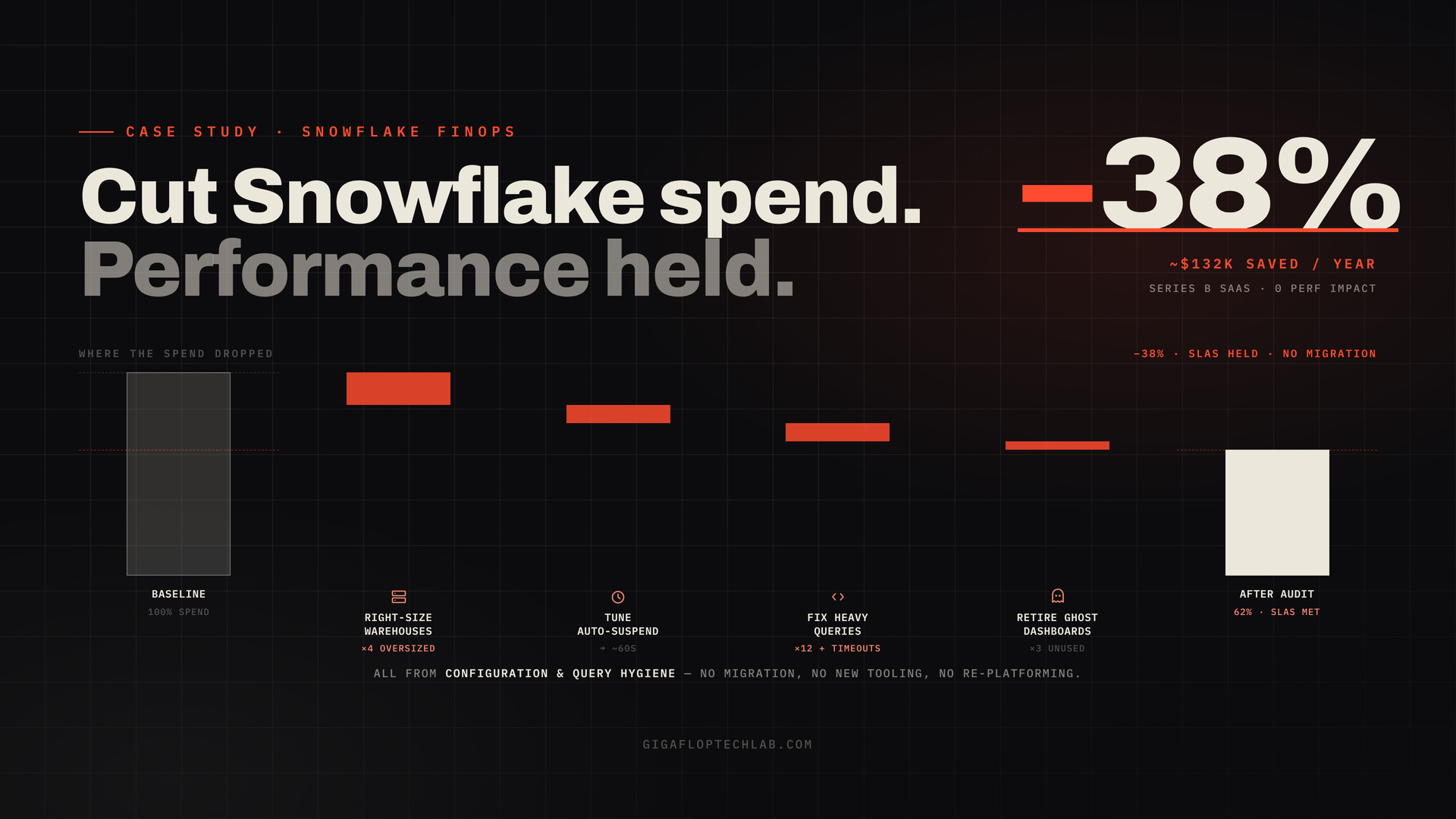
This is the story of one Series B SaaS company where a focused cost audit cut the Snowflake bill by 38% roughly $132K annualized with zero degradation in query performance. More useful than the number: the patterns behind it are common enough that you can go looking for them in your own account today. We’ll show you where they hide.
Results at a glance
| Snowflake spend reduction | 38% (~$132K annualized) |
| Performance impact | None SLAs held |
| Root causes found | 4 oversized warehouses · 12 inefficient queries · 3 unused (“ghost”) dashboards |
| Required | No migration, no new tooling, no re-platforming |
| Time to value | Fixes deployable within the audit window |
Engagement metrics from the Gigaflop record. [[EDITOR: confirm CS-SNOWFLAKE figures 38% / ~$132K / the 4-12-3 breakdown and naming/anonymization approval. Result sits within the documented 30–60% industry range, so it reads as credible.]]
The context
The company was a Series B SaaS business doing what fast-growing SaaS businesses do: shipping features, onboarding customers, and watching the data warehouse bill creep up every month. Snowflake had been adopted early, configured quickly, and then mostly left alone while the team focused on the product. By the time anyone looked closely, the bill had become a line item the CFO asked about and no one could fully explain.
The brief was deliberately narrow: reduce the spend without touching performance. No “rip it out and re-platform.” No degrading the dashboards the business runs on. Just find the waste and remove it.
The challenge
Here’s what makes Snowflake spend tricky, and why it sneaks up on teams: Snowflake’s cost has almost nothing to do with how much data you store. It’s overwhelmingly about compute virtual warehouse runtime typically accounts for 60–80% of the bill (industry FinOps analyses, 2026). And compute waste is invisible in a way storage waste isn’t. A warehouse sitting idle but not suspended, or sized two tiers too large “to be safe,” doesn’t show up as an error. It shows up as a number on an invoice, with no obvious cause attached.
So the challenge wasn’t “use less Snowflake.” It was “find the specific places money was leaking” and prove that closing each leak wouldn’t break a workload the business depended on. That second half is why most teams don’t do this themselves: they’re (rightly) afraid of trading a lower bill for a broken dashboard.
Our approach where the money actually was
We ran a structured cost audit against Snowflake’s three cost vectors (compute, storage, serverless), with compute as the priority. The savings clustered in three places, and they generalize remarkably well.
1. Four oversized & idle warehouses (the biggest lever)
Snowflake bills per second of warehouse runtime, with a 60-second minimum. Two failure modes were stacking:
- Oversized: warehouses sized for a worst-case workload that rarely ran a Large doing work a Small could finish inside its SLA. Doubling warehouse size doubles the hourly credit burn, so a too-big warehouse is a permanent surcharge.
- Idle but awake: auto-suspend left at the UI default (often ~10 minutes) instead of a tight setting, so warehouses sat warm and billed long after the last query. For standard workloads, pulling auto-suspend toward ~60 seconds is the single fastest cost lever there is.
The fix was right-sizing each warehouse to the smallest tier that still met its performance SLA, and tuning auto-suspend per workload (tighter for bursty BI, with care taken where a warm cache genuinely mattered). Crucially: the goal isn’t the smallest possible warehouse it’s the smallest one that completes queries without spilling or missing SLAs. That distinction is how you cut cost without cutting performance.
2. Twelve inefficient queries (small in number, large in cost)
A handful of queries were doing disproportionate damage full scans where partition pruning should have applied, missing filters, and a couple of runaway joins with no statement timeout to cap them. Cost in Snowflake is wildly skewed: optimizing a single expensive query that runs thousands of times a day can pay for itself many times over. We profiled the heaviest consumers, fixed the query patterns, and added statement timeouts so a single bad join could never again quietly burn thousands in credits.
3. Three ghost dashboards (pure waste)
Three dashboards were still refreshing on schedule consuming compute every cycle that no one had opened in months. This is the purest form of waste: paying to compute answers nobody reads. We identified them through usage data and retired (or de-scheduled) them. Most Snowflake accounts carry more of this than anyone expects.
The combined effect was a 38% reduction in Snowflake spend about $132K on an annualized basis with performance SLAs fully intact. No migration, no new tooling, no re-platforming. The savings came entirely from configuration and query hygiene the team simply hadn’t had time to hunt down.
| Before audit | After audit | |
| Monthly Snowflake spend | baseline | −38% |
| Annualized | baseline | ~$132K saved |
| Query performance / SLAs | met | met (unchanged) |
| Oversized/idle warehouses | 4 | right-sized |
| High-cost queries | 12 unoptimized | fixed + timeout-capped |
| Ghost dashboards | 3 refreshing | retired |
The repeatable patterns hunt for these in your account this week
This is the part that outlives the case study. The same leaks recur across almost every Snowflake account we audit. A self-diagnostic:
- Auto-suspend audit. Any warehouse set to never-suspend or >10 minutes is a cost leak. (You can list this straight from account_usage.) Start tightening toward ~60s for standard workloads.
- Warehouse right-sizing. For each warehouse, ask: does a smaller size still meet the SLA? Test it. If Medium finishes in 45s vs. 40s on Large, Medium just halved that workload’s cost.
- Warehouse sprawl. Most accounts have several times more warehouses than they need. Each one is management overhead and idle-compute risk.
- The 12 (or however many) queries. Find your top compute-consuming queries. A small number almost always dominates the bill and they’re usually the most fixable.
- Statement timeouts. Set them. One uncapped runaway join can cost thousands.
- Ghost dashboards & scheduled refreshes. Cross-reference what’s refreshing against what’s actually viewed. Retire the rest.
Common mistakes that inflate Snowflake bills
- Treating it as a storage problem. It’s a compute problem. Storage is usually 10–20% of spend.
- Leaving auto-suspend at the default. The UI default is too loose for most workloads; it’s free money left on the table.
- Oversizing “to be safe.” A too-large warehouse is a permanent surcharge, not insurance.
- No statement timeouts. A single runaway query with no cap is an open-ended bill.
- Set-and-forget. Workloads drift. Without periodic review (or automation), savings erode within months.
Could this work for your Snowflake account?
If your Snowflake bill is rising faster than your data or your usage, the waste is almost certainly there most teams just haven’t had time to hunt it. The questions to ask:
- Do we know which warehouses are oversized or never suspend?
- Do we know our top 10 most expensive queries by credit consumption?
- Are we paying to refresh dashboards no one opens?
- Could we cut spend 30%+ without touching a single performance SLA? (For most accounts we audit, the answer is yes.)
If those are uncomfortable to answer, that discomfort is the savings, waiting.
Conclusion
The headline is a 38% cut and ~$132K a year. The real lesson is quieter: Snowflake bills balloon from configuration drift, not from genuine need oversized warehouses, idle compute, a dozen sloppy queries, and dashboards nobody reads. None of it requires a migration to fix. It requires someone to look, methodically, and to know which fixes are safe.
The waste is sitting in your account right now, fully reversible, with no performance cost to removing it. The only question is whether anyone’s hunting it.
CTA
Wondering how much of your Snowflake bill is waste versus genuine need? For most accounts we audit, 30%+ comes off without touching a single performance SLA.
Book a Cost Optimization Audit → we’ll find your oversized warehouses, your most expensive queries, and your ghost dashboards, then hand you a prioritized, dollar-quantified, SLA-safe savings plan. You’ll know your number in weeks, not quarters.
FAQs
For most accounts, 30%+ is achievable without losing performance — this engagement hit 38% (~$132K/yr). Industry FinOps analyses report typical reductions of 30–60% from right-sizing warehouses, tightening auto-suspend, and fixing high-cost queries. The exact figure depends on how much configuration drift has accumulated.
Because Snowflake cost is driven by compute, not storage — virtual warehouse runtime is typically 60–80% of the bill. Oversized warehouses, idle compute from loose auto-suspend settings, and inefficient queries inflate the bill regardless of how little data you hold. Storage is usually a small fraction of spend.
Done correctly, no. The goal is the smallest warehouse that still meets each workload’s SLA, not the smallest warehouse possible. In this engagement, performance SLAs were fully maintained while spend dropped 38%. The risk comes from cutting blindly — which is why the work is an audit, not a guess.
Tighten auto-suspend. Setting warehouses to ~60 seconds (from the looser default) eliminates idle compute and often reduces costs noticeably within days. Pair it with right-sizing oversized warehouses and capping runaway queries with statement timeouts for the biggest fast wins.
Ghost dashboards are reports still refreshing on a schedule that no one actually views. Every refresh consumes compute, so you’re paying to calculate answers nobody reads. Cross-referencing scheduled refreshes against real usage and retiring the unused ones is pure, risk-free savings.
Regularly — workloads and query patterns drift, so one-time savings erode within months if left unmonitored. A periodic cost review (or continuous automated monitoring) keeps spend in check. Many teams do a deeper audit quarterly and monitor warehouse/auto-suspend hygiene continuously.