Picking the wrong technical approach in generative AI development burns months of engineering time and tens of thousands of dollars. When building custom AI for your business, you face three main choices: prompt engineering, Retrieval-Augmented Generation (RAG), or fine-tuning.
Think of it like hiring a brilliant new employee on day one:
- Prompting is handing them a clear checklist of instructions before they start a task.
- RAG is giving them access to your live company filing cabinet so they can look up exact facts before answering a customer.
- Fine-tuning is sending them to a six-week specialised training camp so they master your exact brand voice and internal workflow by heart.
Choosing the wrong path leads to sky-high API bills, made-up customer answers, and stalled launches. This guide gives you a simple, four-question decision tree to pick the exact right setup for your data, budget, and traffic so you can ship reliable generative AI solutions without over-building.
“AI is not just about writing code; it is about building the right data architecture and choosing the simplest tool that gets the job accurate and fast.”
Andrew Ng, Founder of DeepLearning. AI and Adjunct Professor at Stanford University
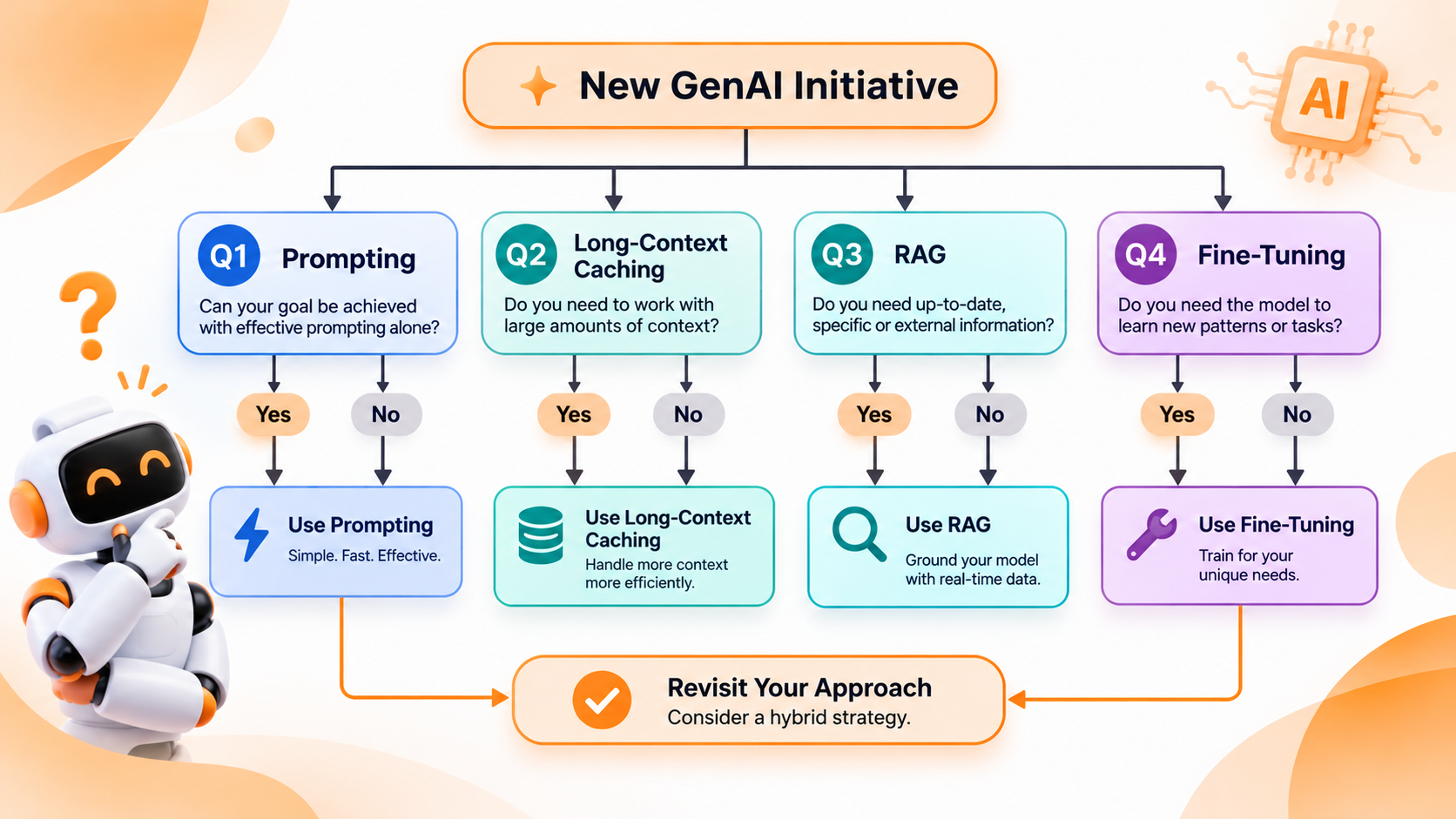
The 4-Question Decision Tree for Architecture Selection
Before spending a dollar on custom LLM development, walk through these four questions in order. Stop as soon as you hit a “Yes.”
- Can an existing AI model solve your task using clear instructions and a few examples?
- Yes: Use Prompt Engineering. Do not build data pipelines or train custom models yet.
- No: Move to Question 2.
- Does the AI need your private company data, and is that file static and under ~500 pages?
- Yes: Use Long-Context Prompting with Prompt Caching. You can paste that reference document straight into the prompt cheaply without building a separate database.
- No (your data is huge, changes daily, or needs user-level permissions): Move to Question 3.
- Does the AI need real-time facts, live inventory, or clickable source links to prevent guesswork?
- Yes: Build a RAG Pipeline. Hook the AI up to your live databases so it looks up real facts before replying.
- No (it already has the right facts, or you already built RAG, but behavior or cost is the bottleneck): Move to Question 4.
- Do you need to slash API costs at huge scale, enforce a unique brand style, or teach a niche industry skill?
- Yes: Use Fine-Tuning (specifically LoRA or model distillation).
Golden Rule of Production AI: Never skip evaluations (Evals). Before upgrading from prompting to RAG or fine-tuning, build a test sheet of 50 to 100 real customer questions and ideal answers. Without a baseline score, you are flying blind and won’t know if an expensive upgrade actually improved accuracy.
Step 1: Prompt Engineering & Long-Context Caching
You don’t touch the AI’s brain here you just give it better instructions and a few good examples.
Modern AI models can now read massive amounts of text at once (over 1 million words) and use a feature called ‘prompt caching’. Instead of paying full price every time you send a 100-page policy manual or supplier catalogue in a prompt, caching keeps that reference file in short-term memory. That cuts repeated input costs by 75% to 90%, as shown in Anthropic’s prompt caching performance benchmarks. Even better, modern models guarantee clean JSON code out of the box, so your software never breaks when reading the AI’s reply.
When to choose prompting:
- You are testing a new idea: Launch an internal tool or customer-facing MVP in days instead of quarters. You get real user feedback before spending big on infrastructure.
- Your reference data stays the same: passing a fixed brand style guide, a static legal template, or a seasonal catalogue directly into a cached prompt is faster and simpler than maintaining a search database.
- E-commerce example: Writing SEO-friendly product descriptions from raw supplier specs, tagging incoming support tickets by urgency, or translating product pages into multiple languages while keeping your brand tone intact.
Where prompting breaks down:
Once your knowledge base grows to thousands of files, changes hourly, or requires strict user permissions (making sure Customer A never sees Customer B’s invoices), stuffing everything into a prompt gets too slow, expensive, and risky. Extra text slows down how fast the first word appears on screen, which frustrates shoppers waiting for an instant reply.
Want to see how top engineering teams structure their prompts and caching layers before scaling? Explore our custom generative AI development services to launch your MVP faster.
Step 2: Retrieval-Augmented Generation (RAG)
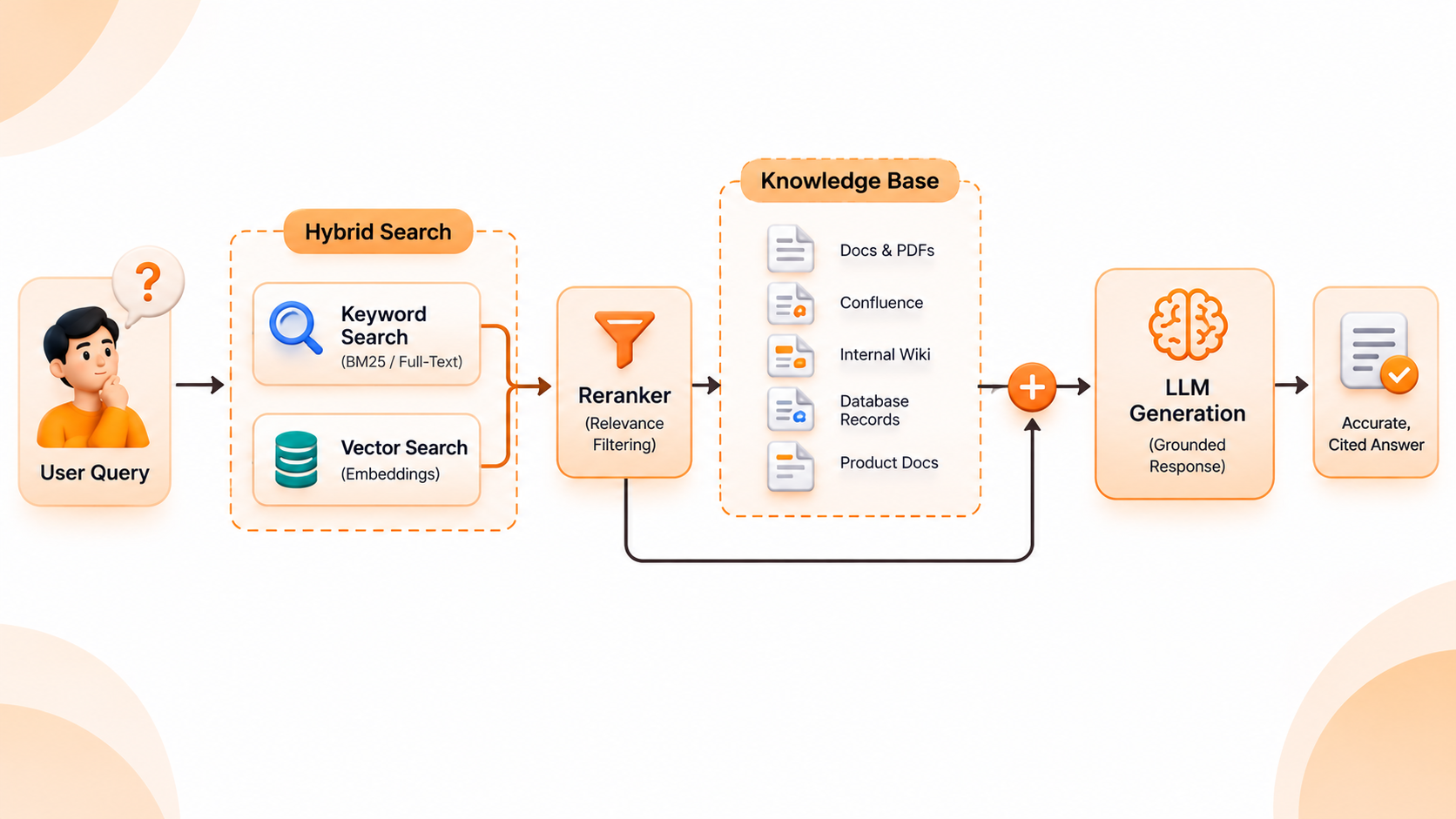
Think of RAG as giving the AI an open-book exam. Instead of forcing the AI to memorise your entire business, RAG connects it to your live internal data. When a customer or employee asks a question, a search engine checks your databases first, pulls the exact matching paragraphs, and tells the AI to answer only using those verified facts.
Great RAG goes far beyond uploading a few PDFs. Production systems combine two types of search: exact keyword matching (crucial for SKU numbers, part codes, and legal terms) and meaning-based search (which understands what a shopper actually means), paired with a smart filter that ranks the best facts at the top before the AI reads them. Research from Stanford HAI on retrieval-augmented grounding proves that anchoring answers in verified records dramatically cuts down made-up facts in business tools.
When to choose RAG:
- Your facts change every hour: Live product stock counts, dynamic pricing, shipping cutoffs, or active order statuses.
- You need receipts and citations: RAG lets your chat window show clickable links pointing straight to the exact policy page or product spec used to build the answer.
- Privacy and permissions matter: You can filter search results based on a user’s login role before the AI reads a single word, preventing accidental data leaks across accounts.
- E-commerce example: A shopping assistant that checks real-time warehouse stock, compares specs across 50,000 SKUs, and answers return questions based on a shopper’s exact order history.
Quick tip on live actions: If you want the AI to check a live UPS tracking number or cancel an order, don’t use RAG; use Tool Calling, which lets the AI trigger live API actions in Shopify or your warehouse software. Save RAG for searching product catalogues, help docs, and company policies.
Step 3: Fine-Tuning & Model Distillation
If RAG changes what the AI knows, fine-tuning changes how the AI thinks, formats, and speaks. You take an existing base model and train it on hundreds or thousands of your own real input-and-output examples until that behaviour becomes second nature.
Today, smart teams rarely pay for expensive full-model retraining. Instead, engineers use lightweight shortcuts like LoRA to adapt a model in days or model distillation using a big, expensive frontier model to generate ideal training examples, then teach a smaller, lightning-fast model to copy that exact skill at a fraction of the cost.
When to choose fine-tuning:
- You have massive traffic: Once you handle hundreds of thousands of requests a day, running a small, fine-tuned model often cuts response times in half and slashes monthly compute bills by 60% to 80%.
- You need rock-solid style or rules: enforcing a distinct brand voice, strict legal redlining rules, or complex medical and financial coding that would otherwise take thousands of words to explain in every single prompt.
- E-commerce example: Cleaning up messy product data from 500 third-party vendors into one neat store catalogue format at scale, or powering a high-volume shopping stylist trained on transcripts from your best in-store sales reps.
What to watch out for:
Fine-tuning is terrible for teaching new facts. If you train a model on today’s price list, it will still quote outdated prices next week unless you pair it with RAG. Even more important: fine-tuned models can accidentally memorise and leak private training data if tricked by clever user prompts. RAG keeps sensitive records safely locked inside your encrypted database, outside the AI’s brain.
Side-by-Side Comparison & Total Cost of Ownership (TCO)
When budgeting for generative AI development, look past the initial build price and factor in ongoing maintenance, speed, and monthly API bills:
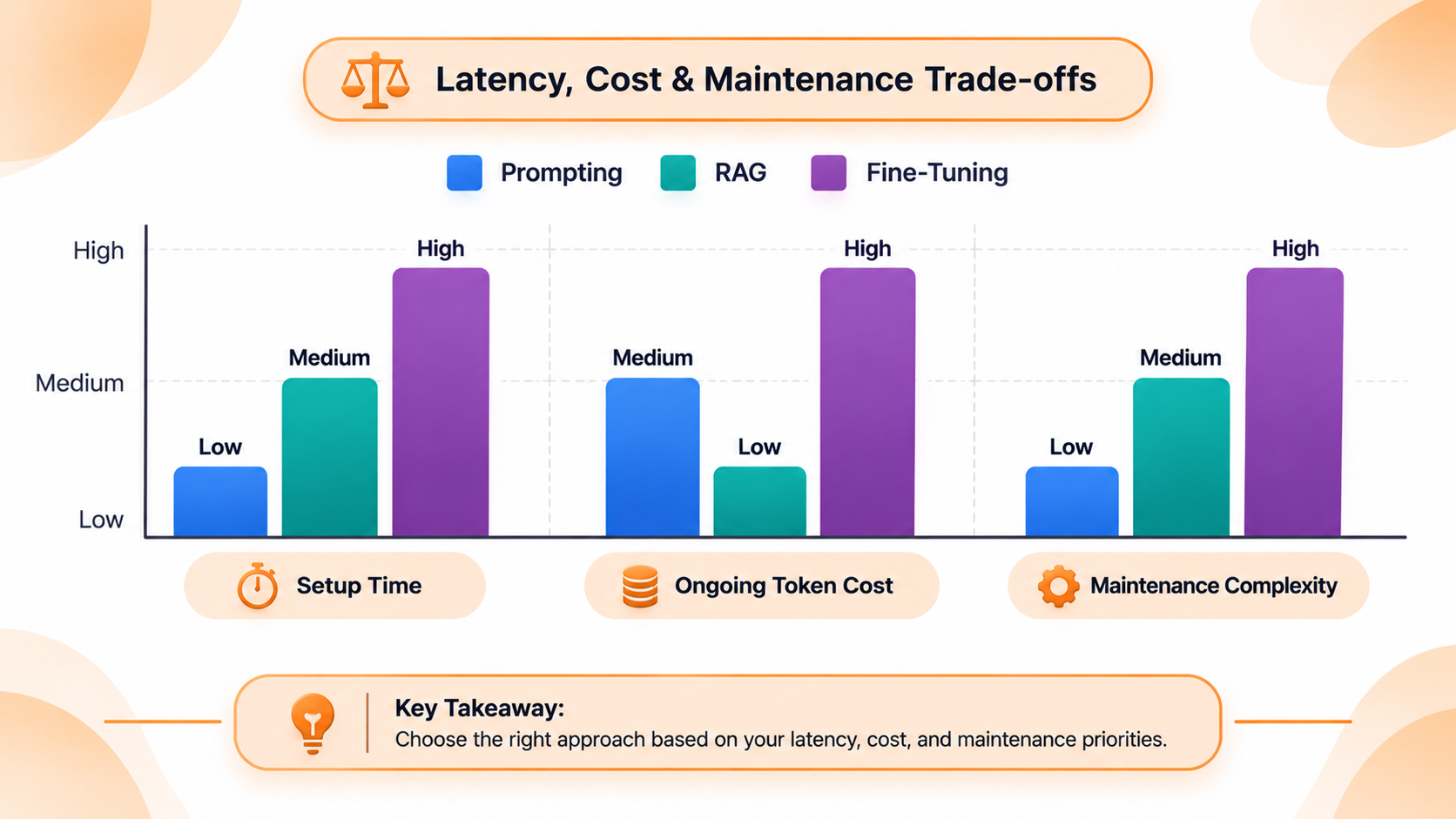
| Decision Factor | Prompting + Caching | RAG Pipeline | Fine-Tuning (LoRA / Distillation) |
| Time to Launch | Days | 2–5 Weeks | 3–6 Weeks (including data prep) |
| Upfront Engineering Cost | Low | Moderate | Moderate to High |
| Ongoing API / Compute Cost | High at a large scale | Moderate | Lowest per request at high volume |
| Handles Live Data? | No (static files only) | Yes (real-time updates) | No (Frozen at training time) |
| Risk of Made-Up Facts | Moderate | Very Low (With citations) | Moderate (if asked about unknown facts) |
| Main Maintenance Work | Updating prompt text | Syncing search indexes | Cleaning datasets & retraining |
Why the Best Production Systems Combine All Three
In the real world, you don’t have to pick just one forever. Most high-performing business apps layer all three together so each piece does what it does best:
- RAG pulls live customer records, current inventory, and up-to-date store policies based on who is logged in.
- A fine-tuned model processes those facts using your exact brand voice and fast response targets without needing massive system prompts.
- Prompting wraps the conversation in live safety rules like blocking competitor mentions, softening the tone for upset shoppers, or handing tricky cases off to a human agent.
Frequently Asked Questions (FAQs)
Start with prompting for behind-the-scenes work like writing product descriptions and tagging catalogue items. For customer-facing shopping assistants or support bots, RAG wins every time because it connects straight to your live inventory, shipping rules, and order tracking without manual updates.
No. Using fine-tuning to memorise company files is one of the most common and expensive mistakes in LLM development. Fine-tuning teaches habits and style, not reliable fact recall. Always use RAG (or cached prompts for small static files) when accuracy depends on your company documents.
With modern lightweight training (like LoRA), you usually need 500 to 2,000 clean, verified examples of inputs and ideal outputs. Quality beats quantity every time; 500 examples checked by your best team members will outperform 50,000 messy, unedited chat logs.
Combine RAG with strict prompt rules telling the AI to say “I don’t have that information” whenever your database doesn’t contain the answer. Adding clickable source links also lets shoppers double-check facts instantly.
Fine-tuning pays off once your traffic gets high enough that cheaper per-message costs outweigh the upfront training work typically around 100,000+ complex requests per month, or when you are replacing huge, repetitive instruction prompts with a compact fine-tuned model.
A simple prompting prototype takes 3 to 5 days. A production-ready RAG system with hybrid search, user permissions, and quality testing usually takes 3 to 5 weeks, while a fine-tuned model takes 4 to 6 weeks largely because cleaning and verifying training data takes time.
Ready to Map Out Your AI Architecture?
Picking the wrong foundation leads to stalled pilots, ballooning API bills, and unreliable answers. Our senior AI architects will review your data sources, speed goals, and security needs to map out the right path before you write a single line of production code.