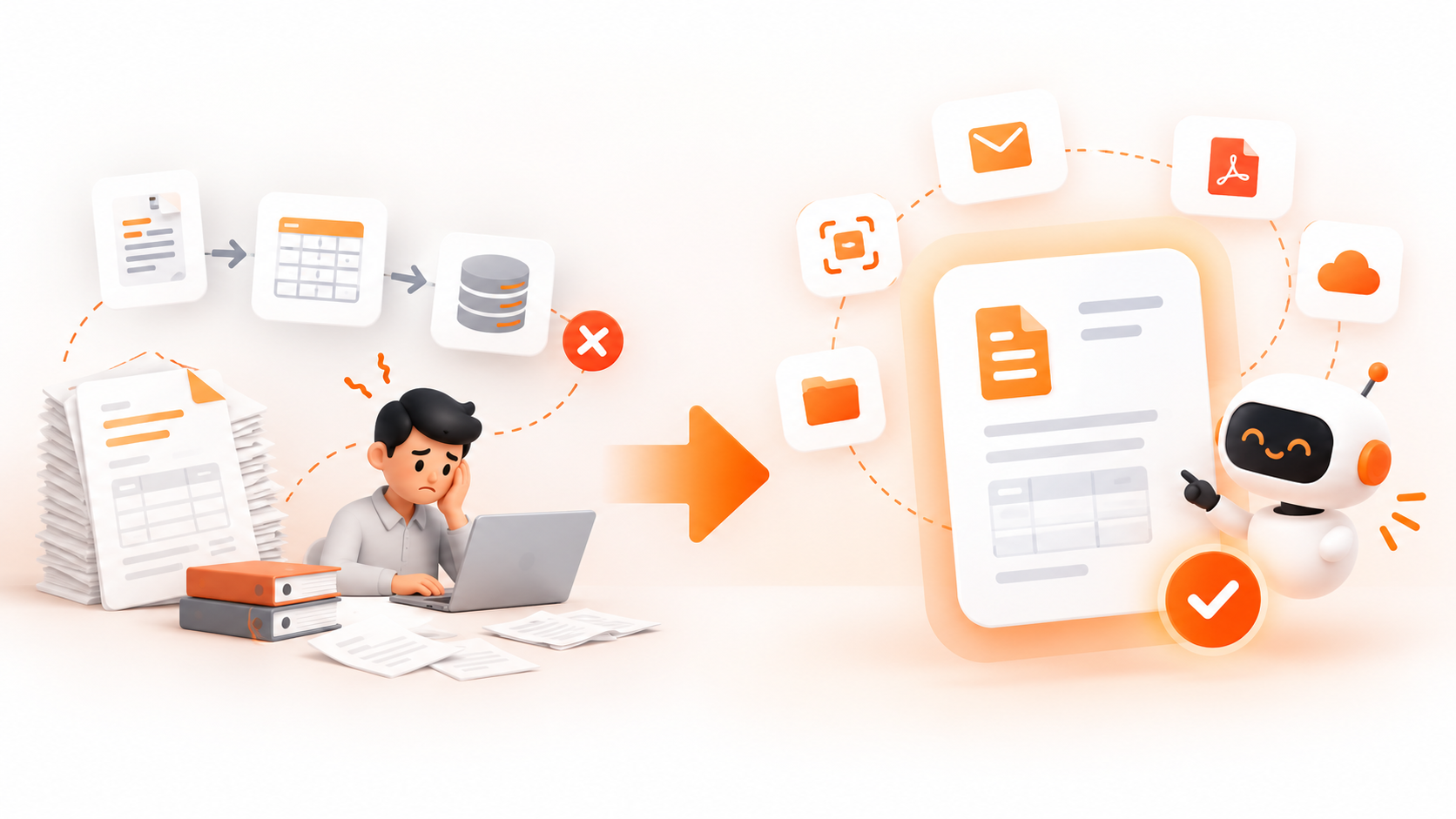
The manual processing of invoices is slow, costly, and it is also liable to errors made by people. Companies like those which belong to the mid-market sector grow in number. As a result, they have to deal with many orders every day and the only way for them to keep their work effective is to automate various processes in an optimal way.
Nevertheless, even before they decide to use any new solutions or dedicate capital to automation projects, leaders of companies are right to ask: how reliable is the software? Namely, it is important to remember that vendors announce their products as having nearly perfect accuracy, even though this cannot be proven in practice.
“Future workforces in enterprise will be a combination of humans and digital humans… Our company’s IT department is going to be the HR department of digital employees of the future.”
Jensen Huang, CEO of Nvidia
Recent enterprise automation benchmarks published in the Gartner Guide to Intelligent Document Processing reveal that while traditional OCR tools plateau when facing unfamiliar layouts, modern document AI platforms adapt dynamically to extract context with high field-level accuracy.
In this manual, you will learn about achievable accuracy standards for document processing, find out what the essential elements influencing the accuracy are, understand the significance of smart document processing in the regular financial processes, and discover practical suggestions for getting maximum return on investment.
What Is AI Invoice Processing?
The traditional practice of entering accounts payable information involves human personnel reviewing tangible paper bills or digital file formats, interpreting unstructured formats, and accurately entering the suppliers’ information into the appropriate accounting or enterprise resource planning (ERP) programs. As reported in the IBM publication about accounts payable, conducting this activity manually creates a risk of errors and delays in payments.
Modern AI invoice processing removes this problem through the implementation of machine learning (ML), computer vision, and natural language processing (NLP) technologies for the automatic reading, extraction, and verification of data from invoices. In terms of using a technological aid, there is no need in applying rigid templates that require designating every template used when one supplier’s invoice layout differs from another invoice layout.
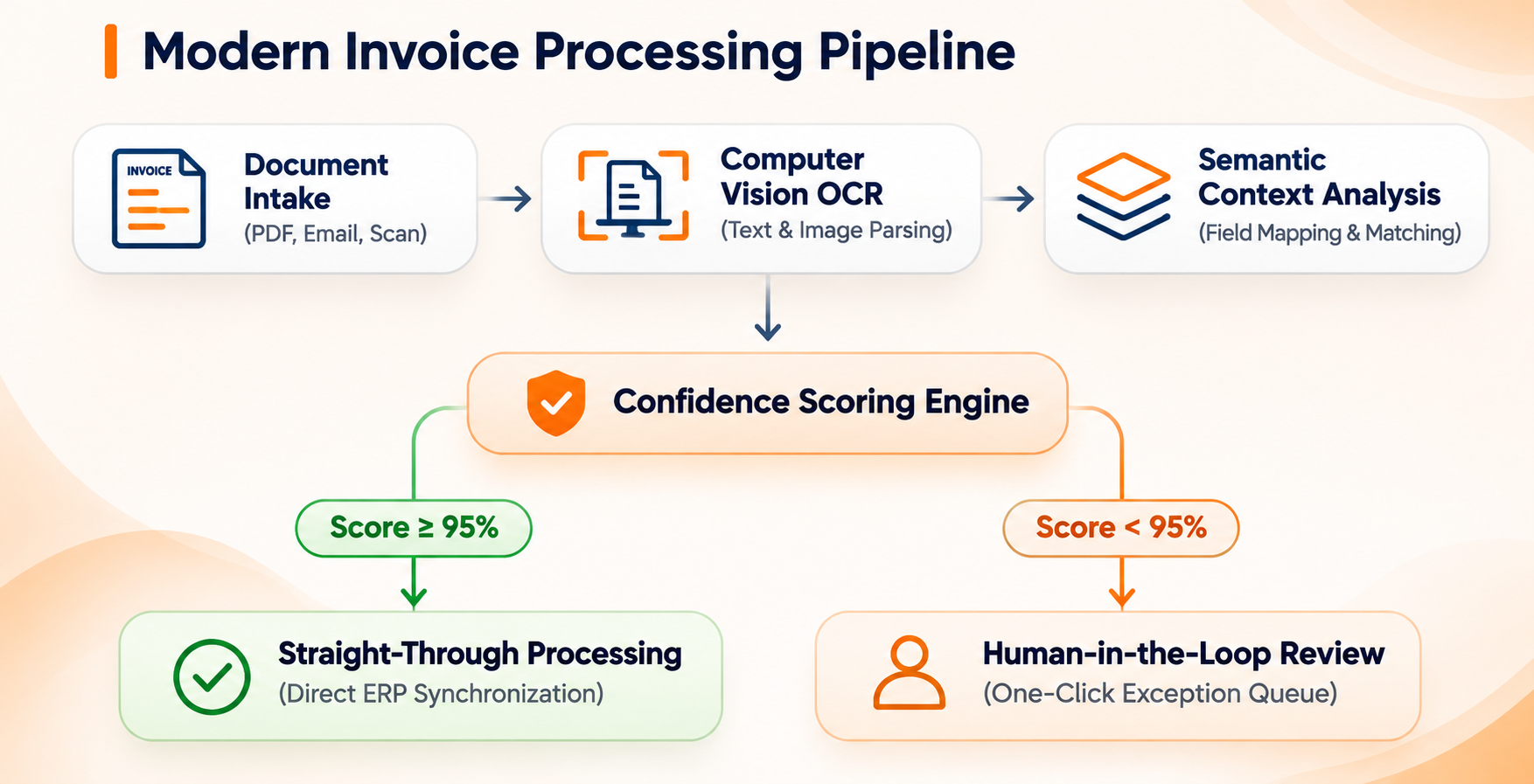
By shifting from manual data entry to automated extraction, enterprise finance teams can process incoming documents in seconds rather than days, maintaining tight financial controls while freeing staff to focus on strategic cash flow management.
The Real Numbers: Character Accuracy vs. Field-Level Accuracy
When assessing vendor claims regarding software, it is important to distinguish between character accuracy versus field level accuracy. Vendors’ sales representatives tend to talk about 99% accuracy in terms of characters recognized. The problem is that if you have a document containing 1000 characters, and the 1% mistake occurs just in the decimal point of the invoice amount, your field extraction cannot be considered valid from the point of view of business.
When developing your automation strategy, you should base your choices on field-level accuracy and Straight-Through Processing (STP) statistics.
| Processing Category | Intake Document Type | Extraction Technology | Expected Field Accuracy | Straight-Through Rate (STP) |
| Structured Digital | Original Digital PDFs | Direct Text Parsing | 98% – 99% | 85% – 95% |
| Clean Scanned | Printed Paper & Clear Scans | Computer Vision + OCR | 93% – 97% | 70% – 85% |
| Unstructured / Mobile | Phone Photos & Faxes | Advanced Deep Learning | 80% – 90% | 50% – 65% |
| Handwritten Elements | Notes & Physical Receipts | Specialized Vision Models | 60% – 80% | Requires Human Review |
1. Digital PDFs that are Structured: Accuracy in the Field 98% – 99%
Whenever vendors send invoices as digitized pdfs which are made directly through accounting software application programs (like QuickBooks, Xero, and NetSuite), the extraction engine only picks textual strings embedded in the files and does not need OCR. Extraction of all the header fields, tax calculations, and purchase order numbers out of such structured files can be done with maximum reliability and no human input involved.
2. Standard Scanned Invoice: 93% – 97% Field Accuracy
Hard copy receipts, paper mail scans, and high-quality jpgs should be converted into machine-readable text via Optical Character Recognition (OCR). Modern vision algorithms are capable of high-quality extraction with traditional typographical fonts, provided the scan has sufficient resolution (at least 300 DPI and good contrast).
3. Unstructured or Mobile Invoices: 80% – 90% Field Accuracy
Invoices taken with mobile phone images, low-quality faxes, or highly blurred paper copies present special challenges for extraction purposes. Some specificities, such as creases, uneven luminosity, or abnormal layout, are detrimental to optical clarity.
4. Handwritten Invoices: 60% – 80% Field Accuracy
In modern-day deep learning, great strides have been made; while it is possible to read clearly written print-style script more or less correctly, legacy cursive handwriting, faint pencil markings, and sprawling notes are too much for current automated systems. From the standpoint of financial compliance and audits, handwritten records should always be subjected to human review.
Key Factors That Impact Processing Performance
Not all financial documents pass through an automated pipeline with equal ease. Understanding the variables that influence extraction quality enables leadership teams to optimize operational workflows before software deployment.
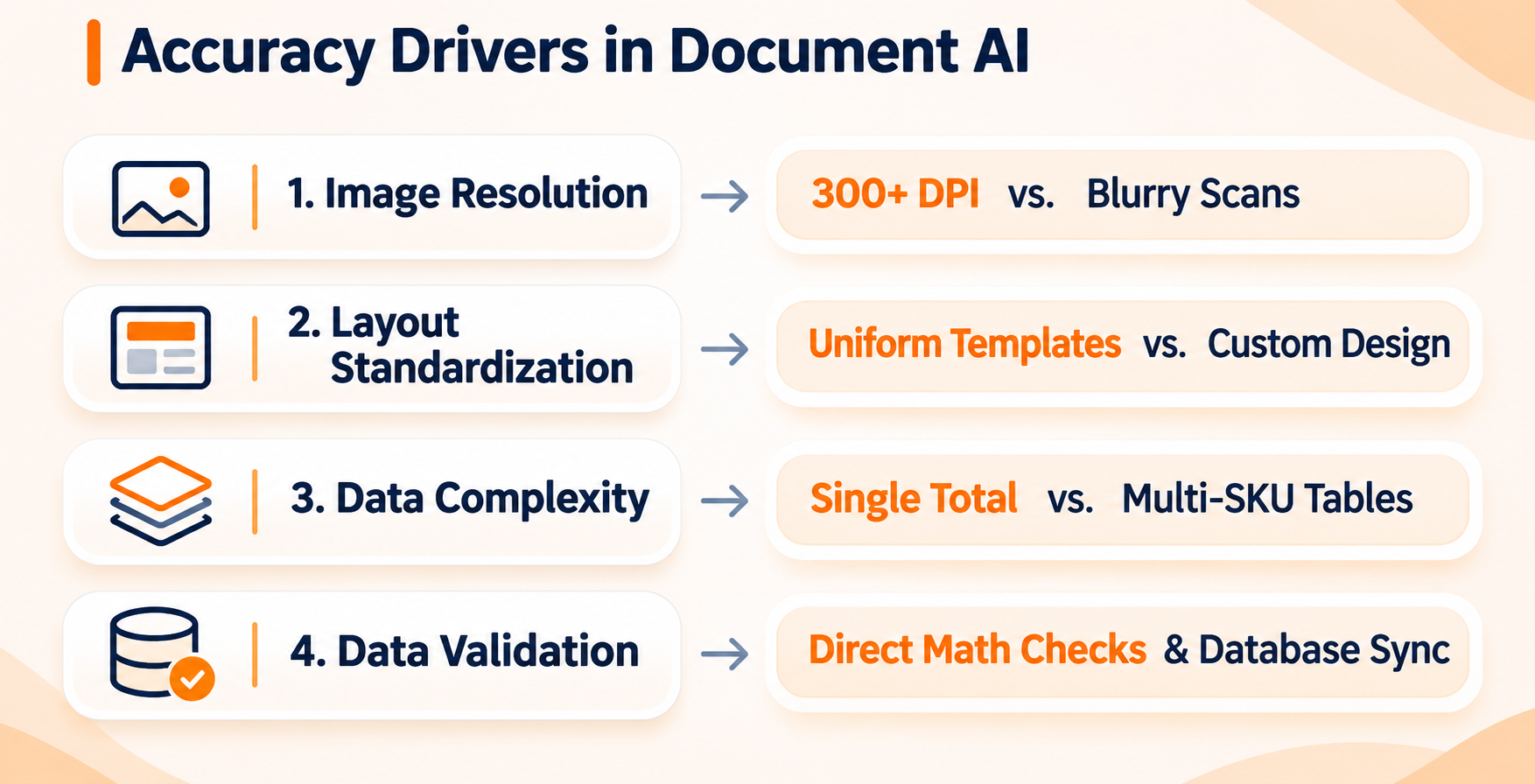
The quality of the incoming documents in either physical form or digital form is the main factor that affects OCR accuracy:
- Good Quality Documents (high-resolution 300 DPI) – The sharpness of the text makes it easier for the optical engine to tell apart visually similar characters, such as ‘0’ and letter ‘O’, or number ‘1’ and letter ‘l’.
- Low-Quality Documents (distorted documents below 200 DPI) – In this instance, poor contrast, dark shadows, and high-compressed JPGs make character components worse, which means that Artificial Intelligence has to depend on the possible context to interpret the text.
Layout and Template Complexity
Standard single-page invoices are processed quickly due to their clear section and box layout and known field names while unusual layouts that use unique design systems, for example, those used by unique boutiques and global partners, require semantic parsing to extract information.
Complexity of Line Items and Multi-Page Tables.
Getting a summary number on the invoice is a simple application. The main reason why there exists a complex table extraction algorithm is because of the difficult nature of enterprise invoices. All sorts of invoices contain many rows of detailed line items that include nested descriptions of products, varying currencies, and complex discounts. The system must ensure that the row boundaries are properly aligned before the totals are computed.
Why Intelligent Document Processing is Better than OCR.
To clarify the reason why modern financial automation produces so good results, it is important to understand the difference between traditional OCR and modern intelligent document processing.
Traditional OCR functions with a fixed grid of coordinates. The administrator must create a separate template for each of the suppliers, writing an instruction for the computer on where to find the invoice number (for example, “Locate the invoice number in the box that is located 2 inches from the top and 3 inches from the right”). As a result of new vendors changing their invoices, the whole template will become invalid.
Smart document processing focuses on understanding the meaning of the content instead of being dependent upon fixed coordinates. The cutting-edge solution utilizes the latest technologies of natural language processing and computer vision to process documents like a qualified specialist in finance. The research of enterprise technology published by Gartner shows that advanced document AI systems analyze both the semantic meaning of and the positions of objects on a page.
The processing solution can identify the meaning of the phrases “Invoice number”, “Reference number”, “Bill Number” and “ID of the document”, since it processes such phrases as the same data field regardless of their location on a page or font type.
Automated workflows we implemented for a rapidly growing distributor helped a middle-sized company reduce costs for processing invoices manually by 64% while increasing the monthly number of processed invoices.
💡 Is your accounts payable workflow ready for automation?
Don’t spend months guessing software capabilities or dealing with manual data bottlenecks. Book a free workflow audit with our strategy team to identify your top high-impact opportunities for automated processing.
Measuring ROI: Straight-Through Processing (STP) and Cost Metrics
Accuracy measures are very important; however, top executives primarily assess software based on how much it saves in operational costs and how fast it processes. It is close to impossible to achieve 100% extraction accuracy on documents because of issues arising from the quality of the source documents. Instead, enterprise finance departments measure success using Straight-Through Processing (STP) rates and Cost Per Invoice (CPI) measurements.
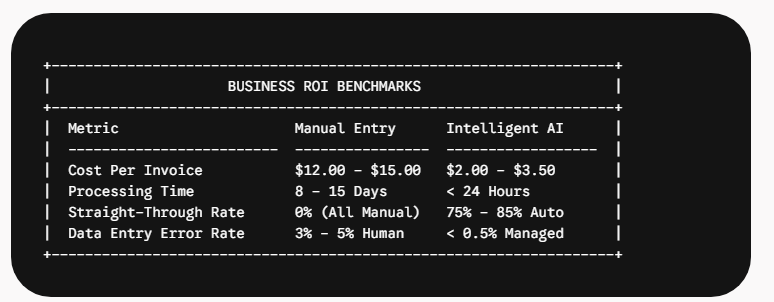
Straight-Through Processing (STP)
STP refers to the portion of received invoices that proceed from the stage of document receipt to the final posting in ERP without any human intervention. Usually, systematizing paperwork with well-implemented document AI leads to an STP result of around 70%-85%. This means that seven to eight invoices out of ten do not need involvement of human agents at the invoice processing stage, thus contributing significantly to increase the volume of invoices processed by accounts payable department without strengthening the personnel.
Exception Handling Efficiency
The remaining 15%-30% of invoices that cannot get through the straight-through validation process go to an exception identification queue in the modern platforms. Instead of rewriting with a whole invoice, human operators have the chance to look at the two screens each of which displays a part of the invoice. One screen shows the invoice and the second one shows the document AI model and the mismatched field. The human operator should confirm the value in one click.
4-Step Roadmap to Maximize Your Automation Accuracy
Successfully deploying ai invoice processing requires a combination of technology strategy and operational governance. Implementing clear intake standards and verification rules ensures your organization achieves maximum extraction performance.
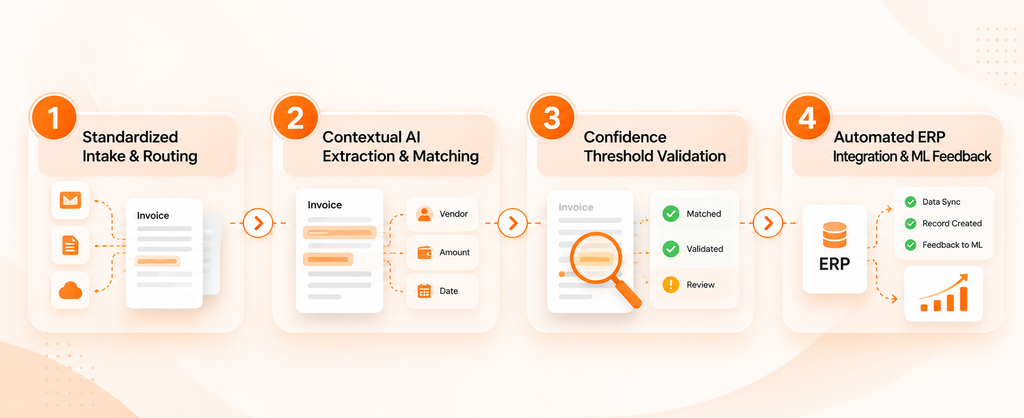
Step 1: Ensure Uniform Vendor Intake Methods
Create a centralized digital intake email (ex. invoices@yourcompany.com) and ask major vendors to simply send original digital documents in the form of PDF files. By removing the need for paper printing and scanning, your data extraction accuracy improves from 93% to 99% right away.
Step 2: Set Up Rigorous Confidence Levels
Define software rules based on risk classification. High-risk fields (i.e. total amount due, banking details, and tax totals) should be set to require at least 95% of confidence in case a verification of the invoice by a human is to be avoided. Low-risk fields (i.e. descriptions of vendors’ addresses) can be processed with a lower confidence level.
Step 3: Introduce Automated Three-Way Matching
Connect your AI document software with your ERP system in order to conduct automated three-way matching. The software will compare the invoice lines with active purchase orders and receiving records, which allows for the automatic approval of the invoice every time the values of item quantity and price correspond to the accepted norms.
Step 4: Take Advantage of Continuous Loops of Machine Learning.
Choose a platform for automation designed for organizations with built-in feedback loops that are continuous. When a member of the accounts payable group manually addresses an exception indicated within the review queue, the model uses the changes made to retrain its weightings continuously, thus minimizing repetitive formulation errors.
Accelerate Your Accounts Payable Strategy
Ready to build or deploy autonomous invoice workflows in your enterprise?
Explore our comprehensive invoice automation solutions to streamline your back-office operations and eliminate manual bottlenecks.
Frequently Asked Questions (FAQs)
Most modern solutions apply a confidence level at the field-level to each and every data point that is extracted. Once the value is under the threshold that is set by the user (like 90% or 95%), the system will highlight the mismatch using either yellow or red color and send this invoice to the human reviewer before using it in the system.
For the majority of mid-sized and large organizations an acceptable STP rate is around 70% – 85%. Meeting a benchmark allows financial departments to process up to 5 times more invoices without introducing any new administrative positions.
Top-notch document AI solutions recognize symbols of global currencies ($, €, £, ¥) as well as their respective ISO codes (USD, EUR, GBP) automatically. The program not only fetches the financial context with numeric values but also performs conversions of values in other countries through real-time currency conversion integration with your accounting package.
Stop letting manual invoice entry slow down growth, lock up working capital, and create unnecessary financial bottlenecks. Modern document AI gives your finance team the speed, accuracy, and operational precision needed to scale efficiently.
Transform Your Business Operations
Stop experimenting with fragmented tools. Start scaling with enterprise confidence.
Schedule a tailored walkthrough with our automation architects to see live invoice extraction and automated 3-way matching in action.