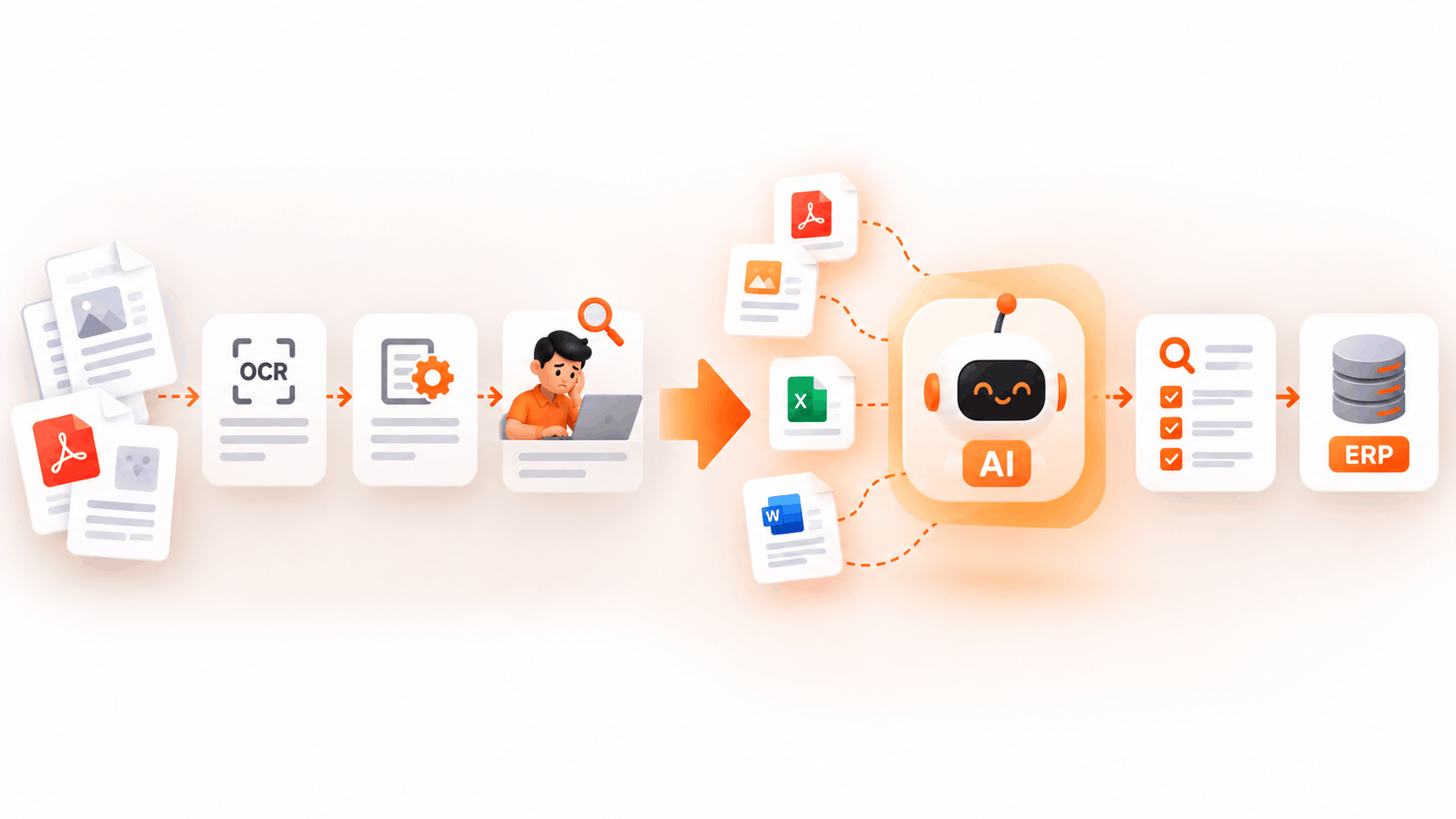
Many digital transformation initiatives at enterprises face obstacles in the form of costs resulting from the manual processes (using human labor) needed to deal with unstructured invoices, paper receipts, shipment documentation, and long legal contracts. With the increased volume of transactions, employing manual data entry teams or old-fashioned template matching approaches is no longer a sustainable option for fast-growing organizations. Currently, companies that handle thousands of documents on a weekly basis are faced with the necessity to implement intelligent processing or document processing tools to do away with operational delays, the high rate of errors, and inefficient back-office processes.
As the executives of enterprises think of their IT solutions investments for the year 2026 the issue presents itself – is it better to have in-house qualified software engineering specialists form a separate team and develop a tailored document processing AI system or use ready-made software solutions offered by companies.
As Satya Nadella, CEO of Microsoft, highlighted regarding the fundamental shift toward integrated AI infrastructure:
“The surge in generative AI is shifting how every business builds, buys, and operates software. Companies no longer win by building commoditized infrastructure from scratch; they win by applying highly reliable, pre-built intelligence directly to their core business workflows to drive operational velocity.”
This extensive guide clarifies the trade-offs involved in the build-or-buy decision in finance, technology, and operations. Founders, CTOs, and operational leaders can make informed decisions regarding implementation schedules, future maintenance responsibilities, security compliance, accuracy metrics, and total cost of ownership (TCO) in order to maximize their long-term ROI.
Executive Summary: Key Takeaways for Decision Makers
The following is a brief strategic summary for busy company leaders considering advanced document processing solutions.
- Buy Commercial Software When – If document processing is a support function that allows the primary business to function (e.g., eCommerce invoice processing, supply chain management, financial clearance, health record management). Commercial solution provides faster deployment time (10 times), lower initial capital expenditure, no need for internal engineering, and much higher out-of-the-box accuracy no matter how odd of a document format a firm using the system has.
- Build Internally When – If the main aim of developing your own document recognition product is making money by selling the document processing system to clients, if your organization requires air gap environments not connected to any external networks, or if you possess plenty of proprietary data which gives you an enormous competitive edge in developing the document technology yourself.
What Is Intelligent Document Processing?
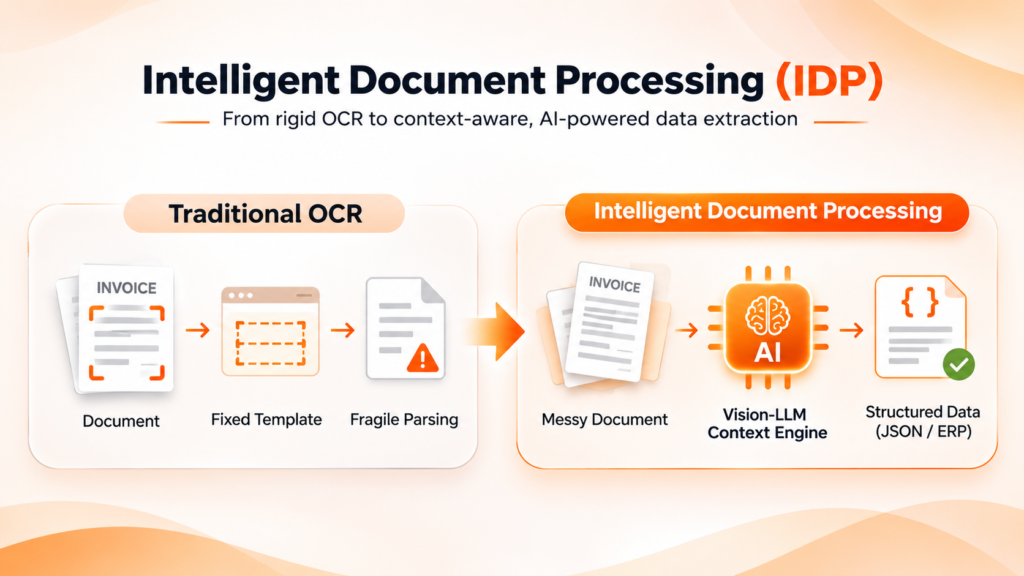
When it comes to accurately evaluating the trade-offs between build and buy options, leadership teams should first differentiate modern document intelligence from traditional optical character recognition (OCR). Conventional OCR relies heavily on fixed templates and zoning rules based on coordinates. Thus, if the vendor modifies the layout by repositioning a logo, changing types, or altering the position of summary tables, the OCR system fails, and the document is sent to human personnel for processing.
On the contrary, modern intelligent document processing incorporates state-of-the-art computer vision technology, machine-learning classification, natural language processing (NLP), and multimodal large language models (LLMs) to execute various complex data (end-to-end) operations.
- Extraction of contextual data – Efficiently pull out unstructured data from complicated data tables; handwritten applications; bills; requisition tickets as well as contracts without the use of programmed layout templates.
- Automation of document categorization – Immediately differentiate and categorize new documents according to type of latest entries into the system (e.g., distinguishing bill of lading from customs declarations).
- Cross-checking of information across systems – Verify that pulled out data is correct by comparing it with entries from databases as well as information from other systems.
The “Build” Approach: Custom In-House Development
Building a proprietary document processing pipeline involves dedicating internal software developers, data engineers, and machine learning specialists to research, assemble, fine-tune, and continuously maintain custom computer vision models or open-source AI frameworks.
Key Advantages of Building In-House
- Specific Customization: The design is specific to the process of developing every extraction pipeline, user interface, database connector, and business rule layer that fits within your unique technical environment and requirements.
- Intellectual Property Ownership: Your organization owns the entire software asset created in the process of developing the fully made code, specifically-trained model weights and proprietary training facts.
Disadvantages and Hidden Costs of Building
- Duration in Market: Creating a production-grade document extraction system usually takes between half a year and a year and a half in research and training, benchmarking, and adjustments to reach acceptable operational accuracy levels.
- Large Amount of Expenses: As stated in the research obtained from the Gartner Report on Intelligent Document Processing Solutions, the costs related to the manual data labelling process, cloud processing units, and salaries of specialists in AI engineering goes beyond the budget of creating a specific solution.
- There is a Never-ending Maintenance Process: Document forms change all the time, be it suppliers or investors or partners. When developing a custom-made system, a team takes over the responsibility for maintenance of the system. Any issue with a template stops the development process.
The “Buy” Approach: Commercial SaaS Platforms
By buying an established commercial platform, businesses can subscribe to a pre-trained, vendor-operated system that connects with their current enterprise resource planning (ERP) or customer relationship management (CRM) software through standard connections or secure REST APIs.
Key Advantages of Buying
- Quick Implementation – Turnkey commercial technologies can be configured, tested and implemented into existing business processes in a matter of weeks rather than quarters.
- High Accuracy From the Start – The most popular commercial software comes pre-trained on many millions of documents worldwide, and thus, it provides high precision in cases of rare documents from the first day of usage.
- Consistent Budget for Usage – Subscription pricing eliminates the unpredictability associated with paying for cloud GPU service, investing in costly hardware infrastructure, or in varying engineering salaries.
- Endless Improvements by Vendors – The suppliers of commercial software constantly improve their algorithms using data from thousands of documents worldwide so that you can get upgrades for free without interruptions.
Disadvantages of Buying
- Being Reliant on Vendor Roadmaps – Functionality updates, features, and interoperability depend on what the vendor chooses to prioritize in its development and pricing policies.
- Security and Compliance Overheads – Managing vendor risk and compliance should be a thorough procedure when sending critical financial, medical, or business data through the intermediary platform.
Head-to-Head Comparison: Build vs. Buy
To give leadership teams a clear side-by-side view, the table below highlights the core differences across critical operational metrics:
| Strategic Evaluation Metric | Building In-House Pipeline | Buying Commercial SaaS Solution |
| Time to Production | 6 to 18 Months | 2 to 4 Weeks |
| Initial Capital Investment | Very High (Engineering Salaries & GPU Compute) | Low to Moderate (Subscription License Fee) |
| Ongoing Maintenance Effort | High (Requires Dedicated Internal AI Team) | Zero (Handled entirely by the SaaS Vendor) |
| Day-One Out-of-Box Accuracy | Low (Requires Extensive Custom Data Labeling) | High (Pre-Trained on Global Document Types) |
| Scaling Flexibility | Limited by Internal Cloud GPU Bandwidth | Elastic On-Demand Scaling Infrastructure |
| Security Certification Burden | Internal Responsibility (Self-Audited) | Pre-Certified (SOC 2, ISO 27001, HIPAA, GDPR) |
When analyzing operational metrics, independent industry research from McKinsey’s Digital Operations Insights shows that automated document workflows regularly deliver over 30% operational efficiency gains and reduce turnaround cycle times by up to 50%.
For instance, when we implemented these automated extraction workflows for a high-growth client, we helped a leading eCommerce retailer cut invoice processing times by 70% using automated workflows.
💡 Is your technology stack ready for automated document processing?
Don’t spend quarters building custom infrastructure without clear ROI. Book a Free 15-Minute Technical Audit with our strategy team to evaluate your current document architecture and identify quick-win automation opportunities.
The Non-Technical Leader’s Decision Framework
To determine the correct path for your company, work through this simple three-stage decision framework:
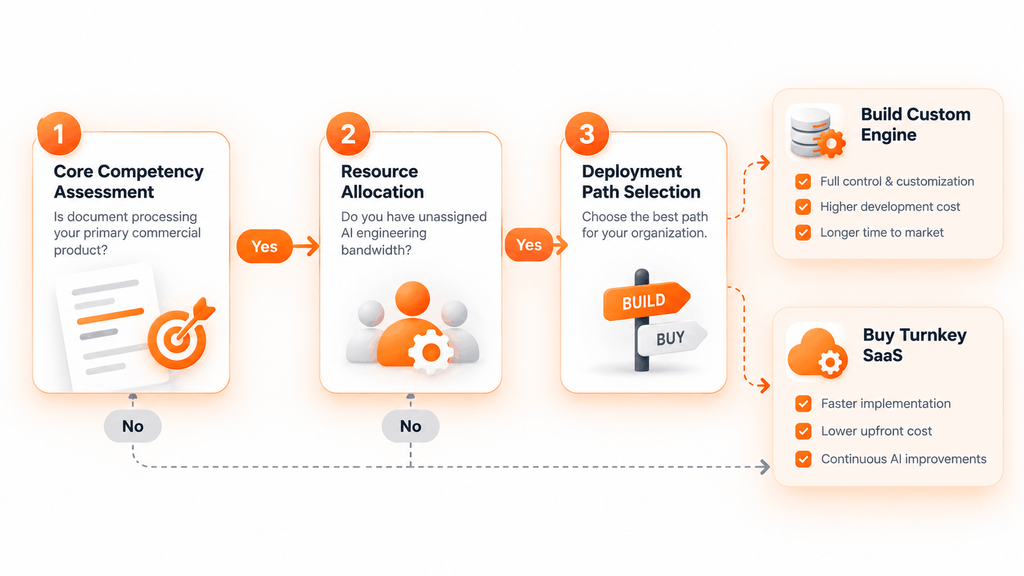
Consider the question: is it document-extraction AI that incentivizes clients to pay your company? Assuredly, if your company offers document management software in external markets, you have to develop proprietary technology to maintain a competitive edge. However, if you run an eCommerce business, delivery service, finance consulting company, or manufacturing business, document processing is just a part of your operations. In addition, having the ability to purchase commercial software that allows you to assign engineers to focusing exclusively on enhancing the products that coerce customers to spend money on your services
- Evaluate the Actual Opportunity Cost
Whatever senior ML engineer or full-stack developer you hire to design and maintain a tailor-made document parser cannot work on your core product, customer experience, or revenue-generating features. Think whether enabling 3-5 key engineers to swap activity for a year creates real value for the company in the long run or raises the shareholders’ confidence.
- Evaluate Your Training Data Edge
Advanced ai document processing models are highly reliant on large, varied datasets which can ensure a 98%+ rate of extraction accuracy on images of low-quality scanned documents, crumpled receipts, rotated pages, and uncommon languages. Commercial IDP providers constantly compile training signals from millions of enterprise documents each day, making it virtually impossible for any individual firm to attain the same scale and efficiency internally.
Key Implementation Steps for a Successful Buy Approach
If the organization plans to implement a commercial platform, it is less likely to face delays in onboarding and successfully utilizing the platform by adhering to the following implementation process
- Conduct Document Type and Volume Audit – Map out the three main documents causing bottlenecks, i.e. invoices, shipping documents, or customer registration paperwork, as well as their average monthly volumes and error rates.
- Determine the Base Metrics – Understand the current cost per document, time to process a document, and frequency of errors before moving on to testing the commercial platform.
- Conduct a 30-Day Experiment – Run 500 problematic real-life documents through the vendor system to evaluate the real accuracy of the platform.
- Connect to Other Systems – Connect the intelligent declaration processing system to the main accounting software or any other relevant systems using secure REST APIs to eliminate manual data transfers.
- Define the Human-in-the-Loop Metrics – Develop a list of automated confidence levels (e.g. any document with automation confidence greater than 95% will be processed automatically and anything lower than that should be sent for processing to a human).
Frequently Asked Questions (FAQs)
In most cases, standard solutions can be connected through API, set up with particular verification procedures in addition to full implementation in the ERP or CRM system in a two to four-week timeframe.
Yes, modern solutions designed for big businesses apply advanced measures of security, such as end-to-end encryption, role-based access, and compliance certifications, including SOC 2 Type II, ISO 27001, GDPR, and HIPAA. Usually, companies that have been in the industry for a longer period offer much higher security than in-house creative solutions.
Custom-made in-house solutions may have a better performance than commercial ones only in rare cases when the type of documents is too rare and only created inside a company with the help of a specialized machine learning team working on their improvement constantly.
Key performance indicators that one should track are cost per transaction, the rate at which manual intervention is required, total process turnaround time, and error rates related to automated data extraction.
Most modern systems achieve an accuracy score in the range of 90 to 98% when working with common business correspondence like purchase orders, invoices, and receipts and employ confidence scoring to send difficult cases to their human workers.
Transform Your Document Workflows Today
Stop letting manual document processing slow down your operational scalability and inflate your back-office costs.
Explore our complete suite of Intelligent Automation Solutions or schedule a direct consultation with our technical strategy team.