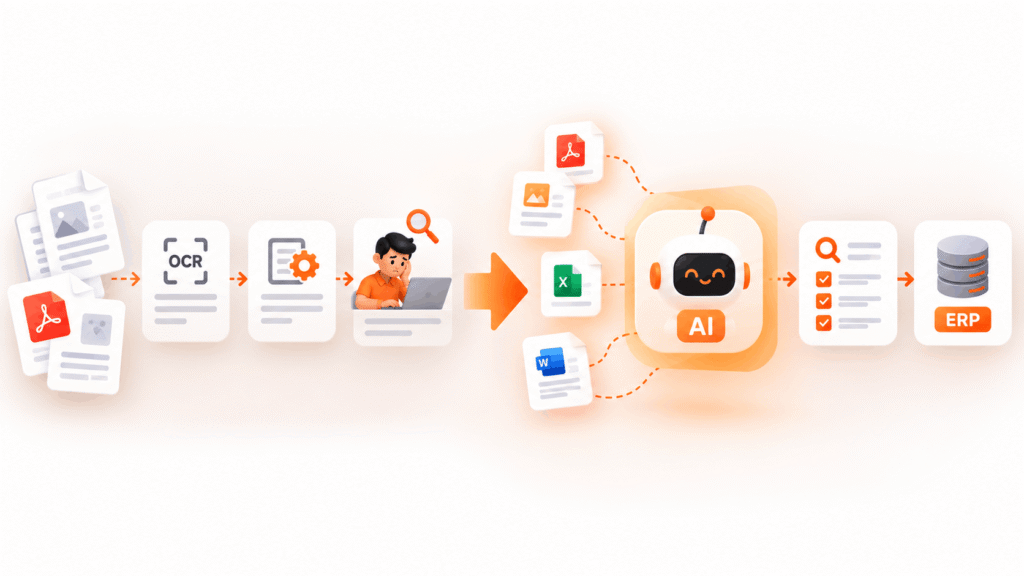
One of the greatest operational obstacles for the businesses of today is the task of extracting data from chaotic documents. The task can involve working with invoices with notes written in handwriting, copies of receipts, complex multi-page contracts, or forms from the suppliers with different styles. In this case, the process of data entry can be very inefficient and ineffective. In case you are a business leader ready to boost operations without significantly increasing the size of your back office, you should learn how to implement AI data extraction in practice.
With this guide, we show what solutions are effective when using AI processing technology in business activities.
As Microsoft CEO Satya Nadella highlighted regarding the transformative impact of document and workflow intelligence across back-office systems:
“The ultimate efficiency gain comes when software moves from merely displaying information to understanding unstructured human records, automating repetitive tasks, and directly executing workflows across the enterprise.”
Why Traditional Automation Fails on Messy Documents
For a long time organizations depended on traditional Optical Character Recognition (OCR) and template-based systems to transform paperwork into digital formats. These older technologies performed well under strict conditions in which the input amounts to a standardized invoice where the position of every amount is exactly the same as in any other.
But real-world contracts are usually very messy.According to extensive research published by Stanford University AI Index Report, new types of multimodal AI models and advanced vision systems are vastly improving the way unstructured visual layouts are interpreted rendering outdated systems useless.
Just think of the following common problems that the legacy systems cannot handle
- Different Layouts – Vendors send transport documents, invoices, and purchase orders all formatted in completely different ways.
- Poor Image Quality – Faded texts, coffee stains, and caved papers produce images that make something very standard look strange.
- Non-structured Text – Legal texts, paragraphs, handwritten words, and clauses that cannot be placed into any table.
Once the rigid templates face a new layout, they fail, leading to the automatic processes being interrupted by the need for manual processing.
OCR vs. Template Parsers vs. Intelligent Document Processing
To understand how modern pipelines solve these bottlenecks, let’s compare the core technological approaches across enterprise environments:
| Capability Layer | Traditional OCR | Rule-Based Template Parsers | Intelligent Document Processing (IDP) |
| Logic Basis | Pixel-to-character mapping | Fixed coordinate grids and regex | Vision-LLMs & semantic context models |
| Layout Adaptation | None (fails if layout shifts) | Low (breaks on new vendor formats) | High (adapts dynamically to any layout) |
| Handling Noise | Highly sensitive to blur/stains | Rigid template matching | Robust image cleanup & context inference |
| Handwriting Support | Poor or nonexistent | Unsupported | High accuracy handwriting transcription |
| Integration Flexibility | Basic text export | Fixed database mapping | Direct API feed to ERP, CRM, and databases |
| Human Validation | Manual error corrections | High exception queues | Automated confidence scoring & HITL |
The New Trend: Intelligent Document Processing
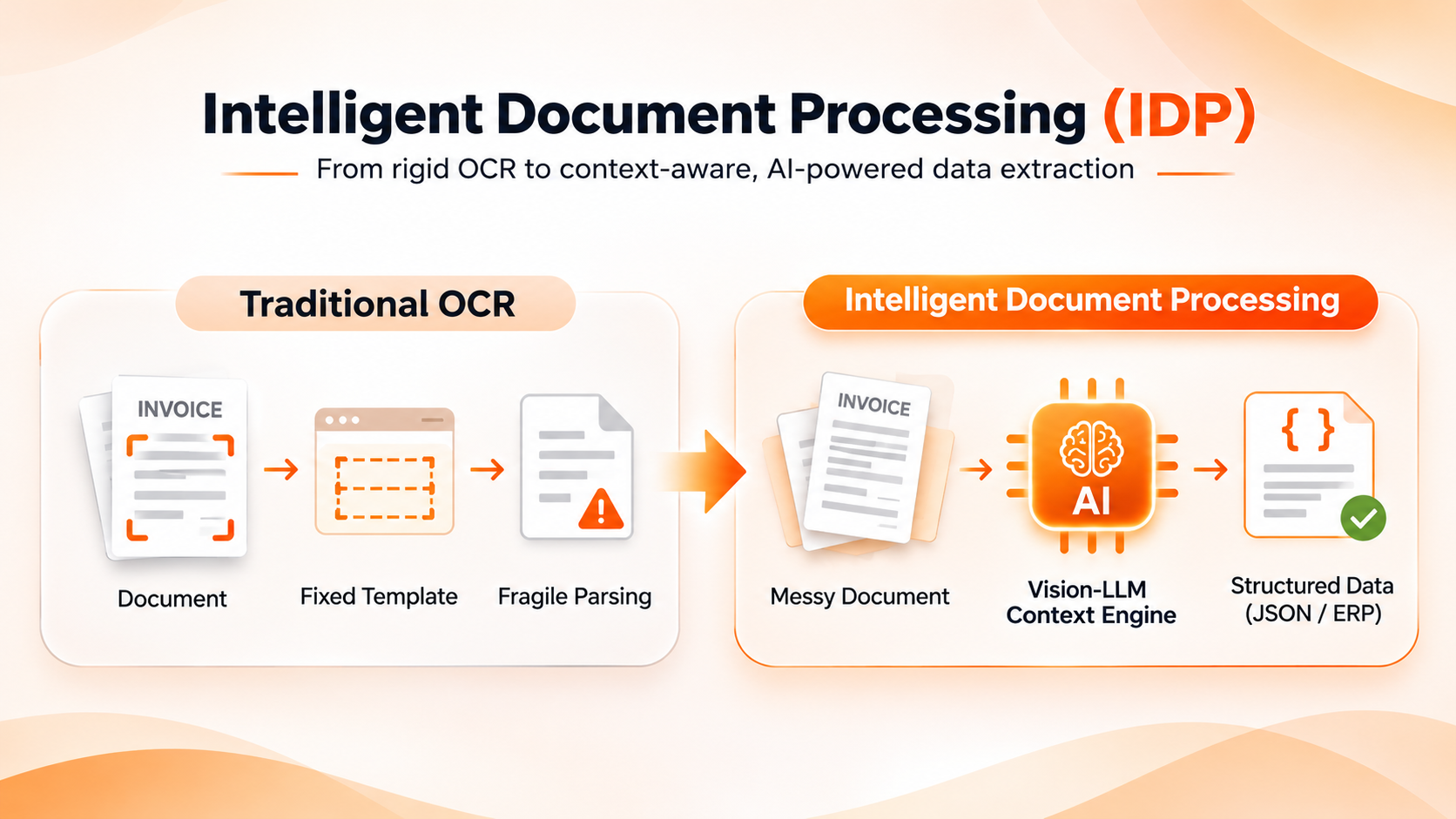
Modern ai document processing goes far beyond simple character recognition. Rather than simply reading what’s on paper, ai software uses the context, semantics, and structure of the document.
1. Contextual Knowledge Instead of Templates
Thanks to machine learning and Vision Language Models (VLMs), intelligent document processing reads the document either like a human. For example, if the total due is printed on the bottom right side of an invoice and somewhere around the middle of another one, the ai software determines its location based not on the coordinates of the text, but rather based on what’s around the text (terms like “Total,” “Amount Due,” and different signs of currency).
2. Handling Handwriting and Interference
Systems at the production stage utilize advanced computer vision models that can get rid of an angle, eliminate external environment noise, and read messy handwriting effectively. As a result, the number of files that are sent for manual handling is significantly reduced.
Building an AI Data Extraction Pipeline That Survives Production
Implementing a proof-of-concept script in a testing environment is not difficult. Maintaining the accuracy of the system at scale under the heavy load of production requires careful architecture. Below are practical techniques that work:
- Hybrid Validation Loop – The best systems may provide you with an accuracy of 95% or 98% of success and leave you a narrow margin of error. The production system must have a human-in-the-loop (HITL) validation interface to review low-confidence extractions that can be corrected by a person and taught on these corrections later.
- Pre-processing and Quality Checking – You need to implement automated checking before your documents get processed on the extraction machine. For instance, you may filter the unreadable documents, deskew the slanted mobile photos, and apply contrast adjustment to make sure your model works well.
- Generation of Structured Response – You should make sure that your pipeline generates neatly formatted JSON or CSV schemas that can be easily integrated into your ERP or CRM or even a database management system.
💡 Are your document workflows slowing down your growth?
Don’t waste months building brittle regex rules.
Book a Free 15-Minute AI Audit with our strategy team to identify your top 3 high-impact workflows.
4 Key Phases of Building an Enterprise AI Extraction Pipeline
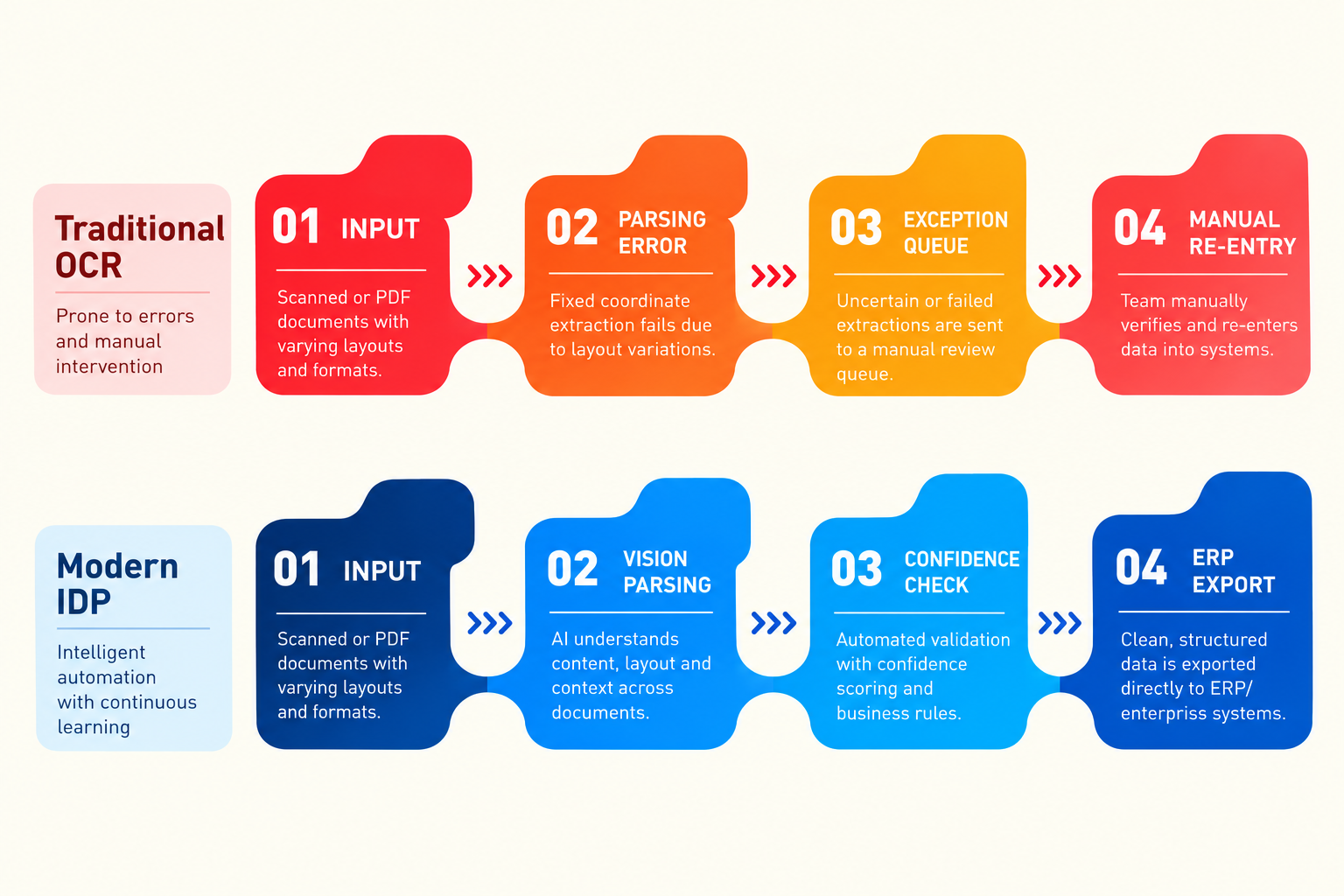
Executing a successful enterprise document extraction project requires clear governance, phased testing, and reliable software design.
Phase 1: Volume Input & Pre-treatment
All files received through email, cloud drives, or users are standardized. Images are trimmed, corrected for any angle distortion, and transformed from PDF into high-quality images before proceeding with the operation.
Phase 2: Contextual Extraction
The file is processed via the Vision-LLM engine capable of detecting key-value pairs regardless of where they are located on the page.
Phase 3: Confidence Scoring and Human Validation
Every field extracted has a confidence measure, which is a percentage that varies from 0-100%. If a field has more than 95% accuracy, it gets accepted automatically. However, if the extraction is less than that, a human team member checks it to ensure its accuracy.
Phase 4: Integration with Downstream ERP and API
The information obtained is converted to structured JSON format and sent directly to the main software application.
Significant Business Applications in Business Operations
Businesses, which are experiencing quick returns, target specific processes and transactions where automated data extraction will be used to solve operational challenges
Receivables and Supplier Invoice – Automatic extraction of line items, tax ID number, and conditions for payment in many layouts by vendors leads to transmitting verified information into SAP or Oracle.
Transportation and Bill of Lading – Understand complex transport papers and find information about container’s weight and delivery date from mobile phones while being on the road.
Customers Onboard and Verification – Automatic verification of government ID, bank statement, and utility bill that clients need to provide during mass registration.
Legislation and Contract Analysis – Automatic extraction of main deadlines, terms of liability, and contract renewal from long PDF contracts.
Real-World Impact: What Success Looks Like
When deployed correctly, automated document pipelines transform business efficiency. For instance, we helped a fast-growing e-commerce enterprise cut invoice processing time by 85% and eliminate manual data entry bottlenecks across thousands of weekly supplier documents. By replacing manual review with intelligent automation, their operations team redirected hours toward high-value growth initiatives rather than data entry.
Key Recommendations for Effective Implementation
To make sure your implementation is successful, retain the following key concepts to follow
Select One Important Use Case – Do not attempt to automate all types of documents on the first day. Choose the use case that has high volumes and problems associated with it (for example, invoices from vendors or transport documents) and focus on that.
Keep an Eye on Confidence Levels – Define clear indicators to understand whether something is approved or needs to be reviewed by a human accountant. In case AI’s confidence is less than 95% regarding the crucial field like tax ID or total amount, send it to human review.
Keep Retraining – Provide the training set with updated checking info for continuous improvement of the extraction process in specific and rare cases that are used for your own company.
🚀 Accelerate Your Document Strategy
Ready to build or deploy autonomous extraction workflows in your enterprise?
Read our in-depth Automation Solutions Page to discover custom architecture options.
Frequently Asked Questions (FAQs)
Traditional OCR simply converts photographs and images of words into computer-readable documents on the basis of their structure and shape. Intelligent Document Processing uses AI and machine learning techniques to analyze the meaning and context of that word and retrieve documents from their hard copy.
Yes. Modern AI technologies with powerful algorithms can recognize different forms of handwritten documents with ease.
When it comes to financial data, business documents, legal papers, etc., make sure the software used protects sensitive data and contains built-in mechanisms to encrypt data in transit.
It varies depending on the document. For example, if you want a pilot project that targets a single document type (for instance, a standard invoice), it can be launched in a couple of weeks. Large-scale projects where you need to develop a unique software solution may take months.
Transform Your Business Operations
Stop experimenting. Start scaling.
Schedule a tailored walkthrough with our technical architects to see live extraction workflows in action.