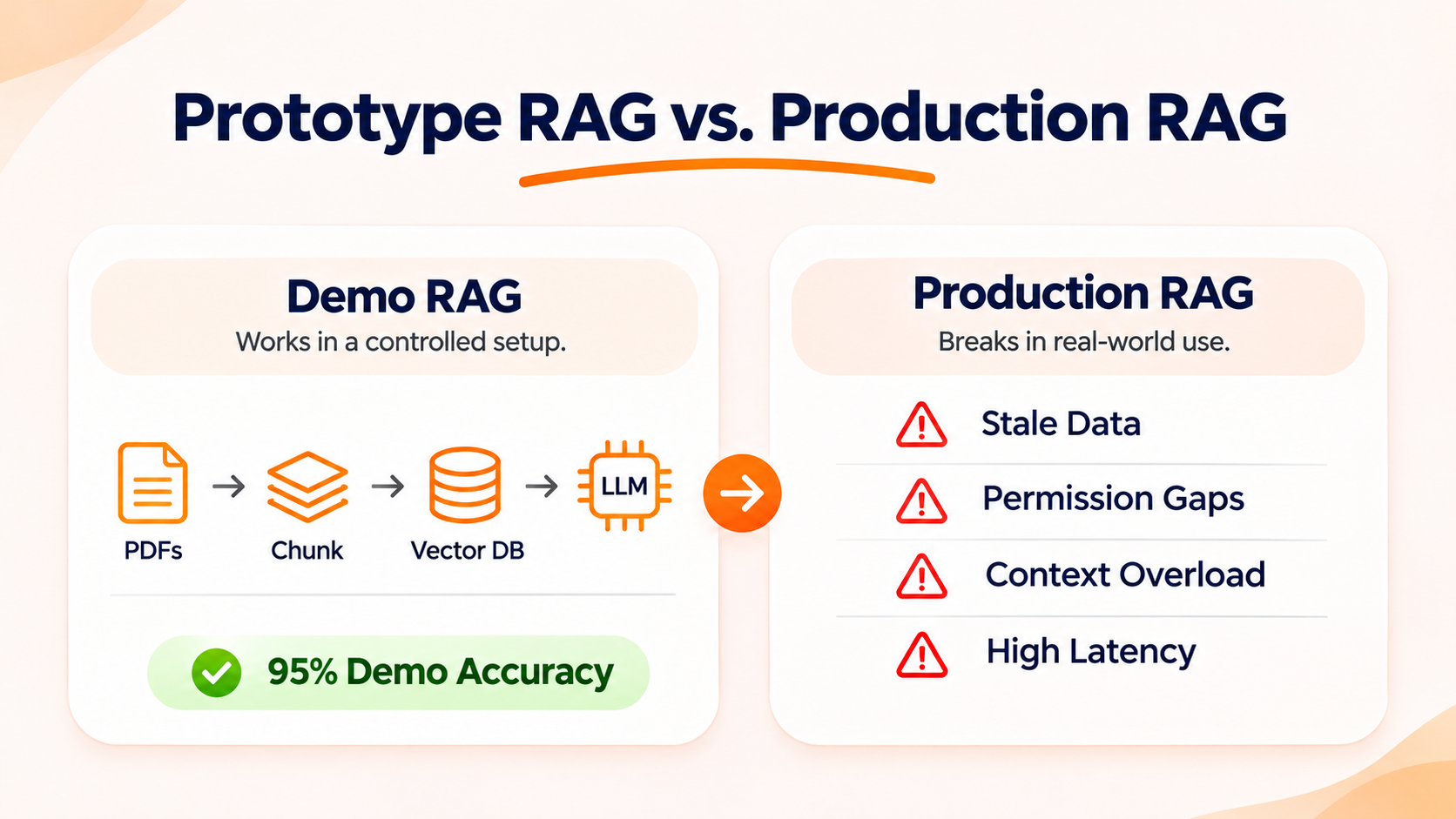
Most Retrieval-Augmented Generation (RAG) systems look brilliant in a boardroom demo and fall apart within weeks of hitting live traffic. When you move from ten clean test PDFs to millions of messy customer records, your retrieval pipeline starts hallucinating, lagging, and leaking stale or restricted data. Partnering with an experienced generative AI development company early on helps you eliminate these architectural blind spots before they erode user trust or inflate your cloud spend.
“The hardest part of enterprise AI isn’t training the model; it’s feeding the model clean, secure, and contextually accurate data at scale without blowing up your cloud budget.”
Satya Nadella, CEO of Microsoft (Reflecting on enterprise deployment challenges)
As the architecture comparison below shows, every stage that works cleanly in a ten-document sandbox introduces a distinct failure point under live enterprise load
Why Demo RAG Fails Under Real Business Traffic
In a prototype, engineers test clean questions against a small, static folder of documents. In production, real buyers type vague queries, e-commerce catalogues change every hour, and multi-hop questions expose weak retrieval logic.
According to Gartner’s research on generative AI project abandonment, at least 30% of generative AI projects are abandoned after proof of concept due to poor data quality, escalating costs, or unclear business value. Below is a quick diagnostic map of the core failure modes behind those shutdowns and the exact architectural fixes required to solve them.
| Production Failure Mode | Business & User Symptom | Core Engineering Fix |
| Lost in the Middle | Wrong answers despite finding the right file | Cross-encoder reranking + top-5 context cap |
| Silent Data Decay | AI quotes expired prices or out-of-stock SKUs. | Event-driven webhook sync + TTL metadata |
| Naive Chunking | Broken tables, missing specs, garbled steps | Layout-aware parsing + parent-child retrieval |
| Pure Vector Blindness | Fails on exact SKU codes, model IDs, or errors | Hybrid search (dense vectors + BM25 keywords) |
| Permission Leakage | Users view restricted HR, pricing, or tenant data. | Pre-retrieval ACL & RBAC metadata filtering |
| Multi-Hop Failure | Fails comparative or analytical buyer questions. | Query decomposition + agentic routing |
| Runaway Latency & Cost | 10-second replies and $15k/month token bills | Semantic caching + dynamic model routing |
| Silent Quality Drift | Accuracy drops quietly after updates or model swaps. | Automated CI/CD evals (RAGAS / faithfulness) |
The “Lost in the Middle” Context Trap
Stuffing 20 retrieved documents into your prompt makes your AI less accurate, not smarter.
Many teams try to fix bad answers by raising their retrieval limit from 3 chunks to 20. However, research from Stanford University proves that Large Language Models (LLMs) struggle to use facts buried in the middle of a long context window. Accuracy drops sharply when the right answer sits between irrelevant paragraphs.
How to fix it:
- Add a reranking step: Pull 20 candidate chunks with fast vector search, then use a cross-encoder reranker to pass only the top 3 to 5 highest-scoring chunks to the LLM.
- Strip boilerplate noise: Remove repeated headers, footers, legal disclaimers, and navigation bars before embedding text.
- Set similarity thresholds: Only send chunks that clear a strict relevance score instead of forcing a fixed chunk count on every query.
Silent Data Decay and Stale Embeddings
Your vector database does not automatically update when your live database or product catalogue changes.
Imagine an e-commerce shopper asking if a jacket is in stock, and your assistant says yes using an embedding generated three weeks ago. Without real-time sync pipelines, your AI confidently quotes expired pricing, discontinued SKUs, and outdated return policies.
How to fix it:
- Build event-driven ingestion: Trigger automatic re-indexing via webhooks whenever a record updates in your CMS, ERP, or product catalogue.
- Attach metadata timestamps: Store last_updated and expiration_date tags on every chunk so your retriever filters out stale records at query time.
- Use soft deletes: Immediately flag archived pages as inactive in your vector store rather than waiting for a weekly batch rebuild.
Naive Chunking That Destroys Meaning
Splitting text every 500 characters slices pricing tables, product specs, and step-by-step instructions right in half.
Standard fixed-size chunking treats a technical manual or SaaS pricing sheet like a plain novel. When a table header lands in Chunk A and the numbers land in Chunk B, the LLM guesses the missing relationship and invents false details. Watch how fixed-character splitting severs a multi-column pricing table compared to layout-aware semantic parsing:
How to fix it:
- Use layout-aware parsers: Parse PDFs, HTML, and spreadsheets into structured Markdown or JSON so tables and headings stay intact.
- Deploy parent-child retrieval: Search against small, precise child chunks for accuracy, then pass the larger parent section to the LLM so it retains full context.
- Inject document context: Prepend the document title, category, and section header into every chunk so isolated paragraphs never lose their meaning.
See how we helped a mid-market retailer cut support ticket escalations by 42% and trim average response latency.
Pure Vector Search Missing Exact Matches
Semantic embeddings understand general concepts, but they fail at exact part numbers, SKUs, and error codes.
If a B2B buyer searches for “Model XR-402B filter”, a pure vector search frequently returns “Model XR-401A” because the two strings look mathematically similar. In e-commerce and technical support, close enough is completely wrong.
How to fix it:
- Implement hybrid search: Combine dense vector search (semantic meaning) with sparse keyword search like BM25 (exact token matching).
- Tune retrieval weights: Give keyword matching higher priority whenever queries include numbers, SKUs, uppercase codes, or short product names.
- Add query rewriting: Use a fast, lightweight model to expand vague user prompts into structured search queries before hitting your index.
Permission Leakage and Multi-Tenant Data Exposure
If you dump all company files into a shared vector index without access controls, any user can surface restricted data.
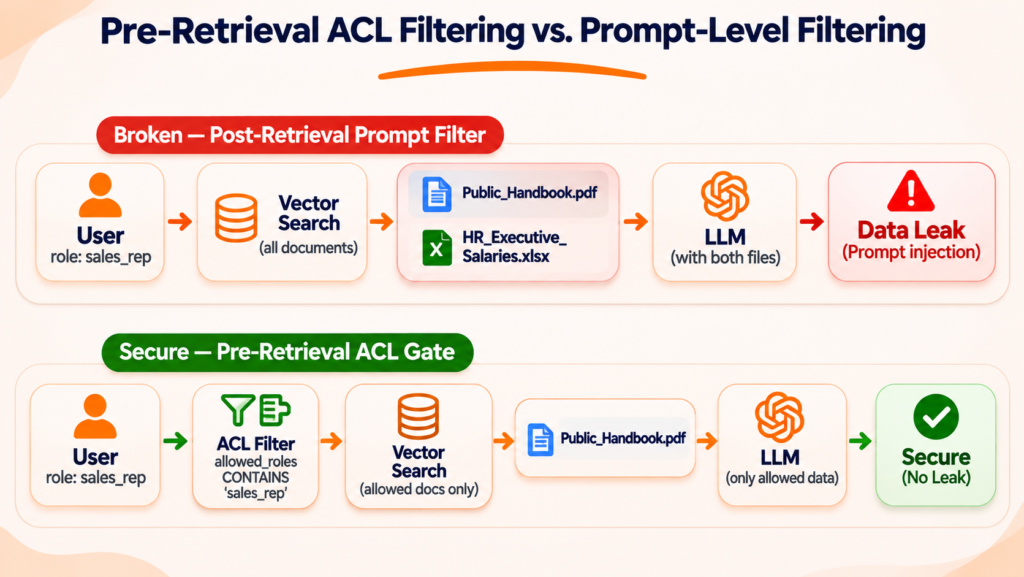
This is the single biggest security blind spot CTOs face during internal rollouts. If an HR compensation sheet, executive board memo, or private client contract sits in an unsegmented vector store, a clever prompt can pull sensitive numbers into a general employee’s chat window. The diagram below illustrates why permissions must be enforced before vector search executes rather than inside the LLM prompt:
How to fix it:
- Enforce pre-retrieval ACL filtering: Tag every vector chunk with Access Control List (ACL) metadata—such as tenant_id, department, and role_level—and filter by user permissions before similarity search runs.
- Never rely on prompt-level security: Telling an LLM “do not share confidential files” in the system prompt will not stop prompt injection. Security must happen at the database query layer.
- Isolate multi-tenant indexes: Use dedicated namespaces or separate collections for enterprise customers to guarantee zero cross-tenant leakage.
Multi-Hop Queries Failing Single-Shot Retrieval
Standard RAG retrieves documents once, which fails whenever a user asks a comparative or multi-step question.
If a customer asks, “Compare your enterprise SLA response times in Europe versus North America,” a single vector search often pulls only the European policy and hallucinates the rest. High-intent buyers ask complex synthesis questions, not single-fact lookups.
How to fix it:
- Use query decomposition: Break complex questions into smaller sub-queries, run parallel retrievals for each part, and synthesize the combined evidence.
- Add agentic routing: Let a lightweight router classify incoming prompts so simple lookups take the fast path while multi-hop questions trigger iterative retrieval.
- Enforce strict grounding: Require the generator to cite specific chunk IDs for every claim and state clearly when partial data is missing.
Runaway Latency and Token Costs at Scale
Multi-step RAG chains can easily take 8 to 12 seconds per reply, causing buyers to abandon your chat before a word appears.
Every extra retrieval step, reranker call, and oversized prompt adds latency and multiplies your API bill. A pipeline that costs $5 a day in staging can quietly scale to $15,000 a month once thousands of concurrent users log in. Notice in the waterfall breakdown below how shifting from a single monolithic LLM chain to cached, routed retrieval compresses both wait time and per-query token cost:
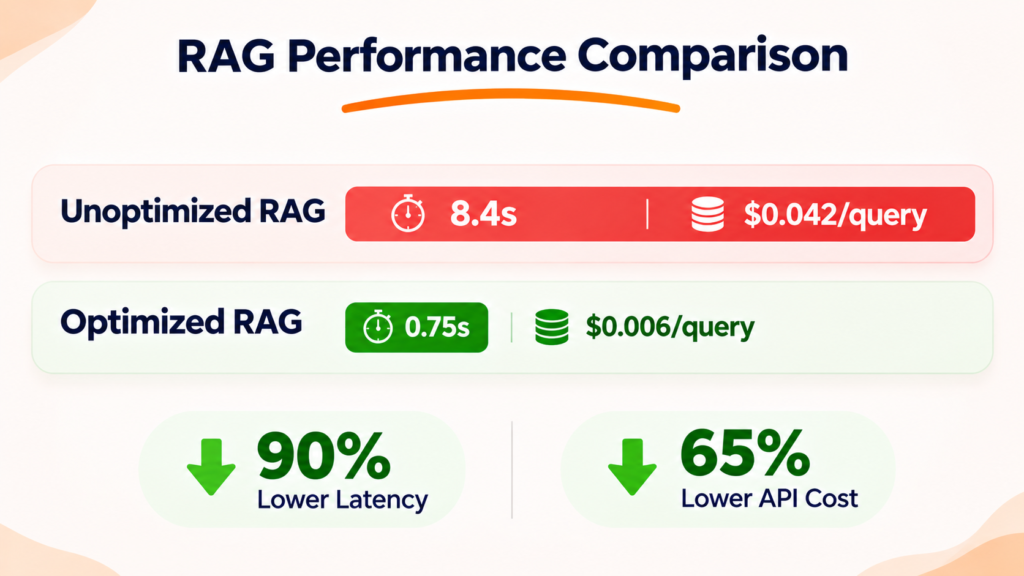
Teams investing in professional LLM development services engineer latency and unit economics into the pipeline from day one:
- Deploy semantic caching: Serve instant, zero-token answers for your top 20% most repeated customer questions using a semantic cache layer.
- Route queries by complexity: Send routine FAQ lookups to fast, low-cost models and reserve heavyweight reasoning models for complex synthesis tasks.
- Stream tokens immediately: Stream output to the UI as it generates, so perceived wait time drops under 800 milliseconds.
Silent Quality Drift and Embedding Model Lock-In
Production RAG accuracy degrades silently over time—and upgrading your embedding model can break your entire index.
Unlike traditional software that throws a 500 error when something breaks, a RAG system keeps returning confident, polite, wrong answers as new documents pile up or user behavior shifts. Furthermore, switching to a newer embedding model renders all existing vectors mathematically incompatible.
How to fix it:
- Automate CI/CD RAG evaluations: Run automated test suites (measuring Retrieval Recall, Context Precision, and Faithfulness) on every prompt, chunking, or model change before shipping to production.
- Maintain dual-index migration pipelines: Keep raw parsed text stored cleanly in object storage so you can re-embed into a shadow index without taking live search offline.
- Audit low-confidence queries weekly: Track thumbs-down feedback, zero-result searches, and negative rejections to spot knowledge gaps early.
When to Partner With a Generative AI Development Company
Building a basic RAG demo takes a weekend; building a secure, sub-second, self-healing retrieval engine takes specialised production engineering. If your internal team is stuck firefighting hallucinations, slow responses, or security reviews, bringing in an outside generative AI development company accelerates time-to-production while avoiding costly architectural rewrites.
Frequently Asked Questions (FAQs)
Hallucinations usually happen because the right document either missed the top retrieval cut, got buried in the middle of too many noisy chunks, or lost its structure during naive text splitting. Adding hybrid search, layout-aware chunking, and a cross-encoder reranker resolves the vast majority of these errors.
Monthly infrastructure and API spend depends on query volume, document size, and model routing. A mid-sized production deployment handling 100,000 queries per month typically runs between $800 and $3,500 per month—though semantic caching and small-model routing frequently reduce token spend by 40% to 60%.
Choose RAG when your facts change frequently or require verifiable source citations, such as live product catalogues, pricing tiers, and internal policies. Choose fine-tuning when you need the model to follow strict formatting rules, adopt a specific brand voice, or master niche industry jargon. Many enterprise systems combine both.
Choose RAG when your facts change frequently or require verifiable source citations, such as live product catalogues, pricing tiers, and internal policies. Choose fine-tuning when you need the model to follow strict formatting rules, adopt a specific brand voice, or master niche industry jargon. Many enterprise systems combine both.
Ready to Make Your RAG Pipeline Production-Grade?
Stop losing customers to slow replies, stale product answers, and silent hallucinations—and give your leadership team full confidence in your AI’s security and unit economics. Our senior AI architects will audit your retrieval pipeline, benchmark your latency and accuracy, and deliver a concrete fix roadmap in 48 hours.