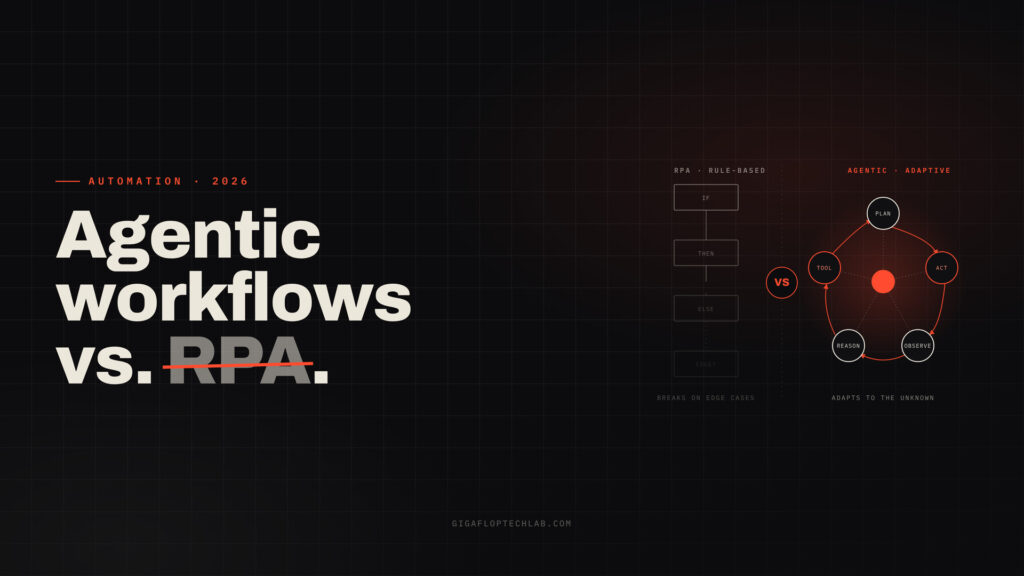
Manual data input, time-consuming process of obtaining departmental approval, and scattered system transitions are quietly draining profits and speed of execution in organizations. The use of AI workflow automation solutions allows businesses to reduce recurring operational barriers by 80% and achieve increased profits without hiring additional staff.
It is wrong to think that organizations can work effectively without introducing AI-based automatic processes in the business. Studies show that by 2026, more than 40% of all enterprise software will contain technologies allowing businesses to automate the most important processes.
“AI is going to re-shape every software category and every business. It changes the user interface, it changes how workflows function, and it reshapes how value is created across organizations.”
– Satya Nadella, CEO of Microsoft
This guide breaks down high-impact operational workflows, where to deploy specialized AI automation services, and how non-technical business leaders can approach implementation without losing control over security or quality.
Traditional Automation vs. AI Workflow Automation: What Is the Difference?
To understand how intelligent operational tools transform day-to-day work, business leaders must first distinguish them from legacy software automation.
| Capability Layer | Traditional Automation | Generative AI Chatbots | AI Workflow Automation |
| Logic Basis | Static rule-based scripts (if/then) | Unstructured text generation | Intelligent context-driven business loops |
| Input Handling | Formatted structured data only | Conversational text prompts | Unstructured documents, receipts, and multi-channel API feeds |
| System Access | Single-point static integrations | Isolated text response interfaces | Reads/writes directly across core CRM, ERP, & database platforms |
| Adaptability Level | Low (breaks on minor data changes) | Medium (requires human prompts) | High (self-correcting with Human-in-the-Loop oversight) |
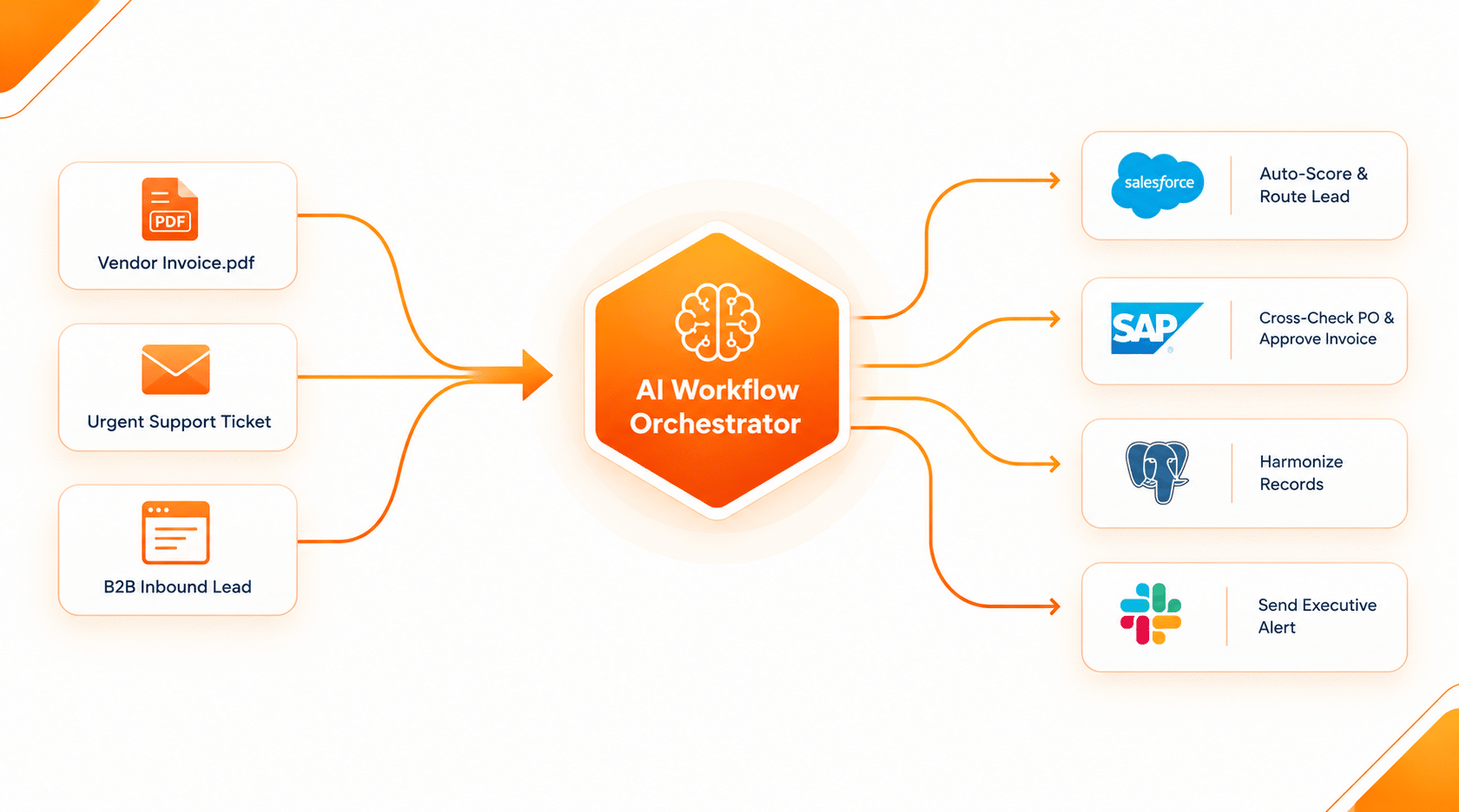
In contrast to traditional software systems that depend on fixed and inflexible processes, intelligent ai process automation uses continuous operational feedback loop
- Acquire – The system obtains an operational stimulus or document (such as an incoming invoice PDF or support request).
- Make a decision and strategize – It breaks down unstructured information, applies business rules, identifies core data points, and identifies relevant software actions.
- Perform – It carries out operations to modify CRM systems, prepare purchase orders, generate refunds, and inquire about database APIs.
- Evaluate and adjust – It checks if the execution matched the requirements, records the course of action taken, and reports low-confidence edge cases to human managers.
💡 Is your operational technology stack ready for intelligent automation?
Don’t waste months experimenting without clear financial ROI. Book a free 15-minute operational audit with our strategy team to identify your top 3 high-impact workflows for immediate deployment.
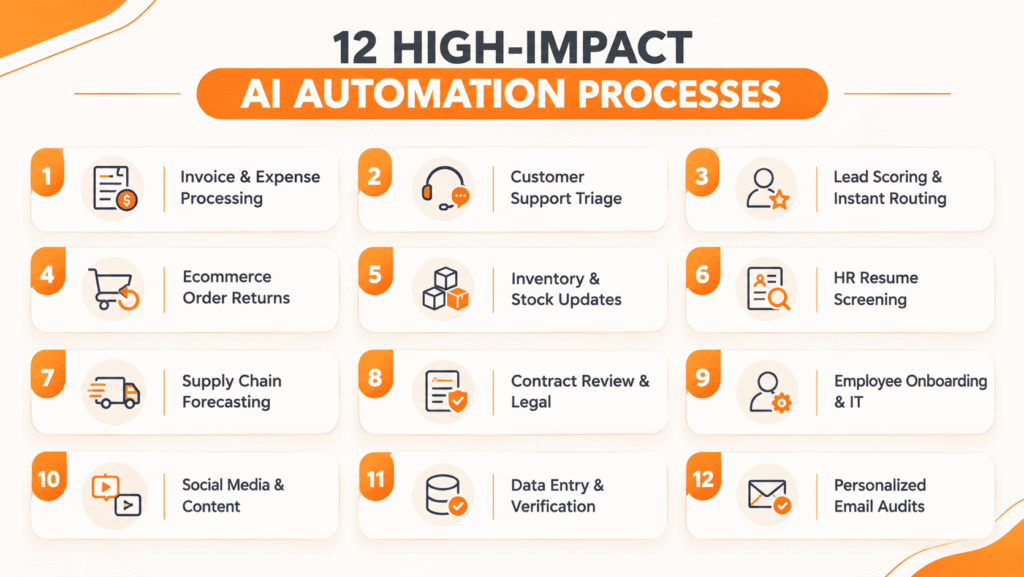
12 High-Impact Business Processes You Should Automate First
Reducing LLM costs does not mean reducing output quality. These strategies can help businesses maintain performance while lowering monthly AI costs
Enterprises achieving rapid return on investment focus on targeted, measurable operational processes where intelligent workflows eliminate manual bottlenecks:
1. Invoice and Expense Processing
Traditional methods of entering invoices create inefficiencies for financial teams through excessive verification processes, which may lead to mistakes, omitted discounts and difficulties with suppliers.
- How it works – By using an optical character recognition (OCR) system, an organization can collect vendor details, line items, tax IDs and PO numbers automatically from incoming PDFs and receipts. The technology compares the line items with the purchase orders in the ERP system, flags any discrepancies, and automatically approves payments.
- Key Impact – Saves processing costs of up to 70%, helping to eliminate late payment fees.
2. Customer Support Triage and Ticket Resolution
Support teams spend significant time dealing with tickets manually. For every ticket, customer support staff evaluate its urgency level and look for customer’s historical records on various platforms.
- How it works – By utilizing advanced natural language processing technology, organizations can process customer messages coming via email, chat, or web. Important inquiries of corporate clients are immediately forwarded to senior staff, while other messages are handled automatically in no time.
- Key Impact – Reduces initial response time for clients from hours to seconds while decreasing overall number of tickets in the support system by as much as 45%.
3. Lead Scoring and Instant Sales Routing
In high-velocity sales environments, speed to respond dictates deal win rates. Static web forms capture basic contact information, but reps lose valuable time manually researching prospect company sizes and tech stack compatibility.
- How it works – Incoming contact submissions trigger an enrichment workflow that queries corporate databases, scores prospects against your Ideal Customer Profile (ICP), and assigns qualified deals to available account executives instantly.
- Key Impact – Cuts lead response times from hours to under two minutes, boosting sales conversion rates by up to 35% while eliminating manual rep research.
Pro Tip: Evaluating pipeline handoffs uncovers significant hidden revenue leaks. When we deployed an automated lead qualification system, we helped a mid-market enterprise boost sales conversion rates by 35% by reducing rep response times to under two minutes. You can also explore our custom AI workflow development services to map your pipeline integrations.
4. Ecommerce Returns and Refunds Processes
Handling returns on your own results in inefficiencies at the warehouse, delayed stock replenishment, and angry customers who want a quick solution.
- How it works – Return processing systems help you check order histories and fraud scores, print return labels, and update stock management systems without any manual input.
- Key impact – Turns customer service into a smooth process that helps you retain customers. For further optimization of store operations, check out our article about scaling ecommerce back-end operations.
5. Automatic Inventory Forecasting and Ordering
Having too much stock is wasting your money, while not having enough results in loss of profits and permanent loss of customers on multiple channels.
- How it works – Predictive analytics systems let you follow sales history, seasonal demand and supplier lead time; if a projected stock level drops below the safety line, it generates the purchase order automatically via vendor portals.
- Key impact – Eliminates stockouts in existing channels as well as reduces unnecessary holding costs.
Ready to eliminate manual operations and scale your workflows?
Partner with our architects to design, build, and deploy custom enterprise AI automations tailored to your tech stack.
[ Schedule Your 15-Minute Strategy Call → ]
6. Review of HR Resumes and Coordination of Candidates
Recruitment departments spend hours reviewing resumes in order to find qualified candidates for technical positions. However, because of the use of outdated applicant tracking systems, the recruitment departments tend to overlook even qualified individuals because of the limitations of their matching systems.
How it works – Language-processing algorithms analyze resumes based on what the job requires in terms of qualifications and skills.
Key impact – Reduces time to hire candidates by more than half.
7. Predicting Supply Chain Demands and Monitoring Logistics
Supply chain problems result in missed shipping deadlines and unplanned freight expenses.
How it works – Logistics processes work with real-time shipping company APIs, customs updates, and inventory statistics. In case of delays, the system detects alternative shipping routes and updates the inventory triggers instantly.
Key impact – Minimizes freight delays and stops custom bottlenecks.
8. Evaluation of Contracts and Risk Analysis
The legal and purchasing departments typically need several days to evaluate typical vendor agreements, service contracts, and confidentiality agreements (CAs), creating bottlenecks in aggressive sales activities.
How it works – A document processing pipeline reviews incoming contracts in seconds, identifying non-standard or nonconforming clauses, highlighting any possible exceptions, and generating executive summaries for the approval process.
Key impact – The execution period of contracts is cut down from weeks to hours with no harm to compliance.
9. New Staff Onboarding and IT Access Management
Managing software licenses, hardware setup, access permissions, and training materials with HR, IT, and department managers takes a lot of time.
How it works – Once the candidate signs an employment letter, an automated onboarding process starts background checks, provisioning software accounts (Slack, Google Workspace, GitHub, Jira), ordering hardware, and scheduling team welcoming meetings.
Key impact – It reduces HR and IT administration work and gives new workers a good experience from day one.
10. Multi-Channel Content Distribution and Asset Repurposing
To develop top-notch content demands considerable planning, but the procedure of reformatting these assets and distributing them across various channels usually becomes a boring work of reproducing similar jobs.
How it works – Once a long-form article or a webinar is released, an automatic pipeline begins to extract the most important ideas, produce social media posts customized for different platforms, change formats of the post, and prepare posts ahead of time.
Key impact – It helps maximize the audience for content along all channels and allows marketing teams to pay attention to major strategic ideas.
11. Multi-System Data Synchronization and Cleaning
Separate applications lead to data storehouses made, multiple profiles of customers, and unintelligent reports in the sales, marketing, and finance sectors.
How it works –Systems function in such a way that they validate data and clean duplicates in databases continuously without the need for manual manipulation with data.
Key impact – It ensures steady reporting across departments and makes reconciliation sessions unnecessary.
12. Tailored Customer Communication and Account Reviews
Standard sale outreach has gone down open rates and low level of involvement. AI-powered outreach solutions track the information about companies and enable planning personal messages in a large amount.
How it works –Automation agents track data about updates in the industry, gather databases of prospects, create customized offers, and send them to sales managers for confirmation before sending them out.
Key impact – Creates high levels of booking meetings while keeping messages authentic and informative.
Visualizing Automation in Action
Below is a short demonstration showing how an automated AI workflow processes incoming vendor invoices, verifies line items against an ERP database, and alerts finance teams in real time
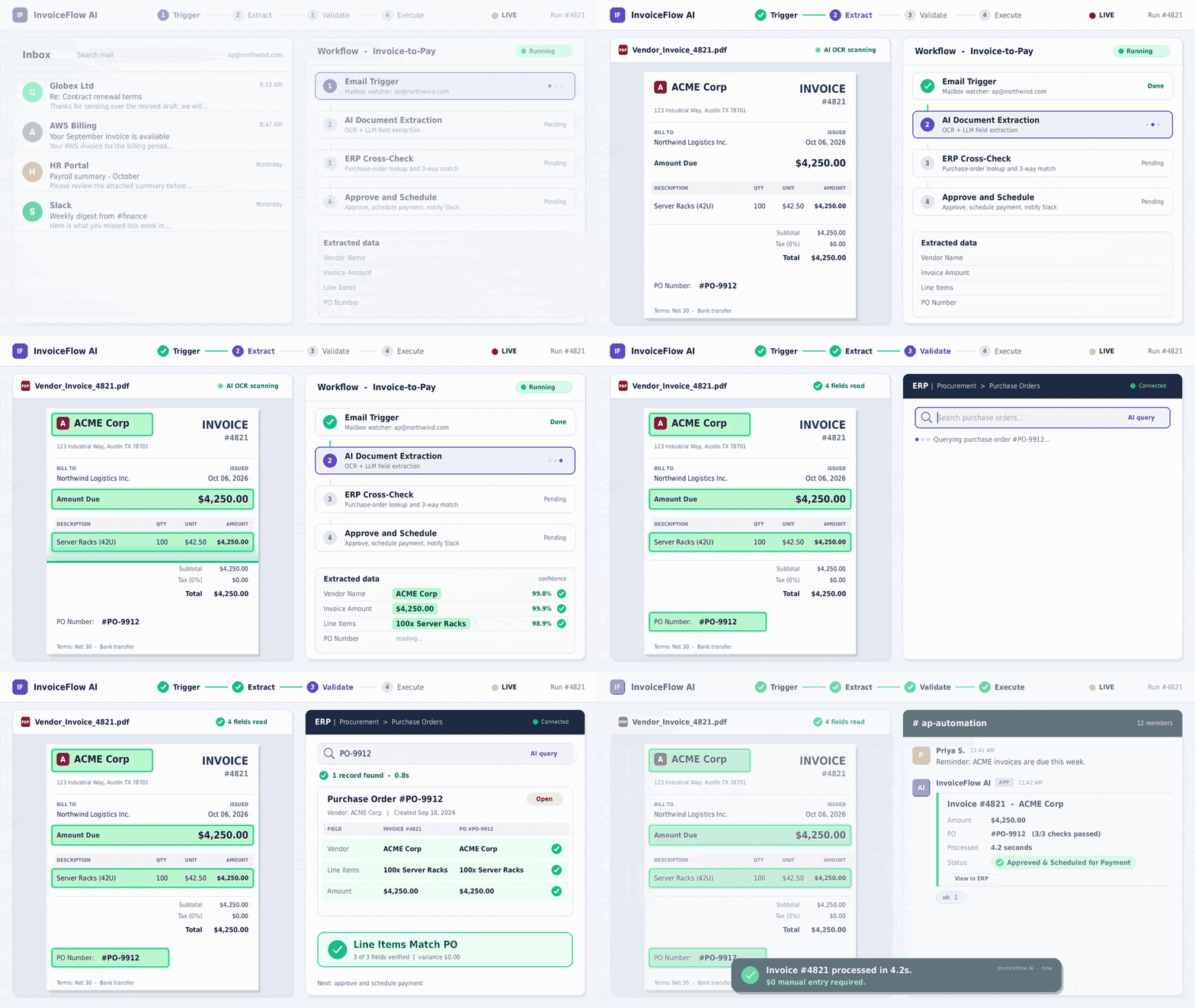
When we implemented these automated workflows for a high-growth distributor, we helped a mid-market enterprise cut manual invoice processing costs by 64% while eliminating late payment penalties.
The Executive Roadmap for AI Workflow Implementation
To carry out a successful business program concerning ai process automation, it is not required to create a custom computer program because it is sufficient to prepare business regulations and corporate governance.
Step 1: Select the Proper Process
Instead of selecting some broad task like “automate customer service”, you should choose one very simple and repetitive task for which KPIs can be easily defined such as “the process of handling simple requests for product replacement”.
Step 2: Set Up Rules and Regulations
You should determine with regards to what operations can be done on the automated process. For instance, you can specify which software can be used for the automation, which data can be changed, and what financial or operational thresholds require the approval from a manager.
Step 3: Decide on the Technology Approach
- Pre-built Automations refer to ready modules of automation that are found in standard platforms such as Salesforce, HubSpot, etc. They are fast to implement. However, the automation relies only on the capabilities of the platform.
- Bespoke AI Automation Systems refer to specific automation services which are developed according to the personal requirements of the organization. This kind of automation allows for high efficiency and scalability.
Phase 4: Run a Trial for 90 Days
The automation must be created and tested with human workers. The team must analyze the speed, accuracy, and the frequency of errors during the initial period of operations.
Looking to streamline your daily business workflows?
Discover how intelligent automation can free up your team’s time and help your business scale effortlessly.
Mitigating Risk: Security, Governance, and ROI
The introduction of automated processes will have significant implications for every organization, which must be addressed in advance.
- Risk of Implementation – An automated system performing undesired actions is a bigger problem than a chatbot incorrectly answering a question. Validation of processes with relevant tools and controlled testing environments is essential for managing the Risk of Implementation.
- Protection of Information – All automations should comply with stringent RBAC principles. Processes should be allowed to use only the data needed for their operation.
Key Performance Indicators – As reported in enterprise KPIs published by Gartner Research Hub and McKinsey & Company, many companies do not achieve the desired level of success due to neglecting analytical KPIs prior to launching a project. Make sure to monitor process time, error rate, and cost per transaction before and after the launch of the project and get clear ROI.
Frequently Asked Questions (FAQs)
The former is an instrument for creation of text or code in response to user requests while AI workflow automation takes this further: it analyzes relevant input data and executes complex business processes, communicates with other software through APIs and performs tasks in the real world while achieving specific aims.
They can be secure if they have strict control mechanisms in place, such as a strict governance framework, Role-Based Access Control (RBAC), audit logs, and the “human-in-the-loop” (HITL) component which controls execution of the actions with high stakes.
The first phase is the pilot implementation of a single function workflow that usually takes about two to four weeks. Full-scale implementation will take two to four months and will include implementation of other ERP and CRM systems.
No. Business leaders can oversee operations using modern low-code management platforms or by partnering with specialized AI automation services providers to handle security, API integrations, and architecture.
📞 Transform Your Business Operations
Stop experimenting with static tools. Start scaling your business efficiency.
Schedule a tailored walkthrough with our technical architects to see live automated workflows in action.