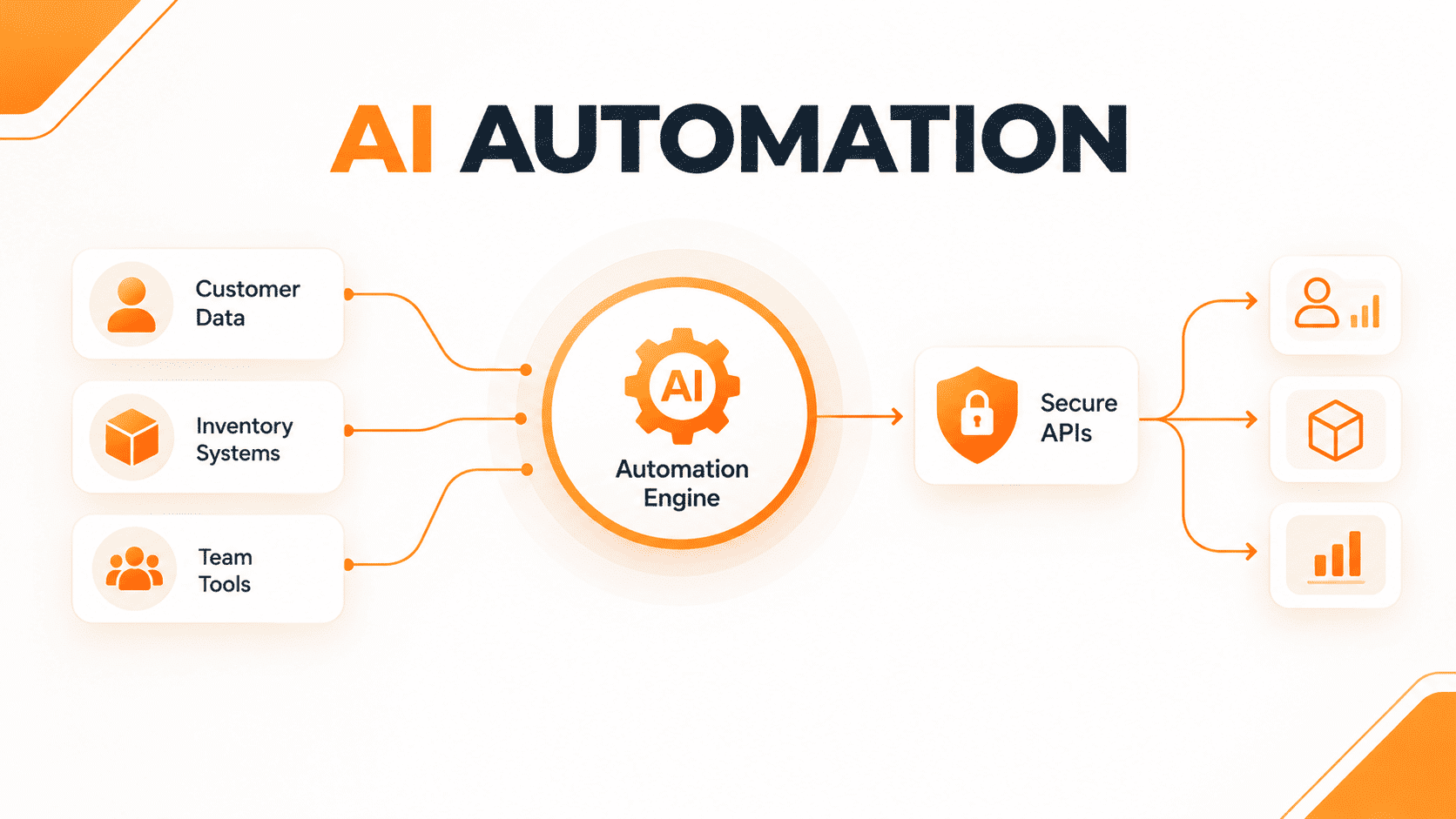
Running a business that is in the process of growth means that you have to take on many different roles and responsibilities. From answering questions from customers, taking care of inventory to receiving orders and updating spreadsheets, executing routine tasks consumes a lot of time that could be used for strategy, development, and high-value aspects of work. If you want to scale up your business while avoiding the burnout of your employees or hiring some other personnel, introducing ai technology into your business processes is one of the smartest investments for any small business.
In this guide, you are going to learn about how one can use AI for the development of business and what are the three specific processes that can be done using the AI technology to save time and resources.
What Is AI Automation and Why Does It Matter?
At its core, AI automation combines the functionality of conventional business process automation tools including Zapier, Make, and various custom API connectors with various AI technologies, including large language models (LLMs) and natural language processing (NLP). While traditional automation uses predictable rules to carry out simple jobs, AI-driven automation can interpret the context, process unstructured information, make sound decisions and communicate with people.
As stated in a recent report published by McKinsey & Company, organizations that leverage intelligent automation see reductions in operational costs of about 30% in the first six months after implementation. For small teams and ecommerce businesses, this means avoiding all the routine tasks of copy-pasting or data entry. Rather than dedicating their morning time to going through customer support tickets or changing inventory on various platforms, intelligent automation tools will take the burden off their shoulders with the help of reliable API integrations.
As Microsoft CEO Satya Nadella highlighted regarding the evolution of workplace technology:
“AI is not about replacing human ingenuity; it’s about amplifying it. The organizations that thrive will be those that integrate intelligent automation into every layer of their daily workflow to remove friction.”
Workflow 1: Intelligent Customer Support and Inquiry Triage
Customer support is one of the biggest operational bottlenecks for growing businesses. When buyers have urgent questions regarding product sizing, shipping times, or order status, delayed responses directly hurt conversion rates and customer loyalty.
How the Workflow Works
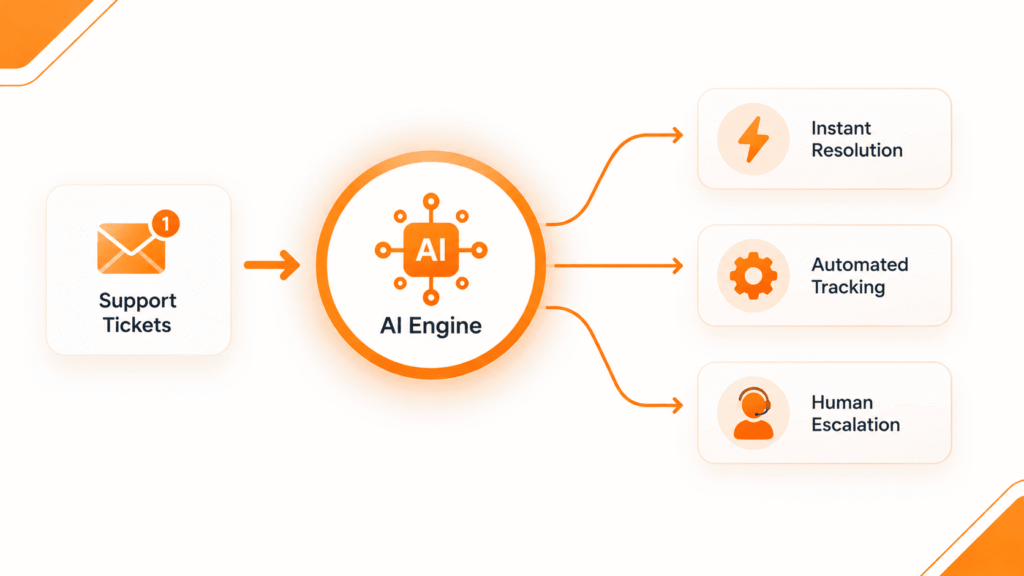
Rather than sending every email, chat message, or social media DM to human inboxes, the workflow powered by AI will do the following first:
- Instant Classifying – AI scans the incoming messages and categorizes them by their intention whether it’s a question before purchasing, a return question, a mailing status question, or a complicated technical problem.
- Automated Solution – For queries that are frequent (e.g. “Where is my shipment to?” or “What’s your return policy?”) AI gets connected to your database or shipping provider APIs and answers in a matter of seconds.
- Adding Complexity – In case the query is too complicated and needs a human being (for example, talking to a displeased customer), AI would summarize the situation, inform about the significance of this query, and send it to the appropriate colleague.
By implementing this workflow, businesses typically cut first-response times from hours down to seconds while keeping customer satisfaction exceptionally high. For a deeper look at how streamlining communication impacts revenue, take a look at how we helped a retailer cut returns by 30% through improved customer communication and backend tracking.
Workflow 2: Automated Lead Qualification and CRM Enrichment
Generating leads is only half the battle; following up quickly and effectively determines whether those prospects convert into paying clients or slip away. Many businesses lose valuable sales simply because inbound leads sit unreviewed in a spreadsheet or shared inbox for too long.
How the Workflow Works
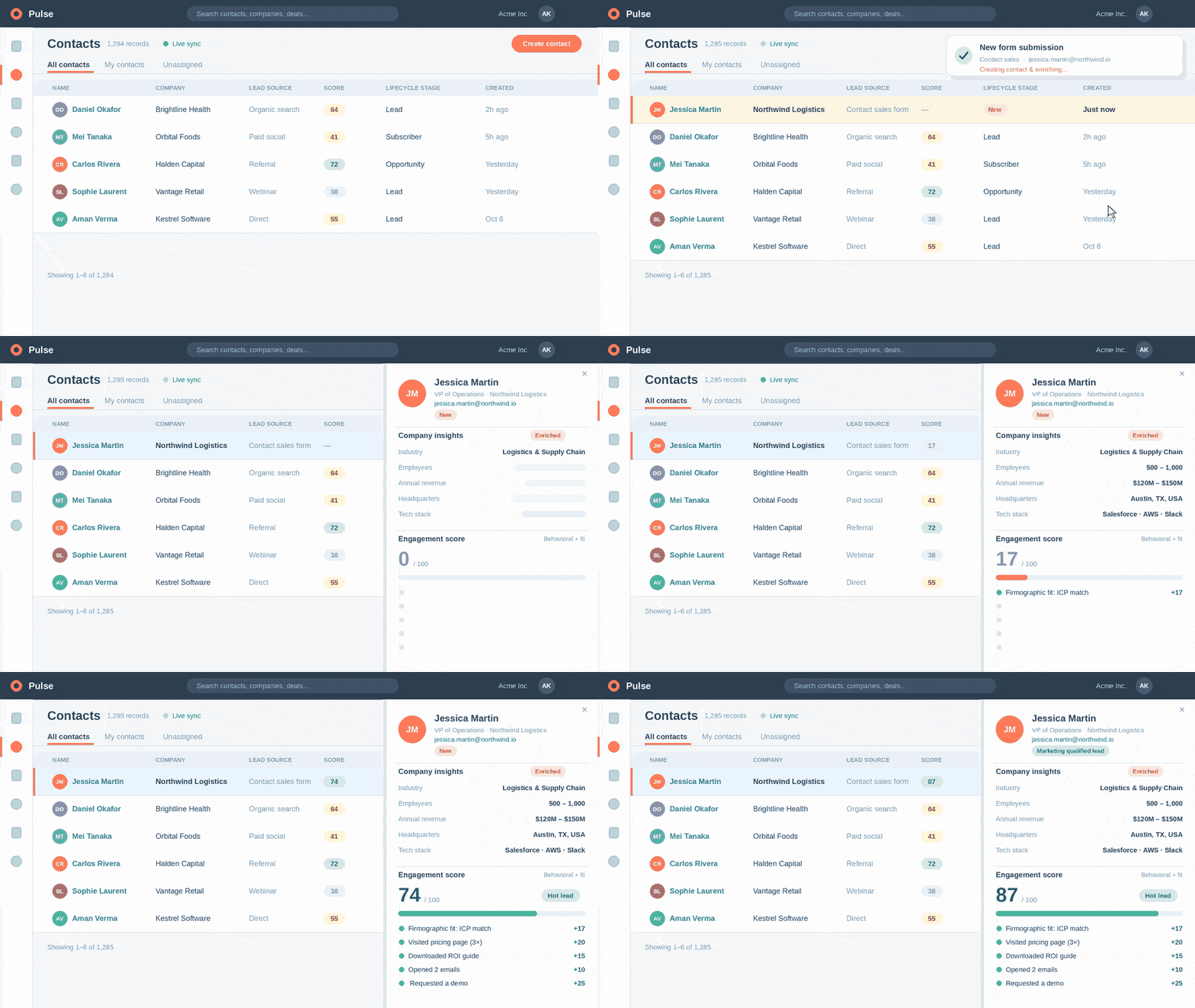
Each time a new lead submits a contact form, books a demo or access a resource on your website, here is how an intelligent automation workflow works:
- Instant Data Enrichment – The moment the AI receives the email address the AI uses data such as public company data, social media information, and firmographic information to fill in the missing information in your CRM (company size and industry, and revenue estimates).
- Behavior Scoring – The system looks at the behavior of the lead while on your website and assesses the answers on the form to score the lead’s purchasing readiness.
- Personal Routing and Follow-up – All high-intent leads are immediately allocated to an account executive who has all the communication content ready to contact the lead, while low-intent leads are placed in the relevant nurturing email series.
Workflow 3: Inventory and Order Status Synchronization
When it comes to e-commerce and product-based companies, the issue of how to keep track of stock on many different channels Shopify, Amazon, physical warehouse systems, and others always generates problems in operations. As a result, manual updating is always associated with overselling, stock shortages, and unhappy clients.
How the Workflow Works
The system builds a unified process that connects inventory management systems and sales channels into a streamlined chain that uses artificial intelligence as its basis:
- Live Inventory Updating – Orders made on any channel initiate instant inventory updates all over the channels and warehouses through the APIs operating in the cloud.
- Predictive Reordering – By relying on the data from previous sales, seasonality, and lead time of suppliers, artificial intelligence monitors when a warehouse is likely to be out of stock of a certain product and prepares a new purchase order for approval.
- Timely Notifications for Clients – The system informs clients about order delays in delivery due to a delay in transit, thus taking the load off the client.
As noted in a recent Gartner research brief on supply chain automation, proactive communication reduces customer service inquiry volume by up to 80%.
💡 Ready to discover where automation fits in your business?
Don’t spend months experimenting without clear ROI. Book a Free 15-Minute AI Audit with our strategy team to identify your top 3 high-impact workflows for immediate deployment
Primary Recommendations for Initiating First AI Processes
Engaging in AI automation might be daunting if you don’t have a plan of action. Use these useful tips as guidance in order to carry out your process smoothly:
- Don’t Rush into Big Projects – Select one of the basic processes in your activity (for instance, handling of customer inquiries) and become proficient at it before dealing with other more complex ones.
- Meet the Quality of Data Requirements – AI technologies need reliable information to work properly, so first it is necessary to improve the quality of your customer database, service lists, and operating procedures.
- Involve Exclusively Human Agents – The processes with customers engaged in them should have strict restrictions so that complex situations and low reliability of AI response would always be redirected to an operator.
To dive deeper into setting up these systems, check out our comprehensive small business tech stack guide.
Frequently Asked Questions (FAQs)
The answer is no. Modern AI automation solutions incorporate graphically-based ways to achieve technology setup. They can utilize phenomena well known to AI, such as drag-and-drop business models and natural language engineering with generating machines in automation solutions.
As for how long does it take to see the results of the new technology? Most organizations measure the time saved during the first days of new systems use. Thus, operations that required employees more than 15-20 hours a week can be put on the machine for automatic completion immediately.
No. AI automation aims to get rid of tedious operations like moving data among systems and responding to all sorts of inquiries from clients or other departments.
Ready to Streamline Your Operations?
Stop letting manual busywork slow down your momentum. Whether you want to supercharge your customer support, streamline your lead generation, or optimize your backend operations, implementing the right workflows changes everything.
Read our in-depth Automation Solutions Page to learn more, or Book your free audit and see how custom automation workflows can transform your business efficiency today.