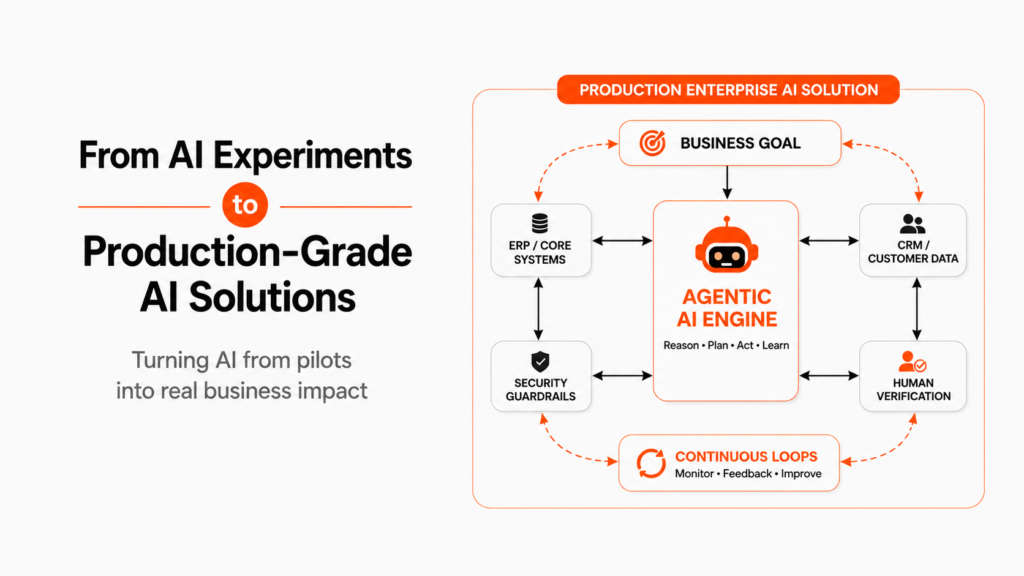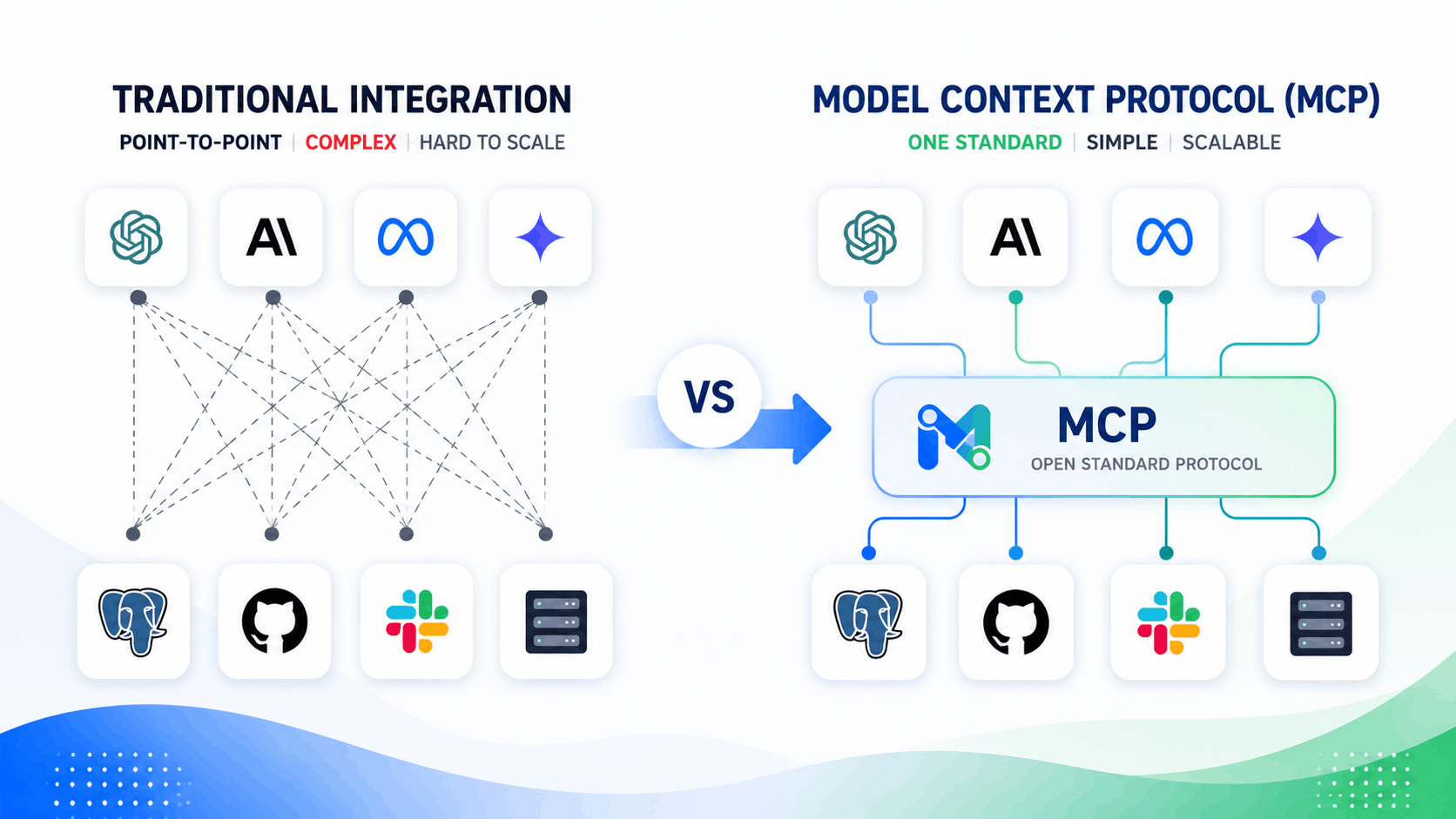
Connecting AI models to internal databases, APIs, and business applications historically meant writing hundreds of fragile custom integration scripts. The open-source Model Context Protocol (MCP) has changed that paradigm. By establishing a standardized “USB-C port for AI,” MCP enables AI models to securely expose data context and execute tools across enterprise software without custom connector glue code.
The developer ecosystem adoption has been rapid: over 9,400 public MCP servers now exist across public registries like GitHub, giving teams instant connectivity to core tools like PostgreSQL, Google Drive, Jira, and Snowflake. As industry analysts at Gartner note regarding current trends in agentic AI:
“Standardized protocol layers eliminate point-to-point integration bottlenecks, turning bespoke AI engineering projects into composable, plug-and-play enterprise systems.”
This guide breaks down what the Model Context Protocol actually is, evaluates the strategic trade-offs for your AI agent development roadmap, and details how technical leaders should approach enterprise implementation in 2026.
Point-to-Point APIs vs. MCP Architecture: What Is the Difference?
To evaluate whether your engineering organization should build on MCP, you first need to understand how it restructures data pipelines compared to legacy API integrations.
| Technical Layer | Legacy Custom API Connectors | Model Context Protocol (MCP) |
| Integration Pattern | Bespoke point-to-point scripts (N×M complexity) | Unified client-server architecture (N+M complexity) |
| Data Context & Prompts | Manually injected via custom RAG pipelines | Dynamically queried via standard protocol primitives |
| Tool Execution | Fixed, hardcoded API function definitions | Auto-discovered server capabilities & resources |
| Protocol Governance | Custom per-endpoint auth and logging scripts | Native transport security (stdio / HTTP with SSE) |
| Maintenance Burden | High (breaks whenever upstream endpoints update) | Low (decoupled client-server implementation) |
Unlike legacy architectures where developers must hardcode function definitions directly into LLM orchestration layers, agentic AI built on MCP operates through three standardized primitives:
- Resources: Readable data streams exposed by the MCP server (e.g., live log files, SQL table schemas, internal documentation).
- Tools: Callable functions exposed to the AI model (e.g., executing a database query, sending a message, or updating a CRM pipeline).
- Prompts: Pre-configured template structures that help the LLM perform domain-specific workflows reliably.
4 Reasons Engineering Teams Are Adopting MCP
Architecting scalable AI agent development around open protocols gives technical organizations four clear operational advantages:
- Drastically Reduced Integration Overhead: Developers replace custom connector code with standardized MCP servers, reducing initial integration build times from weeks to hours.
- Model Agnosticism: Because MCP sits between the application client and data server, you can swap underlying LLM providers (Anthropic, OpenAI, local open-source models) without re-writing your database tool functions.
- Dynamic Tool Discovery: Agents inspect connected MCP servers at runtime, discovering available capabilities dynamically without requiring hardcoded system prompts.
- Granular Local Governance: MCP servers run in isolated environments, allowing security teams to enforce local access control lists before data reaches the model context window.
💡 Unsure how to structure your AI integration pipeline?
Don’t waste engineering cycles on temporary integration glue code. Book a Free 15-Minute AI Integration Audit with our lead systems architects to evaluate your technical stack for MCP readiness.
High-Impact Enterprise Use Cases for MCP Infrastructure
Enterprises leveraging MCP in production use the protocol to unify disparate software environments for agentic ai execution:
1. Developer Tooling & DevOps Automation
Engineering teams connect local developer clients (like Claude Desktop or VS Code) to MCP servers for GitHub, Kubernetes, and Datadog—allowing agents to query live cluster logs, analyze pull requests, and trigger sandbox deployments safely.
2. Multi-Database Business Intelligence
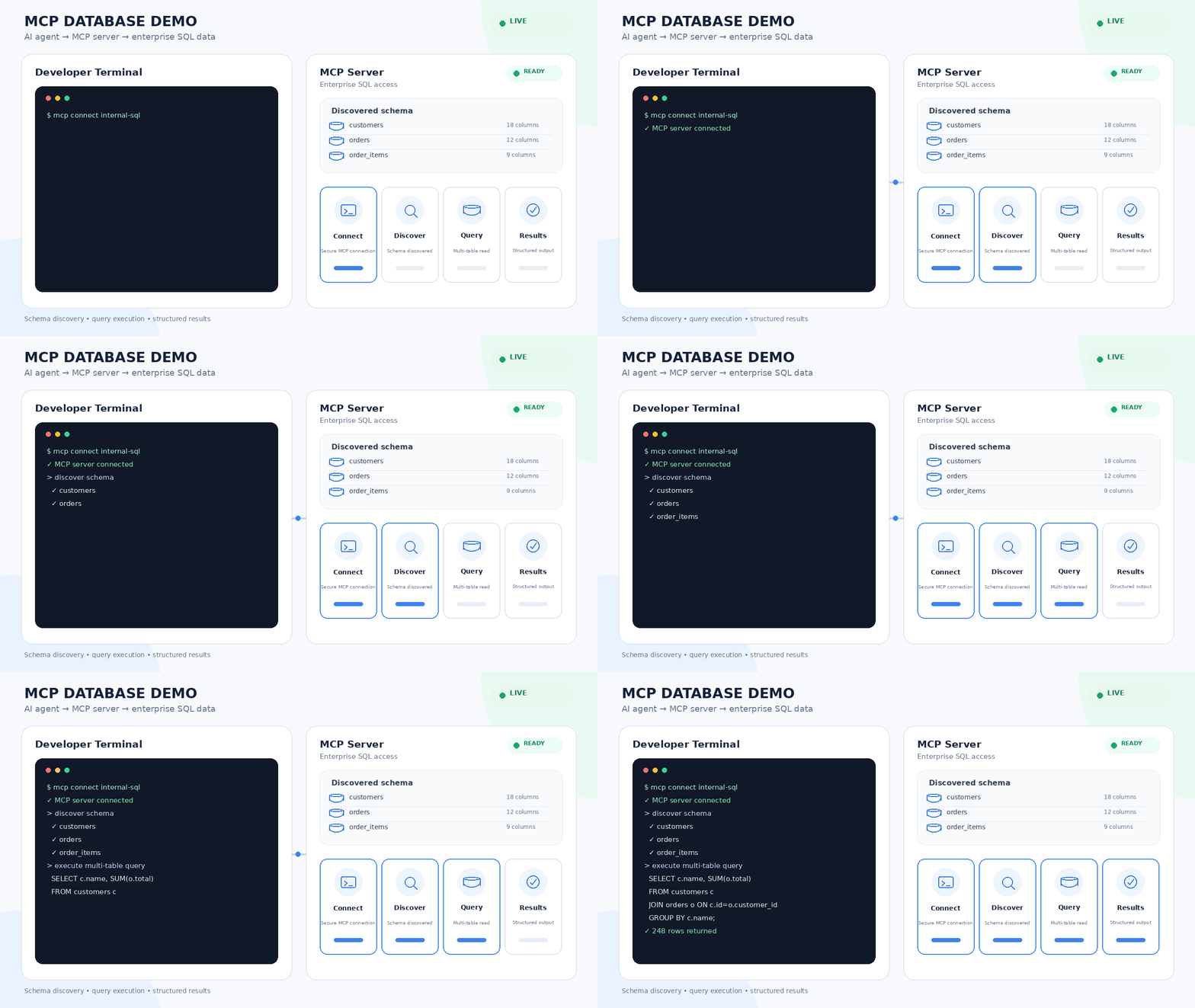
Instead of writing complex SQL generation scripts, an MCP server exposes database schemas and safe query tools. Agents navigate across PostgreSQL, Snowflake, and BigQuery natively to generate multi-system analytics.
3. Automated Revenue & Sales Operations
Connecting CRM platforms (Salesforce, HubSpot) to internal product databases via MCP allows automated agents to enrich lead profiles, check live inventory availability, and update account pipelines without human manual entry.
4. Cross-System Financial Auditing
Finance agents utilize MCP servers to pull live bank records, cross-reference ERP ledger entries in SAP, and match vendor invoices automatically while preserving complete event logging.
When our team engineered unified data access protocols for enterprise operations, we helped a mid-market enterprise cut manual invoice processing costs by 64% while maintaining strict data governance across legacy databases. Explore our AI Solution Case Studies
The Strategic Roadmap for Implementing MCP in Enterprise Systems
Successfully building on the Model Context Protocol requires balancing open-source adoption with enterprise-grade security.
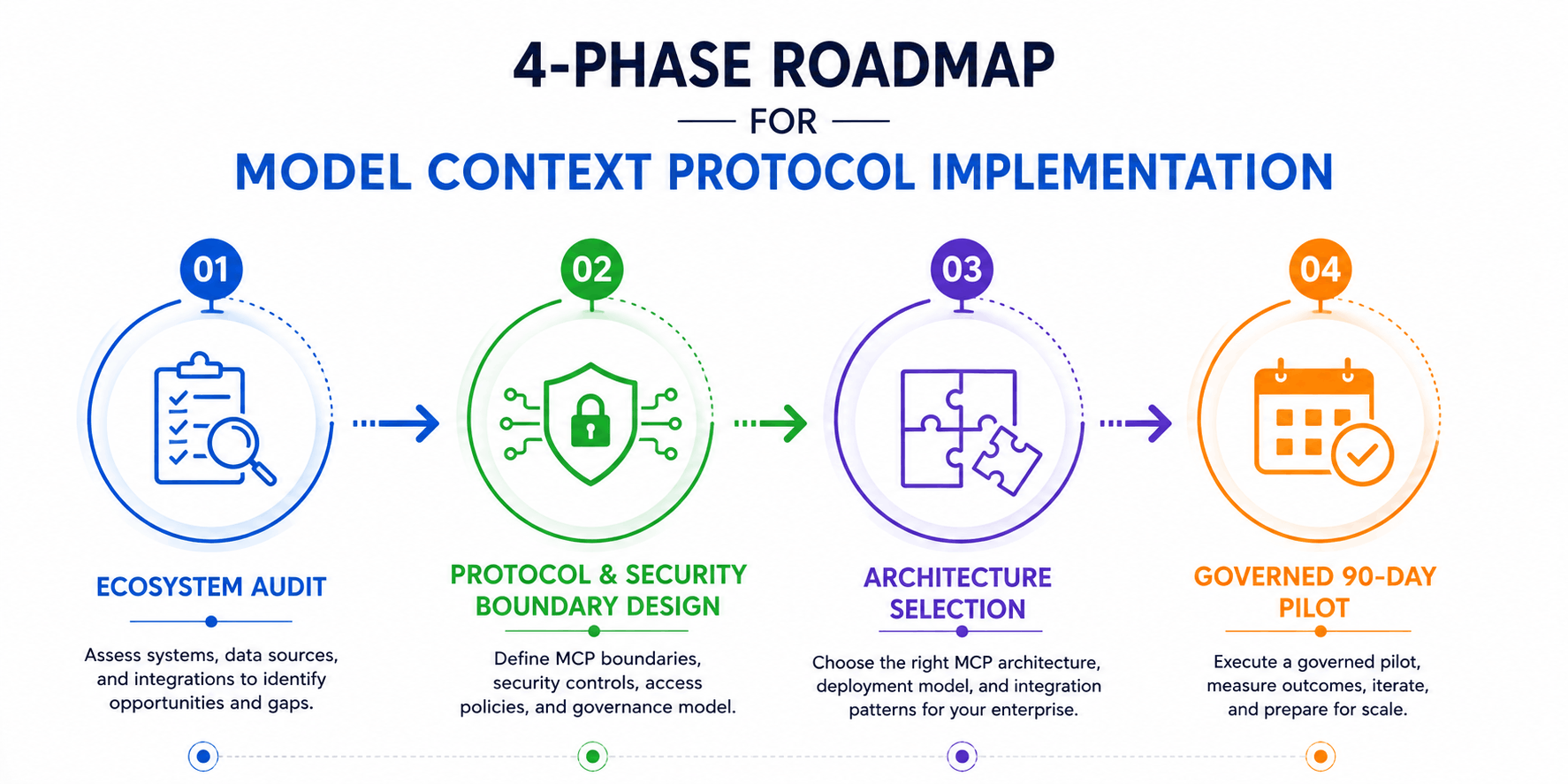
Phase 1: Audit Your Current Integration Ecosystem
Identify existing point-to-point API connections in your AI agent development pipeline. Pinpoint workflows where custom data extraction scripts create frequent maintenance failures.
Phase 2: Define MCP Security & Access Boundaries
Implement strict Role-Based Access Control (RBAC). Wrap public or internal MCP servers in containerized environments, ensuring tools only execute authorized read/write actions with least-privilege credentials.
Phase 3: Choose Between Open-Source and Custom MCP Servers
- Public/Community Servers: Utilize verified community-built MCP servers (e.g., Slack, GitHub, Postgres) for rapid prototyping and standard SaaS connections.
- Custom Enterprise Servers: Build internal MCP servers using official TypeScript or Python SDKs to expose proprietary internal APIs safely. Learn more in our detailed technical comparison on custom versus off-the-shelf AI architecture.
Phase 4: Deploy a Governed 90-Day Pilot
Launch a scoped pilot connecting your agent framework to 2–3 core MCP servers. Monitor execution latency, tool invocation accuracy, error rates, and security logs before rolling out protocol access across production systems.
Accelerate Your Enterprise Agent Strategy
Ready to modernize your integration architecture and deploy scalable agentic workflows?
Mitigating Risk: Security, Governance, and MCP Pitfalls
While 9,400+ public servers demonstrate massive momentum, enterprise teams must address specific operational risks before building production systems on MCP:
- Tool Execution Risks: Giving an agent access to write-heavy MCP tools (such as database deletions or email broadcasting) without human checks can lead to catastrophic execution errors. Enforce strict confirmation steps for sensitive actions.
- Server Verification & Supply Chain Attacks: Inspect third-party public MCP server code before running it inside your enterprise perimeter. Malicious or unverified servers could attempt prompt injection or data exfiltration.
- Context Overhead Management: Connecting dozens of MCP servers simultaneously can flood the model’s context window with tool schemas, increasing token costs and causing tool selection confusion. Keep server connections focused on specific workflow requirements.
Frequently Asked Questions (FAQs)
The Model Context Protocol (MCP) is an open standard that enables AI applications (clients) to securely connect to external data sources and execution tools (servers) using a unified, standardized interface.
For standard tools like PostgreSQL, GitHub, or Slack, start with well-maintained public MCP servers. For proprietary databases, custom business logic, or sensitive internal APIs, build internal MCP servers using official SDKs.
MCP significantly lowers development costs by eliminating the need to write and maintain bespoke API integration code for every new tool, allowing teams to reuse standardized servers across multiple AI projects.
Yes, provided MCP servers are deployed inside secure corporate perimeters, enforced with Role-Based Access Control (RBAC), transport-layer encryption, and strict human-in-the-loop validation for sensitive operations.
Build Scalable Agentic Systems with MCP
The explosive growth of the Model Context Protocol signals a clear shift toward standardized, composable AI architectures. By adopting MCP early, forward-thinking enterprise teams can eliminate point-to-point technical debt and scale agentic AI workflows cleanly.
Ready to simplify your integration stack and build production-ready agentic systems?