There’s a myth that AI automation is an enterprise game, that you need a six-figure budget, a data team, and a year to get anything real into production. It keeps a lot of small businesses on the sidelines, watching, assuming the entry ticket is out of reach.
It isn’t. In 2026, $15K is a genuinely workable budget, as long as you spend it like a small business and not like a shrunken enterprise. Here’s the grounding that makes that real: a scoped, single-purpose AI agent costs roughly $1,500 to $5,000 to build plus a few hundred a month to run; broader “workflow optimization” builds land in the $8,000 to $15,000 range; multi-agent systems jump to $5,000 to $25,000 and up. So $15K doesn’t buy everything. It buys one well-scoped, production-grade workflow, done properly. And one workflow that actually works and pays back beats a sprawling “AI transformation” that stalls, every time.
The catch, and the entire point of this guide, is that succeeding on $15K is almost entirely about how you scope and spend it, not the number itself. Get that wrong and $15K evaporates on a half-built thing. Get it right and it’s one of the best ROI decisions a small business can make. Let’s get it right.
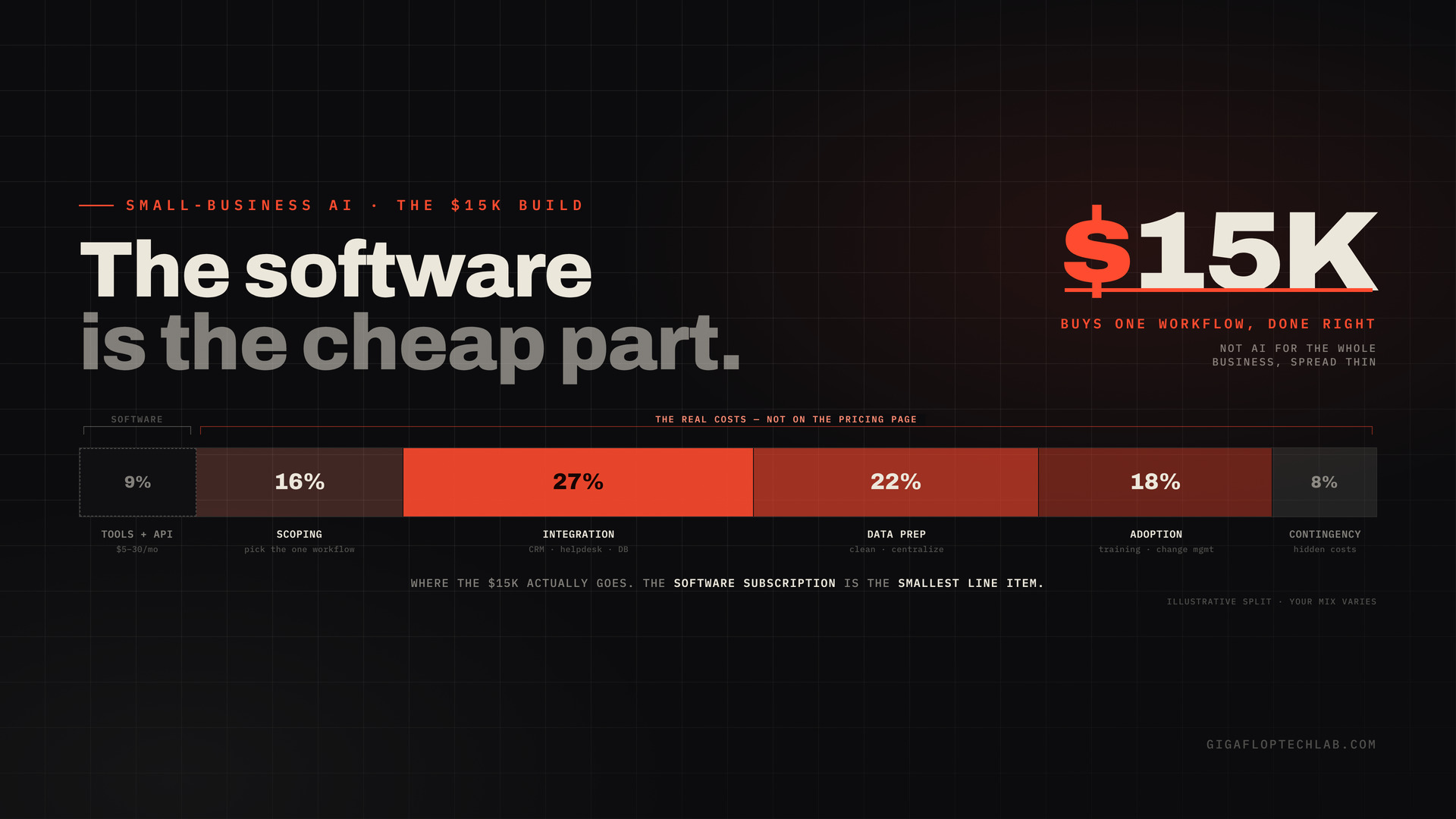
<!– VISUAL 1: FEATURED IMAGE (near top, required). Not generic stock. Suggested: a $15K allocation chart. Small slice on tools/API; the majority on scoping, integration, data prep, and change management (adoption). Make the point that “the software is the cheap part.” Compress before upload. ALT TEXT: “How a $15K small-business AI automation budget actually splits: small slice on tools and API, most on scoping, integration, data prep, and adoption” CAPTION: Where the $15K actually goes. The software subscription is the smallest line item. –>
Where the $15K actually goes. The software subscription is the smallest line item.
Rule 1: Buy one workflow, not “AI for the business”
The single most expensive SMB mistake is automating for the sake of automating, adding AI complexity without solving a specific, measurable problem. On a $15K budget that mistake is fatal: it spreads the money thin across vague ambitions and ships nothing production-grade.
So the first move is brutal focus: pick exactly one workflow, and not just any one, the right one. Score your candidates the way we’d score any automation:
- Volume. Does it run often enough that automating it matters? (High-frequency, repetitive.)
- Variance. Is it predictable and bounded enough to automate reliably?
- Verifiability. Can you check that the output is correct?
The workflows that score high on all three are exactly where SMBs get the highest ROI: customer support, lead handling, document processing, scheduling, and finance ops like invoicing and reconciliation. Pick the one that’s bleeding the most hours, scores well on all three, and has a clear before/after you can measure. That’s your $15K project. Everything else waits.
Rule 2: Orchestrate off-the-shelf, don’t custom-build
This is where budgets live or die. The instinct is to commission a custom build, and on $15K that instinct is usually wrong. The reality: off-the-shelf SaaS tools handle most SMB automation needs, and custom builds should be reserved for workflows where existing tools genuinely don’t fit.
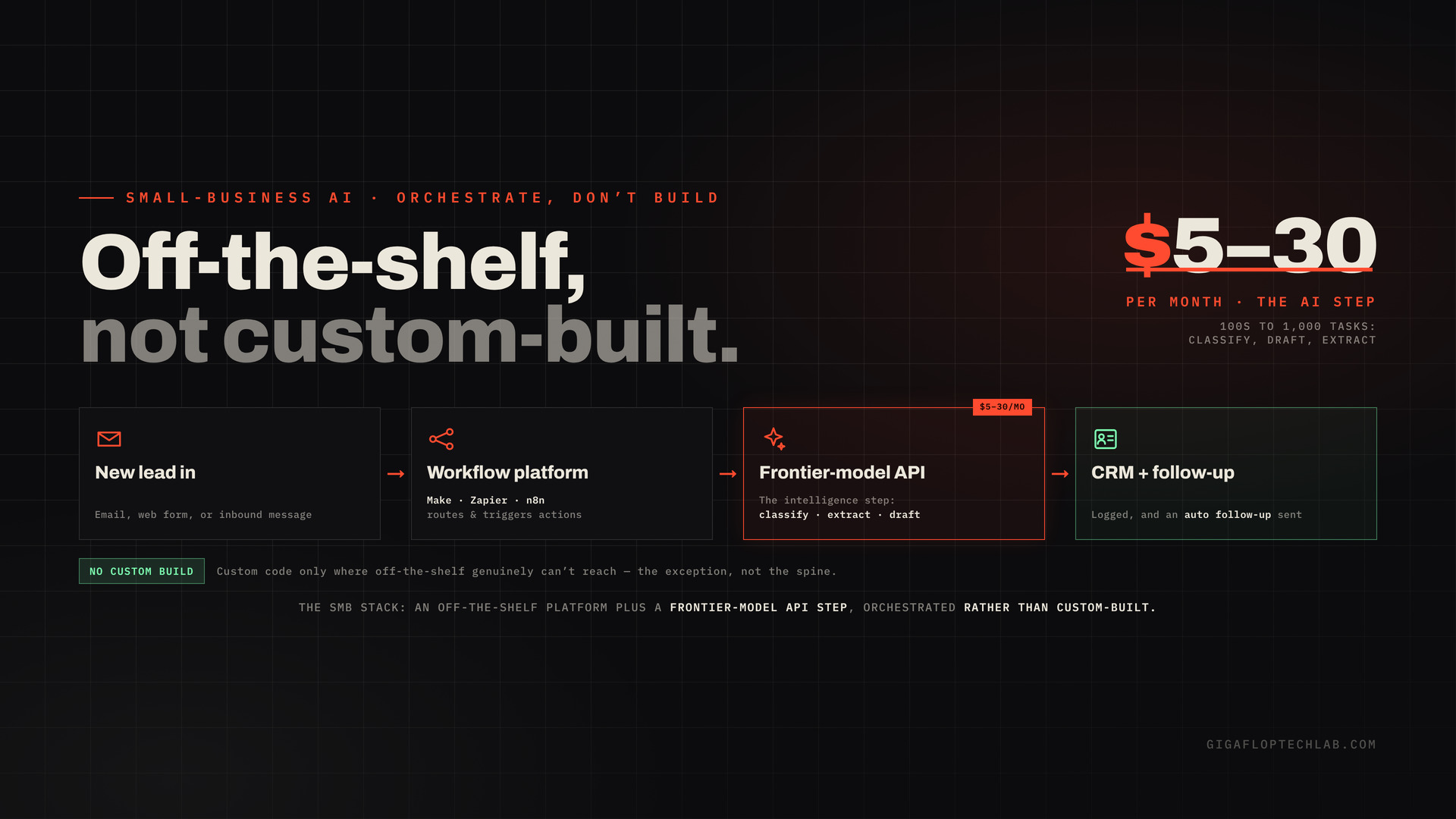
The pragmatic stack for an SMB is orchestration, not construction:
- Workflow platforms like Make, Zapier, or n8n to connect your apps and trigger actions, so a new lead flows into the CRM and gets a follow-up automatically.
- A frontier model via API for the “intelligence” step: classify, extract, draft, summarize. API costs are surprisingly low, often just $5 to $30 a month for hundreds to a thousand tasks.
- Custom code only where off-the-shelf genuinely can’t reach. The exception, not the spine.
The most common cost mistake cuts both ways: SMBs commission custom builds for problems off-the-shelf tools would solve, and they try to force off-the-shelf tools to handle workflows that genuinely need custom architecture. Picking the wrong tier first is how money disappears. On $15K, default to orchestration and earn your way to custom only when a real misfit forces it. It’s the small-business version of “orchestrate, don’t construct.”
Rule 3: Budget for the real costs (the software is the cheap part)
Here’s the line that sinks SMB automation projects: the SaaS subscription is the smallest cost. The biggest costs are the ones that don’t appear on the pricing page.
- Integration. Connecting the automation to your existing CRM, helpdesk, or database. Budget an extra 20 to 40% on top of the tool cost, because SMBs consistently underestimate this.
- Data preparation. Automating bad data just produces faster bad outcomes. If your data’s a mess, cleaning it is part of the project, not a prerequisite you can skip.
- Change management. The automation changes how people work, and if the team doesn’t adopt it, the ROI never materializes. Training and iteration are real line items.
- Contingency. Hidden costs (integration, data prep, training) routinely add two to three times the sticker price in year one. Plan for it, or it plans for you.
A realistic $15K allocation, then, isn’t “$15K of software.” It’s closer to a modest slice on tools and API, with the majority going to scoping, integration, data prep, and getting the team to actually use it. The teams that get the worst ROI are the ones who blew the budget on the build and left nothing for adoption.
Rule 4: Right-size production discipline
“Production-grade on $15K” sounds contradictory, but it isn’t. It just means right-sized discipline, not enterprise gold-plating. You still need the essentials that separate a real automation from a demo, scaled to your context: it has to handle real inputs (not just the happy path), keep a human in the loop on the consequential cases, fail gracefully, and be something you can monitor. You don’t need a governance committee or a 14-layer eval platform. You need the lean version: does it work on messy real inputs, who gets alerted when it breaks, and can a human step in. That’s achievable inside $15K, and skipping it entirely is how a cheap automation becomes an expensive incident.
Rule 5: Make the ROI math honest before you spend
On a tight budget, break-even discipline matters more, not less. The framing to use:
- Estimate a realistic efficiency gain. A 30 to 50% time saving on the target task is a conservative benchmark. Don’t model “10x.”
- Add all first-year costs. Build plus integration plus subscriptions plus data prep plus training plus contingency, not just the sticker.
- Calculate break-even in months. If it’s over roughly 12 months, reconsider the scope. SMBs should usually see faster payback than enterprises because the workflows are narrower.
To show the shape of the math, plug in your own numbers: if a $15K automation removes about 15 hours a week of manual work valued at, say, $50 to $75 an hour, that’s roughly $39K to $58K of recovered capacity a year, a payback measured in months, not years. Those are illustrative figures, not a promise; your numbers depend on your workflow and loaded labor cost, which is exactly why you run the ROI math before you spend.
The 6-step SMB playbook
- Pick one workflow. The highest hours bleed, scoring well on volume, variance, and verifiability.
- Set the baseline and break-even. Measure the “before,” model all-in first-year cost, and confirm payback under roughly 12 months.
- Default to orchestration. Make, Zapier, or n8n plus a frontier-model API; custom code only for a genuine misfit.
- Budget for the real costs. Integration (plus 20 to 40%), data prep, change management, and two-to-three-times contingency.
- Right-size production discipline. Real inputs, human-in-the-loop on consequential cases, graceful failure, monitoring.
- Ship it, measure it, then expand. Prove ROI on one workflow before funding the next, and avoid pilot purgatory by scoping to production from the start.
The bottom line
You don’t need an enterprise budget to get production-grade AI automation. You need enterprise-grade discipline applied to a small-business scope. $15K won’t transform your whole company, and pretending it will is how the money gets wasted. But pointed at one high-volume, verifiable, painful workflow, orchestrated from off-the-shelf tools, budgeted for the real costs, with right-sized production discipline and honest ROI math, $15K reliably ships something that works and pays back in months. For a concrete example of one scoped automation built to production standard, see how we shipped a 191-CV screening stack.
The SMBs winning with AI in 2026 aren’t the ones who spent the most. They’re the ones who scoped the tightest, spent on the right workflow, and resisted the urge to build a cathedral when a well-made door was what they needed. Start with one door.
Scope a $15K automation build
Have $15K (or less) and want it to ship one automation that actually works, instead of a pilot that stalls? The whole game is picking the right workflow and scoping it to production from day one.
Scope a $15K Automation Build → We’ll help you pick the single highest-ROI workflow (volume, variance, verifiability), orchestrate it from off-the-shelf tools where we can, build custom only where we must, and budget honestly for integration, data, and adoption so it ships and pays back. Right-sized for a small business, built to production standard.
FAQs
Yes. $15K is a workable 2026 budget for one well-scoped, production-grade workflow. A scoped single-purpose AI agent runs roughly $1,500 to $5,000 to build plus a few hundred a month, and broader workflow builds land around $8,000 to $15,000. What $15K won’t buy is an enterprise-wide rollout. The winning approach is one high-ROI workflow done properly, not “AI for the whole business” spread thin.
The workflow that’s bleeding the most hours and scores high on three criteria: volume (runs often), variance (predictable enough to automate reliably), and verifiability (you can check the output). In practice, SMBs get the highest ROI from narrow workflows like customer support, lead handling, document processing, scheduling, and finance ops such as invoicing. Pick one, prove it, then expand; don’t try to automate everything at once.
Default to off-the-shelf orchestration. Workflow platforms like Make, Zapier, or n8n combined with a frontier-model API handle most SMB automation needs, and API costs are low (often $5 to $30 a month for hundreds of tasks). Reserve custom builds for workflows where existing tools genuinely don’t fit. Picking the wrong tier, custom-building what off-the-shelf would solve or the reverse, is the most common way SMB budgets get wasted.
SMBs typically see faster payback than enterprises because the workflows are narrower, so well-scoped automations often pay for themselves in months. As honest math: an automation that removes about 15 hours a week of manual work valued at $50 to $75 an hour recovers roughly $39K to $58K of capacity a year (illustrative). Model all-in first-year costs and aim for break-even under about 12 months; if it’s longer, reconsider the scope.
SMBs typically see faster payback than enterprises because the workflows are narrower, so well-scoped automations often pay for themselves in months. As honest math: an automation that removes about 15 hours a week of manual work valued at $50 to $75 an hour recovers roughly $39K to $58K of capacity a year (illustrative). Model all-in first-year costs and aim for break-even under about 12 months; if it’s longer, reconsider the scope.
Right-sized discipline, not enterprise gold-plating. The automation must handle real, messy inputs (not just the happy path), keep a human in the loop on consequential cases, fail gracefully, and be monitorable so you know when it breaks. You don’t need a governance committee or a large eval platform, just the lean version of those essentials. Skipping them entirely is how a cheap automation turns into an expensive incident.